
Preview text:
lOMoARcPSD|39287459
Review final - Summary Business Computing Skills
Business Computing Skills (International University - VNU-HCM) Scan to open on Studeersnel
Studocu is not sponsored or endorsed by any college or university
Downloaded by Vu Do (wuagzuu@gmail.com) lOMoARcPSD|39287459
International University - VNUHCM
School of Business Administration ----------------- Final Examination
Date: 24/1/2024; Duration: 120 minutes (13:00-15:00) Closed book
SUBJECT: Business Computing Skills (ID: BA120IU)
Approval by the School of Business Administration Lecturer: Signature Signature Full name:
Full name: M.Eng. Do Ngoc Hung Proctor 1 Proctor 2 Signature Signature Full name: Full name: STUDENT INFO
Student name: __________________
Student ID: __________________
INSTRUCTIONS: the total of point is 100 (equivalent to 40% of the course) 1. Purpose:
• Test your knowledge in CLO6
• Examine your skill in analysis and preparing documents, presentations, and spreadsheets
• Develop technical computer-based skills needed to prepare documents, presentations, and
spreadsheets using Microsoft’s Office Suite Software 2. Requirements:
• Carefully read each question and answer it following the requirements
• There are two parts: Part 1 30% (30 Multiple-Choice Questions) doing directly on Blackboard
using the link given by the instructor; Part 2 70% (Excel exercises) doing on your computer and
submit your exam on Blackboard (Assignment rubric)
Downloaded by Vu Do (wuagzuu@gmail.com) lOMoARcPSD|39287459
International University – VNUHCM
Student Name:………...………….
School of Business Administration Student ID:………………………. ----------------- PART 2: MS EXCEL (70%) Q1 (20 marks)
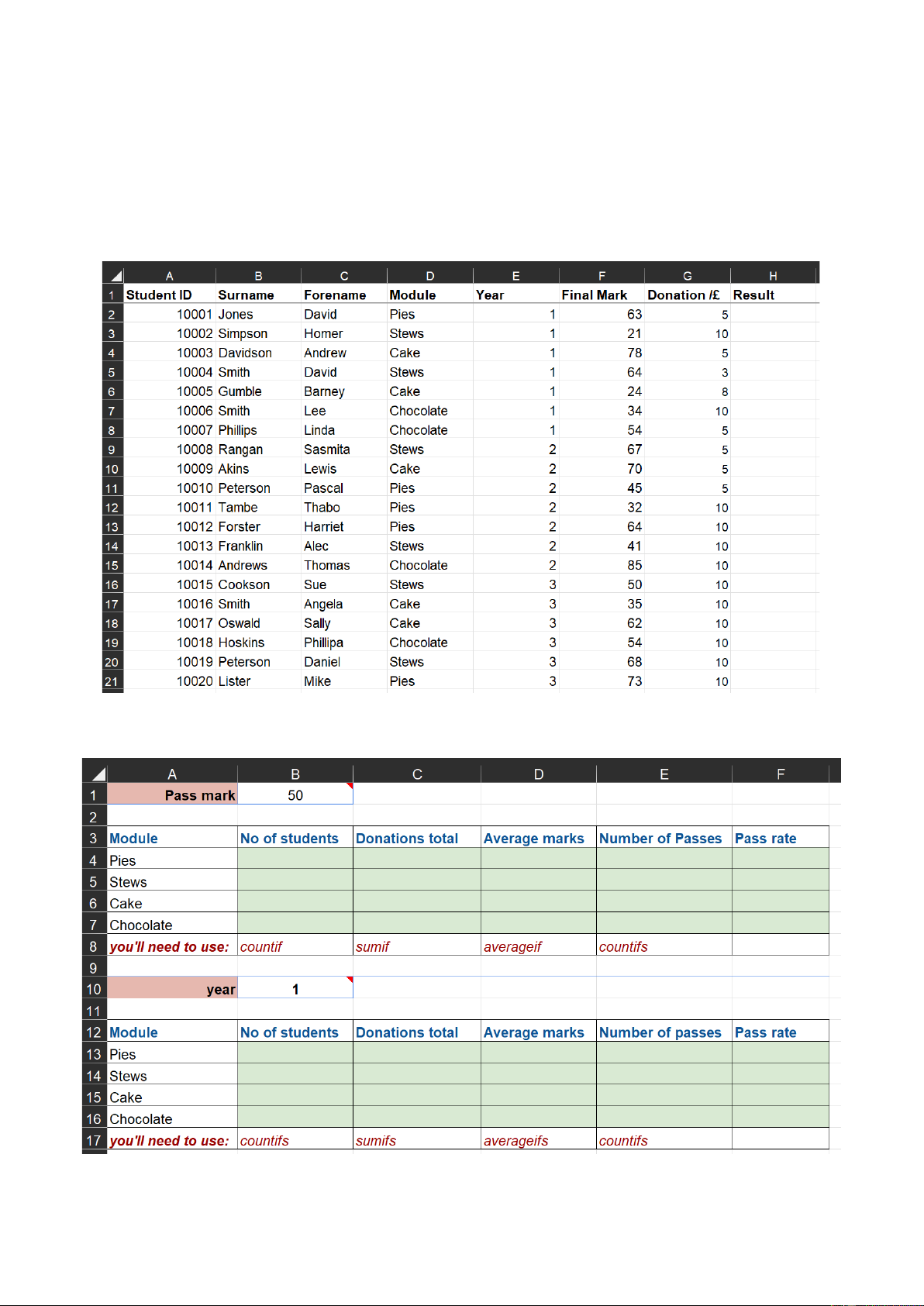
a) Given the following data (sheet Q1_1, Q1_2) Figure 1: sheet Q1_1 Figure 2: sheet Q1_2 2 /5
Downloaded by Vu Do (wuagzuu@gmail.com) lOMoARcPSD|39287459
International University – VNUHCM
Student Name:………...………….
School of Business Administration Student ID:………………………. -----------------
The Q1_1 sheet is a list of the students taking the Culinary Appreciation course, each of whom
also makes a donation towards food for a homeless charity.
b) In cell H2 enter an If function that will display “Pass” if the mark in column F is greater than or
equal to the value in Pass mark, or “Fail” if it isn’t. c) name ranges as follows:
All of column D – module
All of column E – year
All of column F – mark
All of column G – donation
All of column H – result
d) Use the functions in row 8 to fill data B4:F7
(the Pass rates - the proportion of passes against the number of students taking the module)
e) Use the functions in row 17 to fill data B13:F16 Q2 (20 marks) a)
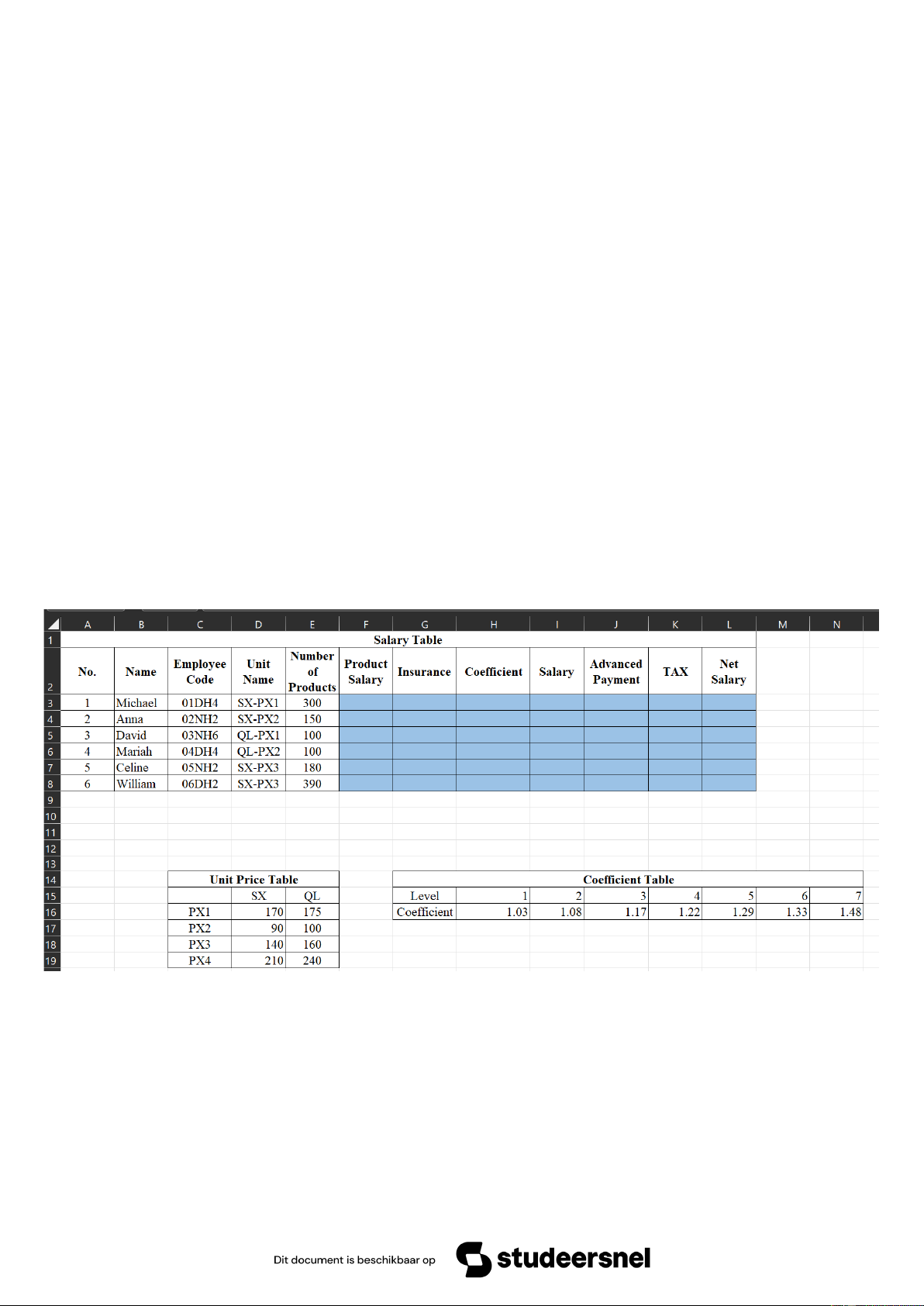
Fill the following data to sheet Q2 Figure 3: sheet Q2 b)
Calculate the Product Salary by using Unit Price Table
Product Salary = Number of Products * Unit Price Table c)
Calculate Insurance (Salary Table) as follows:
+ If Employ Code (Salary Table) has DH, Insurance = 5%*Product Salary 3 /5
Downloaded by Vu Do (wuagzuu@gmail.com) lOMoARcPSD|39287459
International University – VNUHCM
Student Name:………...………….
School of Business Administration Student ID:………………………. -----------------
+ If Employ Code (Salary Table) has NH, Insurance = 0 d)
Find Coefficient (Salary Table) by using the last number of Employee Code (Salary Table)
and Coefficient Table? e)
Calculate Salary (Salary Table) as follows:
+ If Unit Name (Salary Table) has QL, Salary = Product Salary* Coefficient
+ If Unit Name (Salary Table) do not have QL, Salary = Product Salary f)
Calculate Advanced Payment (Salary Table) as follows:
+ If an employee has Level >= 5, Advanced Payment = 1/3*Salary
+ If an employee has Level < 5, Advanced Payment = 1/5*Salary g)
Calculate TAX (Salary Table) as follows:
+ If an employee has Salary > 50,000, TAX = 30%*(Salary - 50,000), else TAX = 0 h)
Calculate Net Salary = Salary - (Insurance + Advanced Payment) i)
Use conditional formatting to hightlight the name of person who has highest net salary
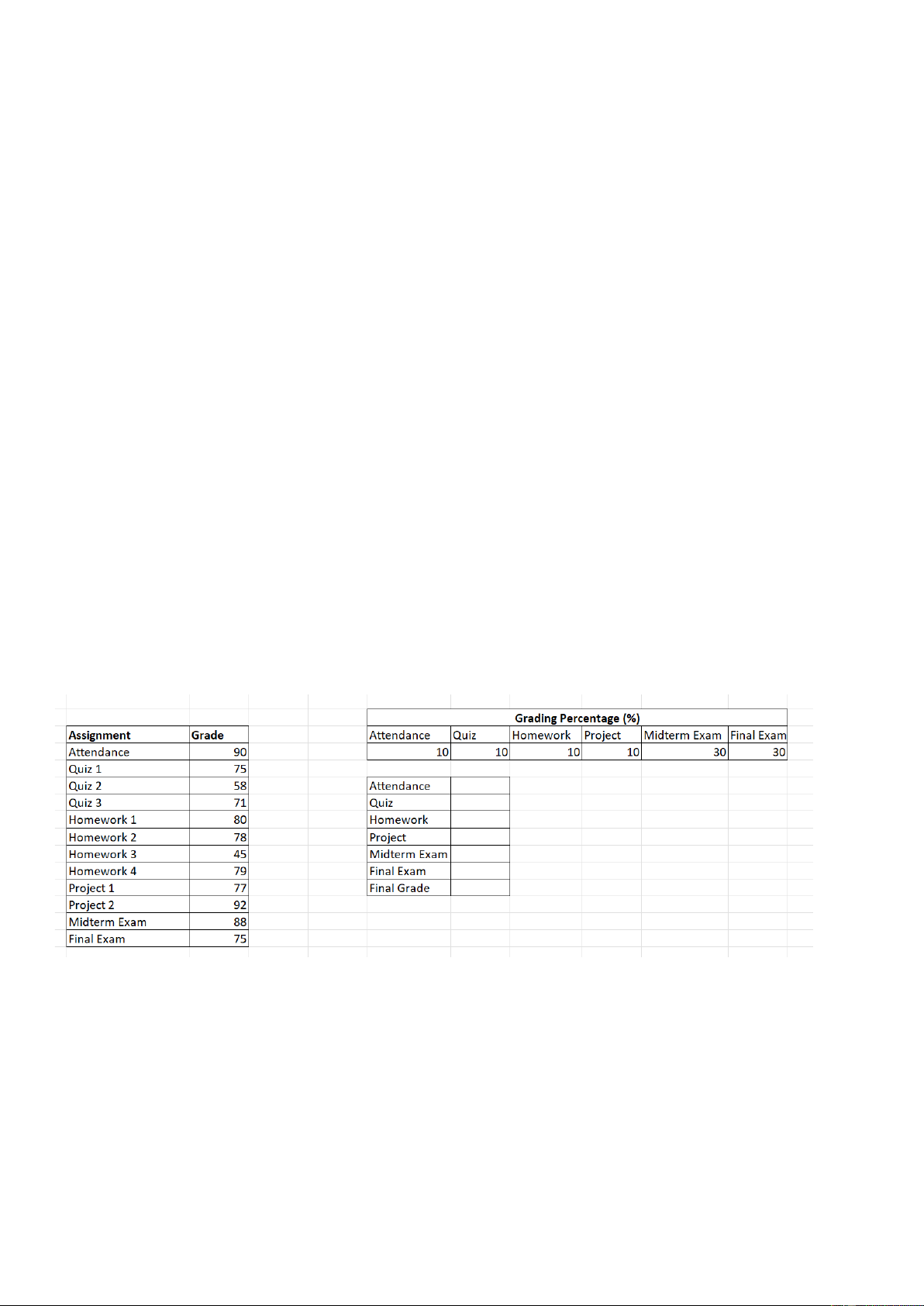
(Light Yellow Fill with Dark Green, Bold Italic Text). Q3 (20 marks) a)
Fill the following data to sheet Q3 Figure 4: sheet Q3 b)
Determine the average value of Quiz, Homework, Project c)
Using grading percentage to calculate the Final Grade d)
Using what-if analysis to analyze the Final Grade when Final Exam changes from 10 to 100 (10 values) e)
Create a copy of Q3 sheet and save as Q3_2 sheet. Using Goal Seeking to find the Final
Exam in order to have the goal of Final Grade is 77 4 /5
Downloaded by Vu Do (wuagzuu@gmail.com) lOMoARcPSD|39287459
International University – VNUHCM
Student Name:………...………….
School of Business Administration Student ID:………………………. ----------------- Q4 (10 marks)
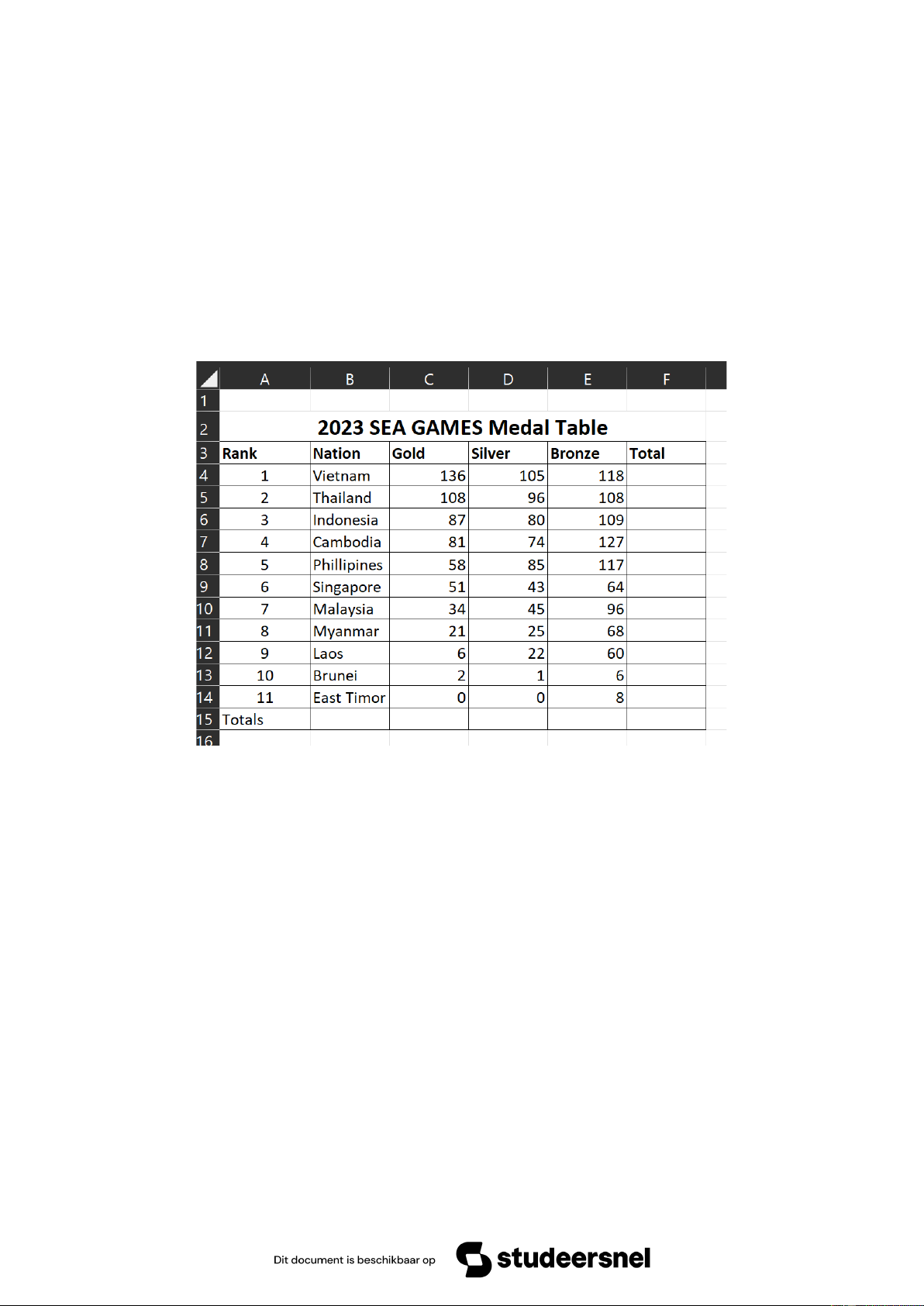
a) Fill the data in figure 5 to sheet Q4
b) Calculate the total medals of each country and all countries.
c) Generate a column chart to display the data (Gold, Silver, Bronze) of the top 4 countries. Then
format each column color corresponding to the color of medal. Insert and format the title of the
chart “SEA GAMES 2023 Medal – Top 4 Countries”, red color, fontsize 20, bold. Insert the
legend for types of medal Gold, Silver and Bronze. Figure 5: sheet Q4 – END – 5 /5
Downloaded by Vu Do (wuagzuu@gmail.com)