Bài giảng Chapter 02: Models in Web API môn Lập trình | Trường Đại học FPT Hà Nội
Bài giảng Chapter 02: Models in Web API môn Lập trình | Trường Đại học FPT Hà Nội. Tài liệu được sưu tầm giúp bạn tham khảo, ôn tập và đạt kết quả cao. Mời bạn đọc đón xem.
Môn: Lập trình (FPT) 6 tài liệu
Trường: Trường Đại học FPT Hà Nội 62 tài liệu
Tác giả:











Preview text:
Models in Web API Objectives ◆ Model in ASP.NET Core MVC ◆ APIs and Data Access ◆
Code-first development with API ◆ Data Transfer Objects 2
What is a Model in ASP.NET Core MVC? ◆
A model is a class with .cs (for C#) as an extension having both properties and
methods. Models are used to set or get the data. ◆
If your application does not have data, then there is no need for a model. If your
application has data, then you need a model. ◆
The Role of Models in ASP.NET Core MVC
The Models in ASP.NET Core MVC contains a set of classes that are used to represent
the domain data (you can also say the business data) as well as it also contains logic to
manage the domain/business data.
Models are responsible for the data and these data are used on Views. 3
Model in ASP.NET Core MVC ◆
The model classes represents domain-specific data and business logic in the
MVC application. It represents the shape of the data as public properties and business logic as methods. 4 3-Layer Application ◆
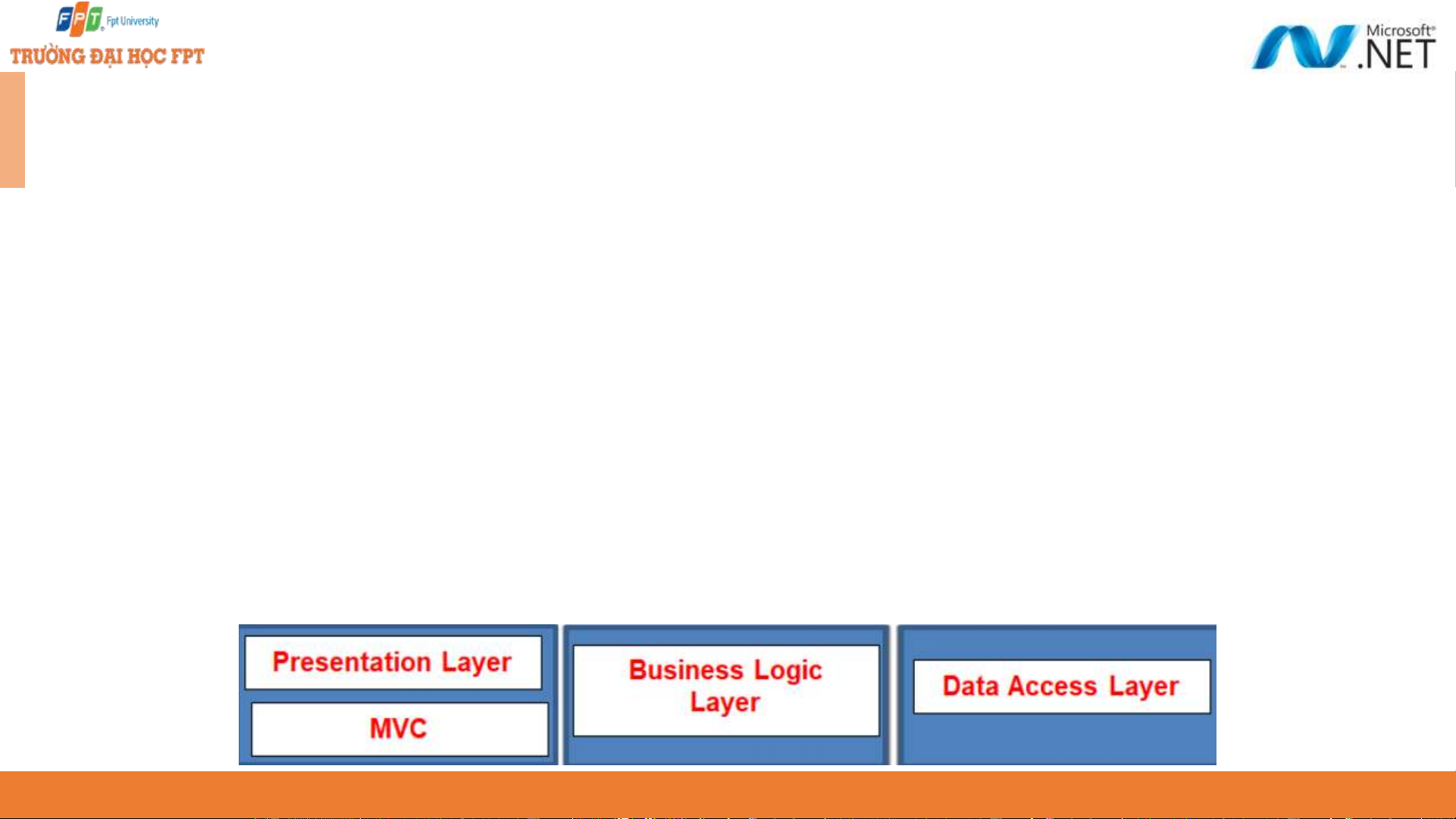
In general, a real-time application may consist of the following layers ◆
Presentation Layer: This layer is responsible for interacting with the user. ◆
Business Layer: This layer is responsible for implementing the core business logic of the application. ◆
Data Access Layer: This layer is responsible for interacting with the database
to perform the CRUD operations. ◆
The MVC design pattern is basically used to implement the Presentation Layer
of the application. Please have a look at the following diagram. 5 APIs and Data Access ◆
ORM (Object Relational Mapping) and Entity Framework Core ◆
Reviewing the different design workflows supported by EF Core ◆
Working with database-first and code-first development and migrations ◆
Building Web APIs that implement the most commonly used HTTP methods for serving data 6
ORM and Entity Framework Core ◆
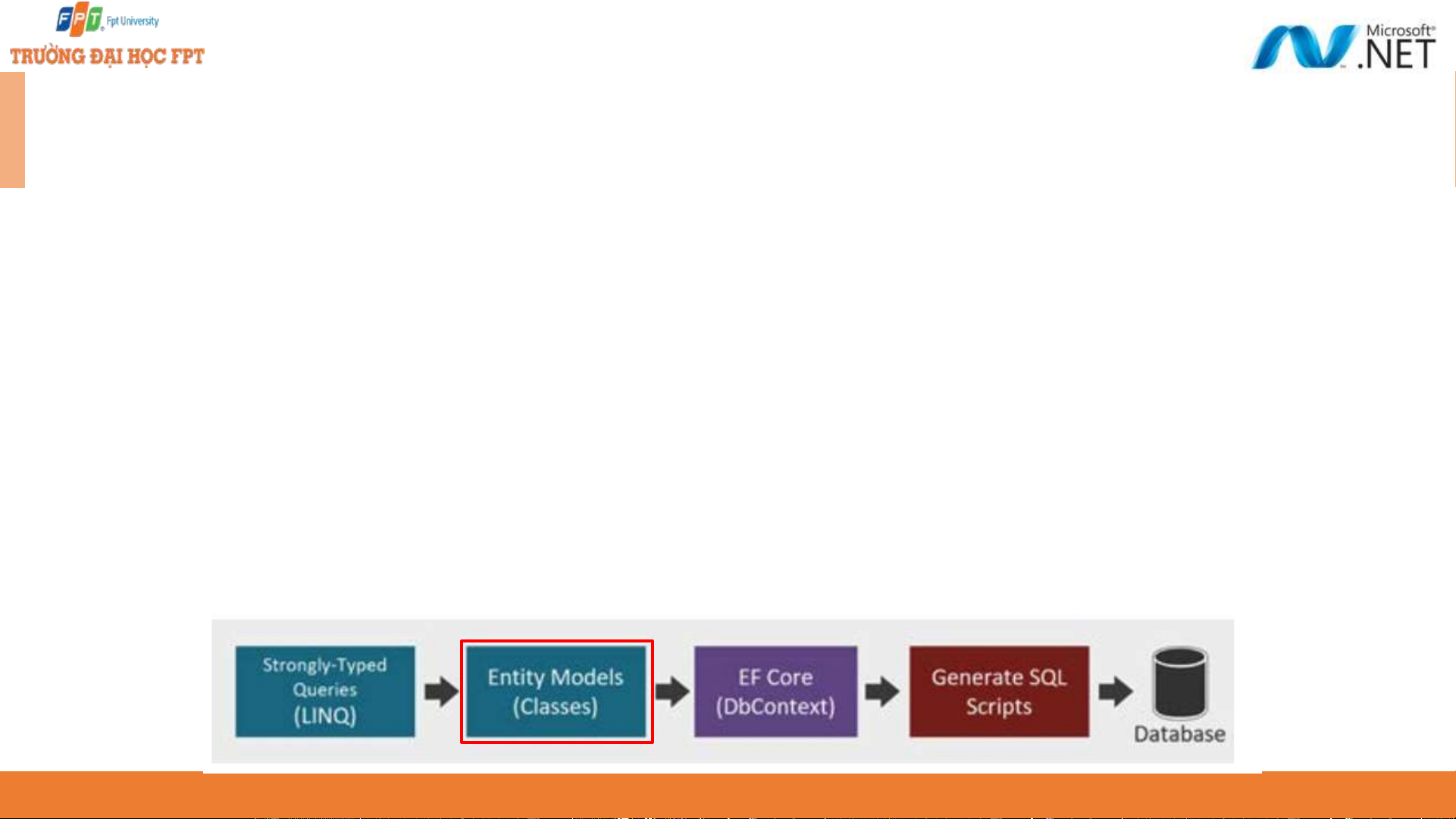
Entity Framework Core is an ORM and a data access technology that enables C#
developers to interact with a database without having to manually write SQL scripts. ◆
ORMs like EF Core help you build data-driven applications quickly by working through
.NET objects instead of interacting directly with the database schema. These .NET
objects are simply classes, which are typically referred to as Entities. ◆
With EF Core, C# developers can take advantage of their existing skills and leverage
the power of Language Integrated Query (LINQ) to manipulate the dataset against
the conceptual Entity Models, otherwise simply referred to as Models. 7
ORM and Entity Framework Core - 2 Reasons to use EF Core ◆ Simple to get started ◆
It supports NoSQL Databases along with relational databases ◆
It fits nicely in ASP.NET MVC Core setup ◆ Integrates well with LINQ ◆
Possible to use on Linux and Mac
since it is based on .NET Core along with Windows. 8
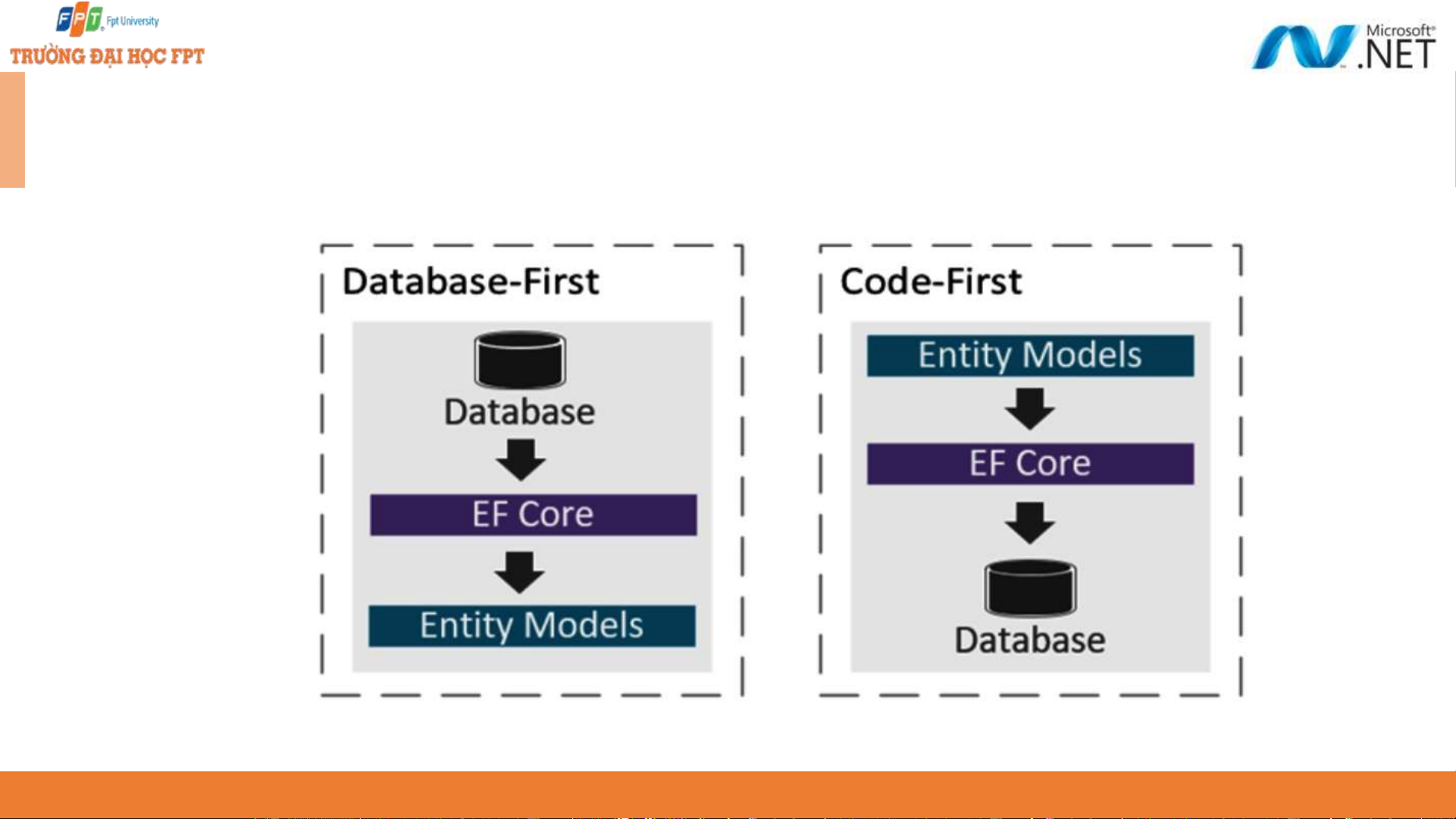
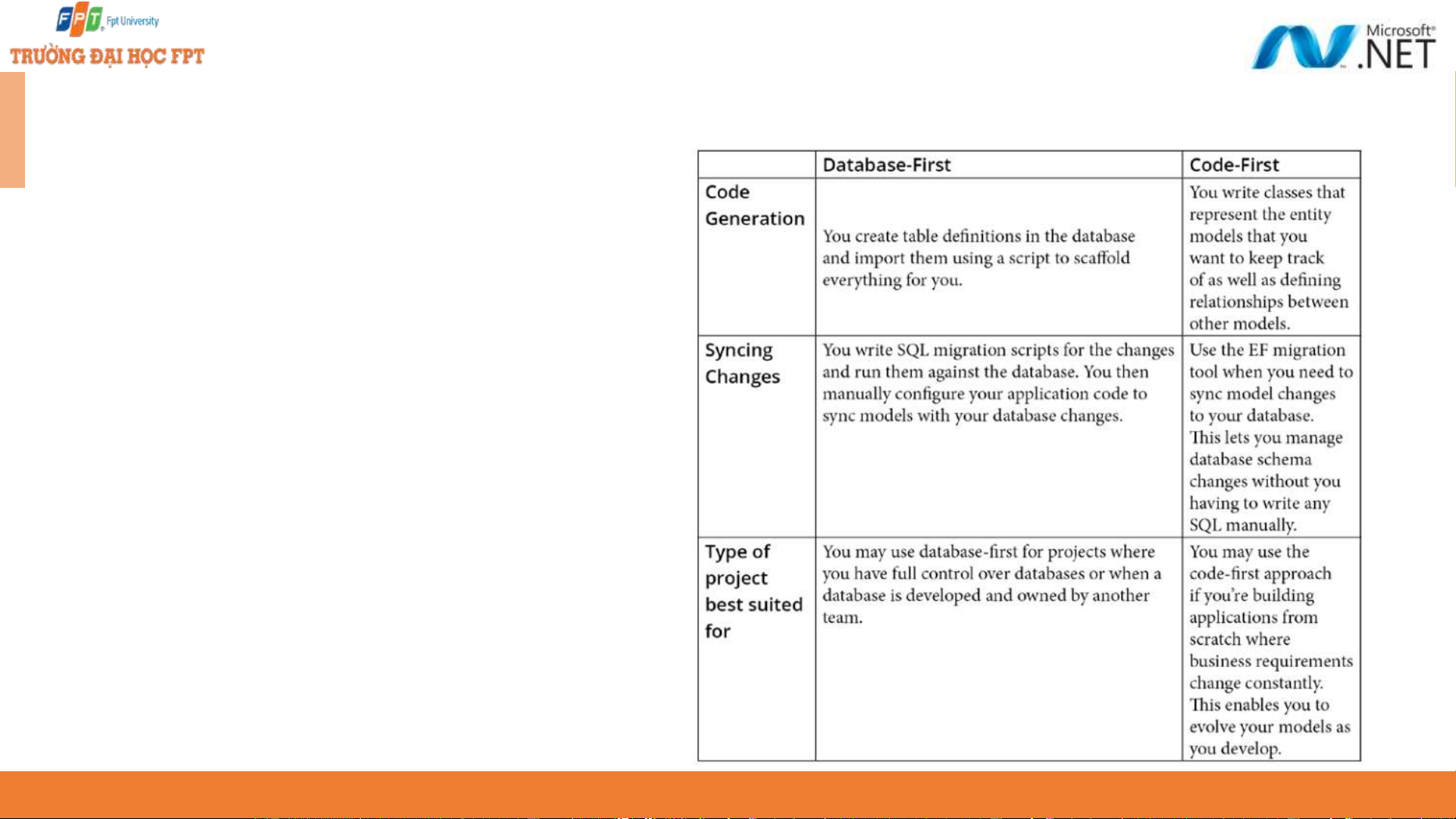
EF Core design workflows - 1 9
EF Core design workflows - 2 ◆ The differences between the design workflows when to apply them to the projects. 10
Generating models from an existing DB - 1 ◆
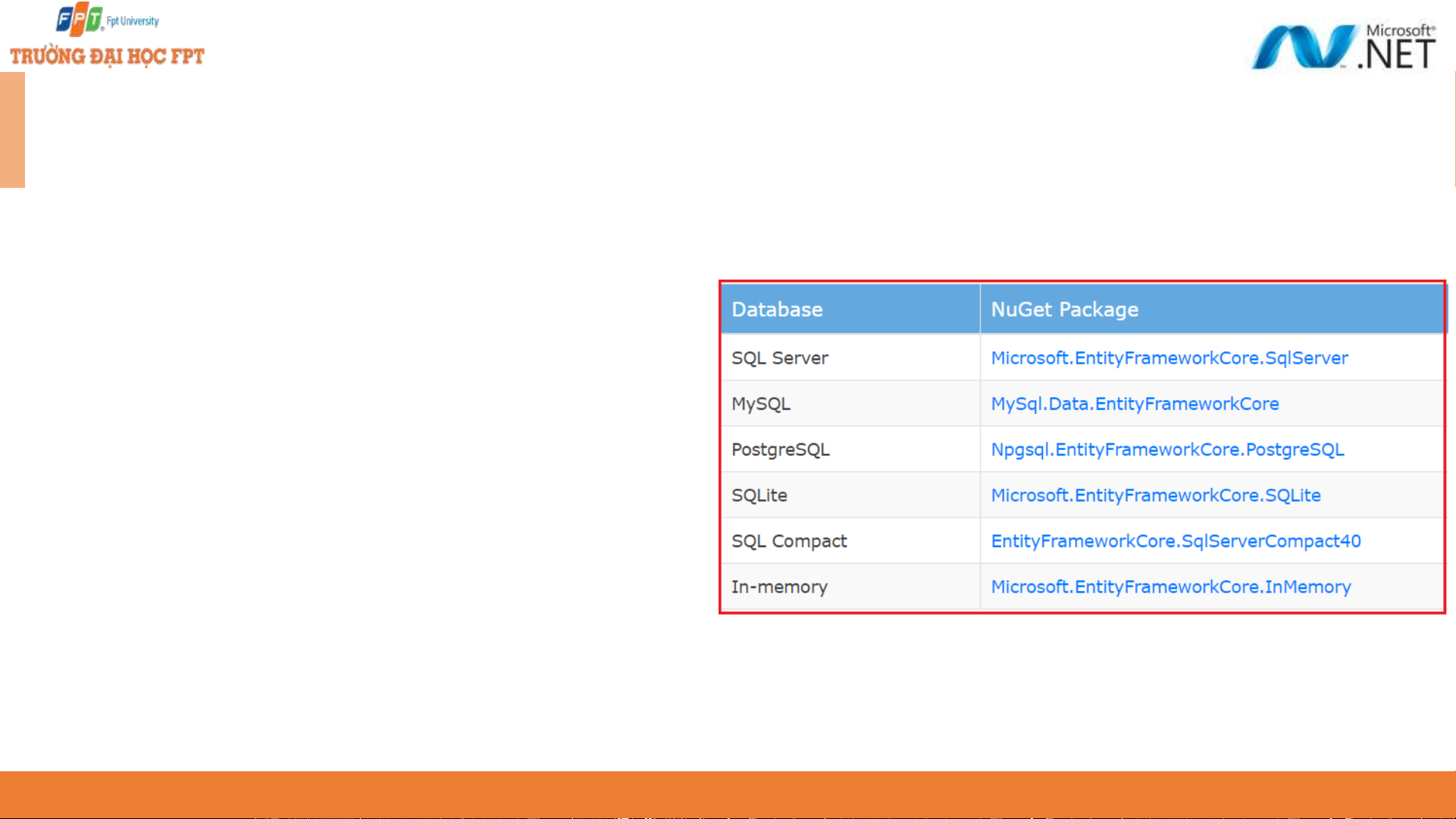
Integrating Entity Framework Core using these packages
Microsoft.EntityFrameworkCore.Tools
Microsoft.EntityFrameworkCore.SqlServer
Microsoft.EntityFrameworkCore.SqlServer.Design ◆
Using the Scaffold-DbContext command
Scaffold-DbContext “CONNECTION STRING”
Microsoft.EntityFrameworkCore.SqlServer -o Db
dotnet ef dbcontext scaffold “CONNECTION STRING HERE”
Microsoft.EntityFrameworkCore.SqlServer -o Db 11
Generating models from an existing DB - 2 ◆
Connection string: The first parameter is the connection string that instructs
how to connect to the database. ◆
Provider: The database provider that will be used to execute the connection
string against. In this case, we’ve used Microsoft.EntityFrameworkCore. SqlServer as the provider. ◆
Output directory: The -o option is shorthand for –OutputDir, which enables
you to specifythe location of the files to be generated. In this case, we’ve set it to Db. 12
Learning code-first development with API ◆
Step 1. Creating a Web API project ◆
Step 2. Configuring data access ◆
Step 3. Managing database migrations ◆
Step 4. Data Transfer Objects (DTOs) ◆
Step 5. Creating Web API endpoints 13
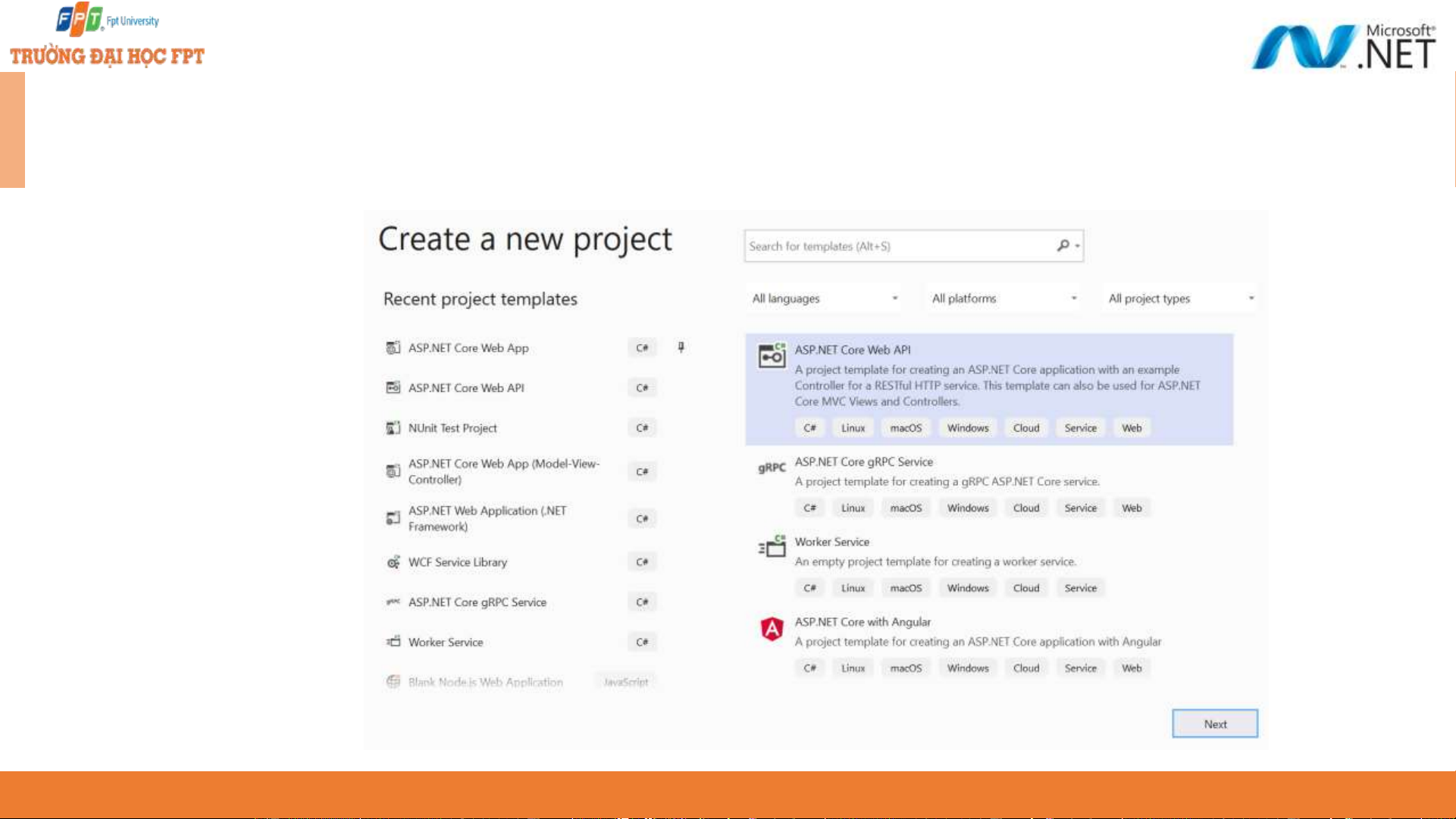
Creating a Web API project ◆
Choose ASP.NET Core Web API project 14
Configuring data access - 1 ◆ Install the NuGet packages: ◆ Microsoft.EntityFrameworkCore ◆
Microsoft.EntityFrameworkCore.Design ◆
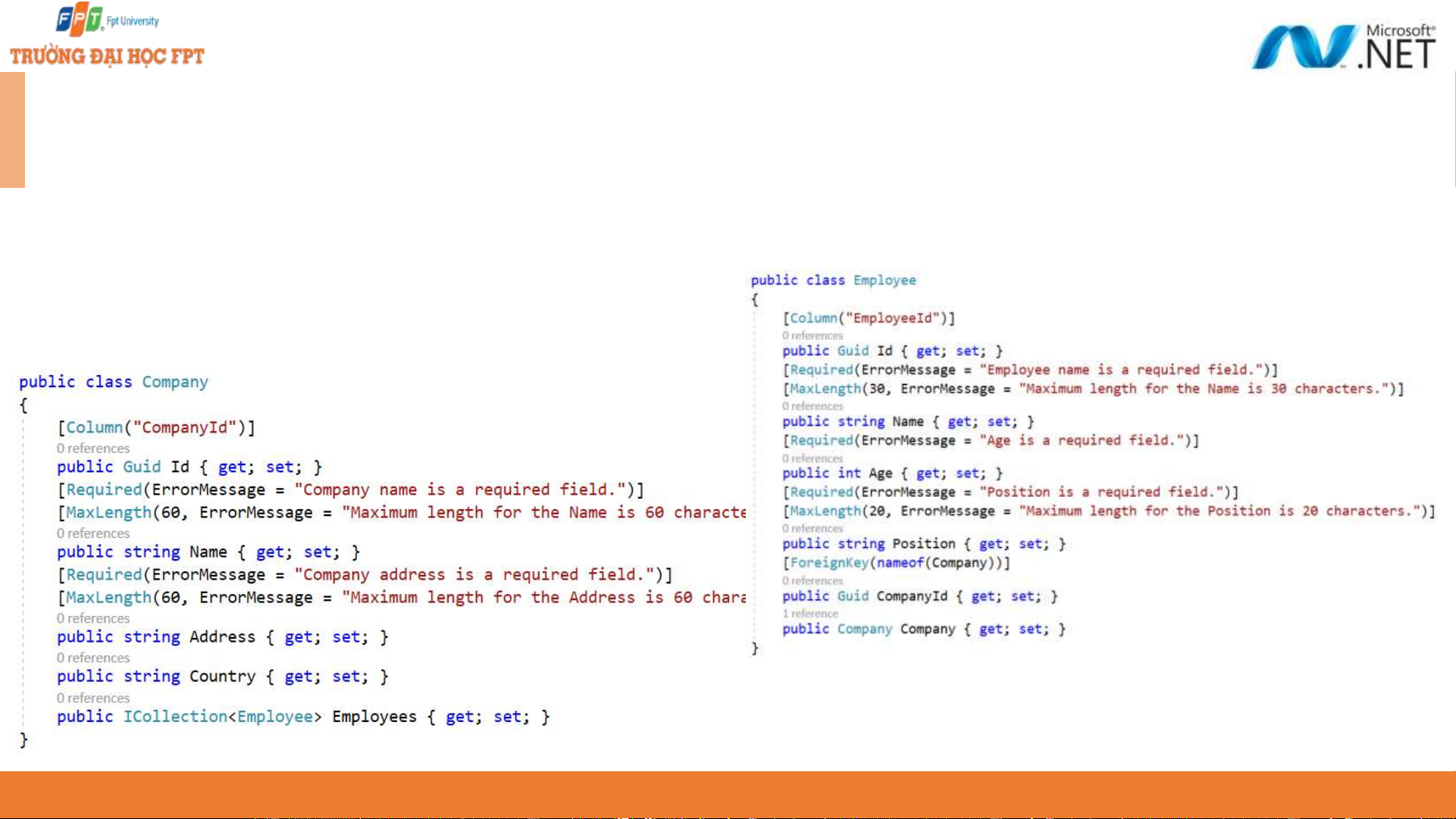
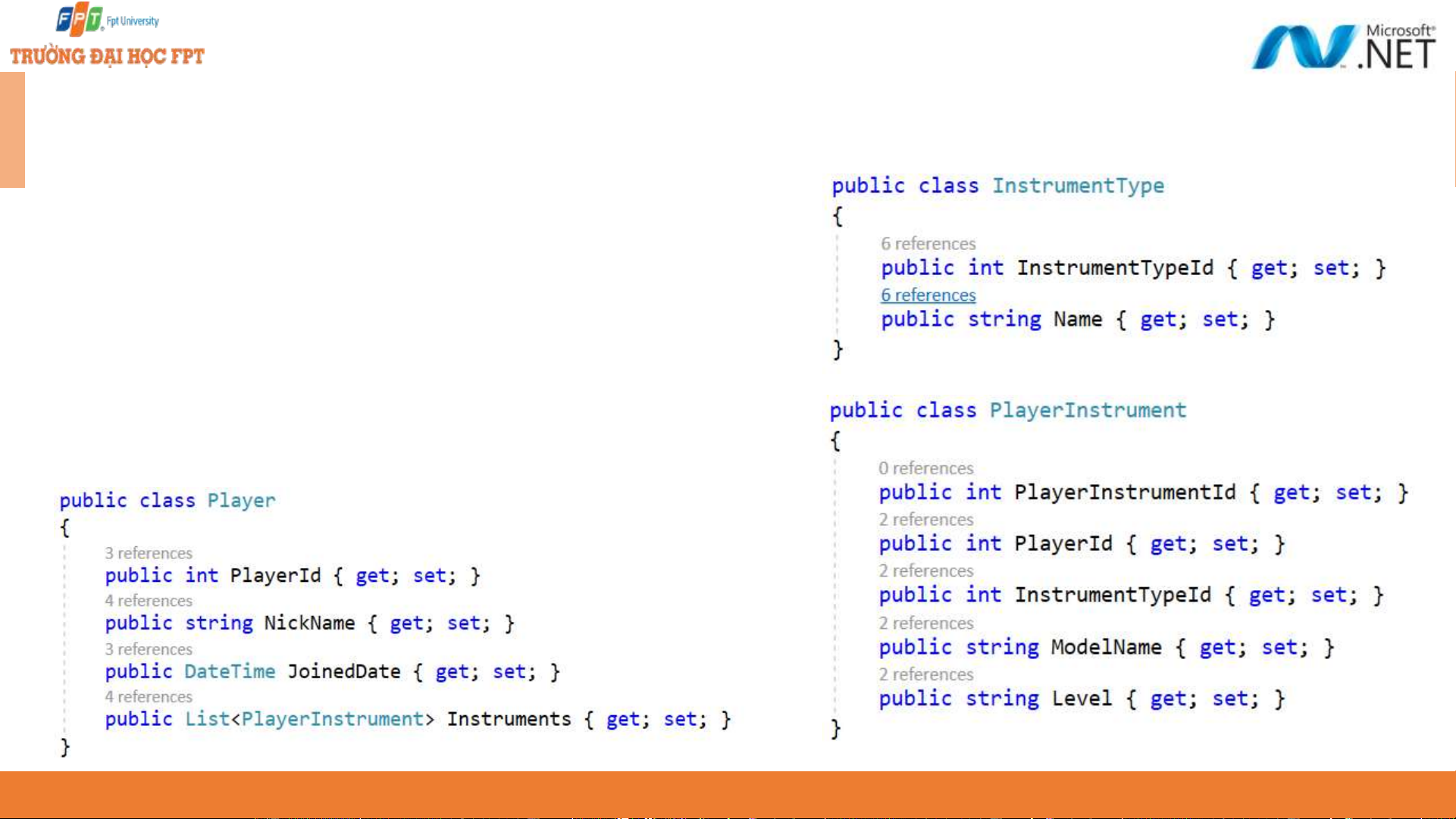
Microsoft.EntityFrameworkCore.SqlServer ◆ Creating entity models 15
Configuring data access - 2 ◆ Defining a DbContext 16
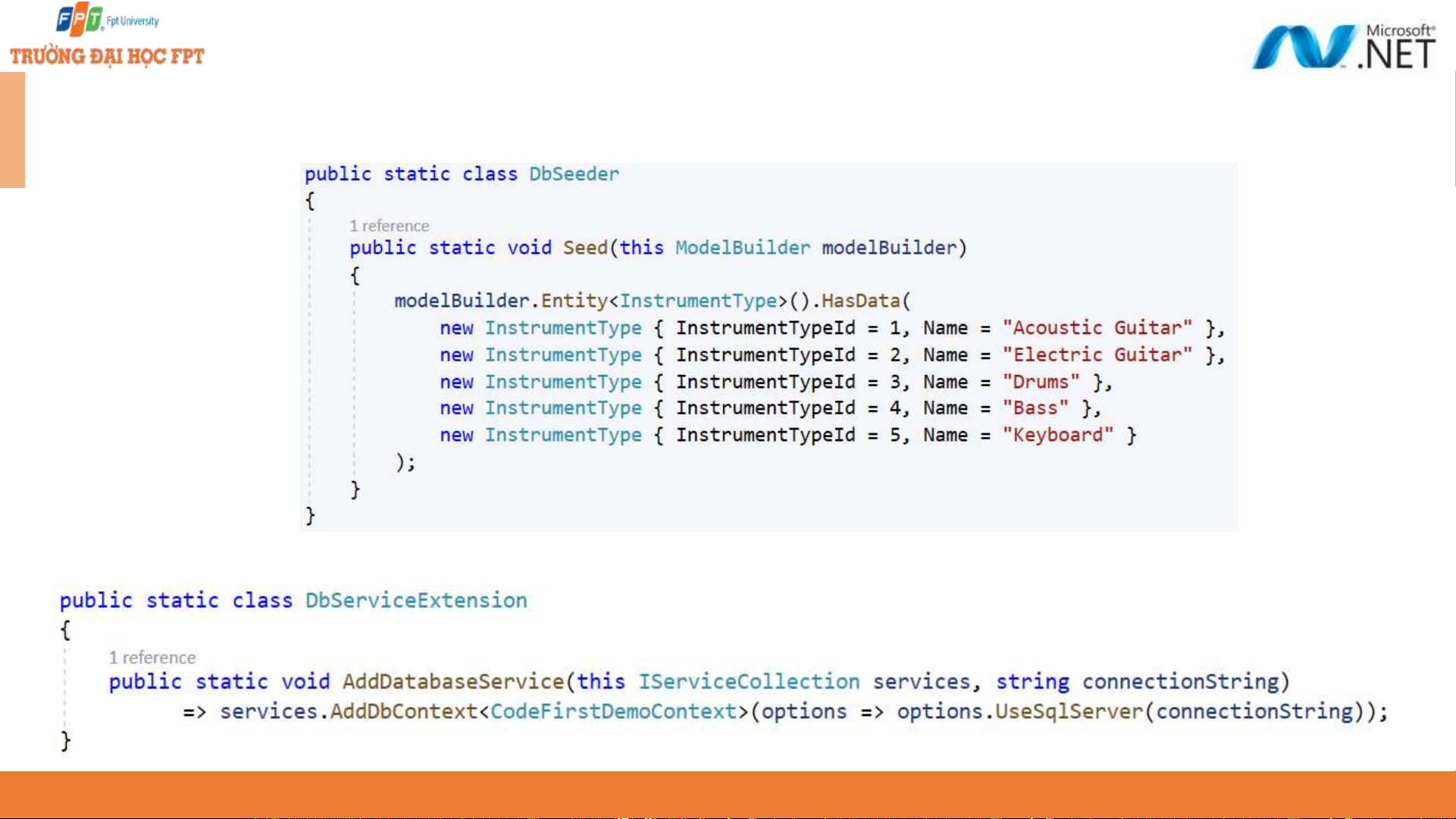
Configuring data access - 3 ◆ Seed data ◆
Registering the DbContext as a service 17
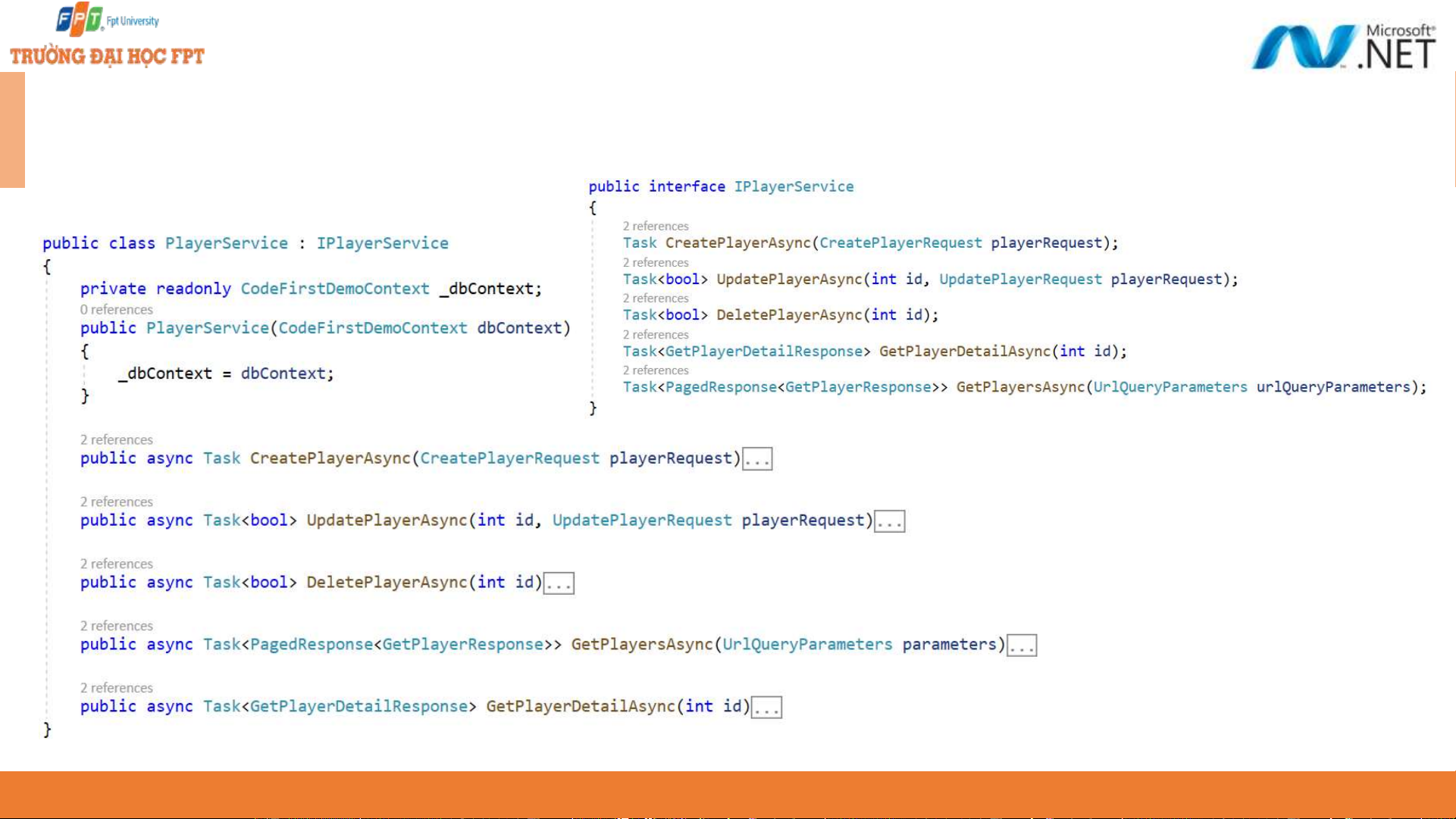
Configuring data access - 4 ◆ Create service 18
Configuring data access - 5 ◆
Setting the database ConnectionString ◆ Modifying the Startup class ◆ Migration
Add-Migration InitialMigration -o Db/Migrations Update-Database -verbose 19
Data Transfer Objects (DTOs) - 1 ◆
Data Transfer Objects (DTOs) are classes that define a Model with sometimes
predefined validation in place for HTTP responses and requests. ◆
You can think of DTOs as ViewModels in MVC where you only want to expose relevant data to the View. ◆
The basic idea of having DTOs is to decouple them from the actual Entity
Model classes that are used by the data access layer to populate the data. ◆
This way, when a requirement changes or if your Entity Model properties are
changed, they won’t be affected and won’t break your API. Your Entity Model
classes should only be used for database related processes. 20