Chapter 4: Tricks of the Trade for Startups môn Giao dịch thương mại quốc tế | Trường Đại học Kinh tế, Đại học Quốc gia Hà Nội
Chapter 4: Tricks of the Trade for Startups môn Giao dịch thương mại quốc tế | Trường Đại học Kinh tế, Đại học Quốc gia Hà Nội. Tài liệu được sưu tầm giúp bạn tham khảo, ôn tập và đạt kết quả cao. Mời bạn đọc đón xem.
Môn: Giao dịch Thương mại quốc tế 4 tài liệu
Trường: Trường Đại học Kinh tế, Đại học Quốc gia Hà Nội 491 tài liệu
Tác giả:




















Preview text:
CHAPTER 4
Tricks of the Trade for Startups
A side from money, you’ll need to invest a great deal of time, energy, and
emotional intensity to get your business off the ground. You’ll need to get people
interested in your service, persuade manufacturers or artisans to work with you,
then find foreign contacts to securing financing. Going over all the details—
especially the financial ones—with a magnifying lens and a critical eye is crucial to your success.
That old refrain “The best things in life are free” does not apply when you
are starting a business. Fortunately, an import/export company is typically not at
the expensive end of the startup costs spectrum. At the same time, you don’t
want to cut corners to save money initially.
Keep in mind, you’ll likely need to invest money in your education and
training, above and beyond the core startup costs for the business. Until you’ve
acquired the necessary training and you’re confident that you have the
knowledge needed to pursue running an import/export business, don’t move
forward or you could wind up losing a lot of money and making some major
mistakes. There are many ways to obtain the international trade training and
experience you need. One option is to spend some time gaining real-world
experience by working for another company before launching your own business venture.
In this chapter we help you figure out what you’ll need in your office and
what you can expect to pay for it. The second part of the chapter gives you a
preview of the tasks you’ll need to accomplish to legally set up your business. Should You Work from Home?
One of the many advantages of an import/export business is that the startup costs
can be comparatively low. You have the advantage of initially or permanently
operating from home, if you want to. This strategy cuts office lease expenses
down to nothing. Unless you’re starting as a distributor, you can get away
without purchasing inventory, which means no outlay of funds for pretty
doodads to grace display spaces, since you’ll have no display spaces. Your major
financial outlay will go toward office equipment and market research expenses.
If you are like many people, you already have the most crucial piece of office
equipment: a computer with internet access.
The following is a breakdown of everything, from heavy investment pieces
to flyweight items, you’ll likely need to get up and running:
Desktop computer (Windows PC or an Apple iMac) Laptop computer and/or tablet Laser printer
Copier/fax/scanner (or all-in-one)
High-speed and reliable internet
Email. Includes business email accounts that end with your company
name/domain name (e.g., Username@YourCompanyName.com). Using a
free email account from Google, Yahoo!, or Apple, for example, is
unprofessional. Your website domain name registrar or website hosting
service should be able to provide you with personalized email accounts
for your business (for an additional monthly or annual fee).
Website, which includes the design, maintenance (updating), and hosting
of your company’s website. While maintaining a presence on social
media (e.g., Facebook, LinkedIn, Twitter, and Instagram) is free, you
may wind up wanting to hire someone to manage your company’s social media presence and website.
Software, including a wide range of specialized and general business
software, such as word processing, spreadsheet management,
customer/client relationship management (CRM), and bookkeeping.
Market research and trade leads
Smartphone with calling, text, and cellular data service Voicemail
Letterhead and matching business cards Office supplies
Postage, which includes the monthly fee for a postage machine or the
ability to create postage from your computer
Travel expenses for conducting market research on foreign turf
Office furniture, including a full-size desk, comfortable desk chair, office
phone equipment, and filing cabinets
You can add many goodies (of varying degrees of necessity) to this list, and
we’ll cover more options in Chapter 10.
But let’s consider you are starting from absolute scratch. You can always set
up your computer on your kitchen table or on a card table in a corner of a
bedroom. You can stash files in cardboard boxes or plastic crates. It’s not
glamorous, but it will suffice until your business becomes profitable. Computing Computer Costs
A computer with high-speed and reliable internet access should be at the top of
your list when it comes to “must have” office equipment. Your computer will
allow you to access the myriad trade leads and market research materials
available online, plus allow you to communicate with potential and established
customers, as well as vendors worldwide, all via email.
That same computer can be used to generate invoices, certificates, and forms
quickly, easily, and inexpensively, plus handle your company’s bookkeeping,
scheduling, internet-based voice and video calls, and help you maintain detailed
information about your customers and clients (using specialized customer/client
relationship management software). As you’ll discover, there are also highly
specialized (vertical market) software applications designed for use by import/export businesses.
To help reduce your physical paperwork and traditional filing needs,
digitizing and scanning forms, documents, and files, and storing them
electronically on your computer’s hard drive or within the cloud, is a viable
option—and one that helps the environment too!
Many people today, especially in a field that requires a lot of traveling, use a
laptop computer and/or tablet as their main computer. You may also opt for a
desktop computer for your office, but ensure that all your data, documents, and
files automatically sync between your computers and mobile devices (via the cloud).
For a basic, Windows 10-based desktop computer (including keyboard and
monitor) that can have you surfing the internet shortly after you buy it, you
should allocate funds in the $800 to $2,500 range.
You’ll typically pay a bit more for an Apple iMac, but there are distinct
benefits of using Apple equipment, such as the company’s superior AppleCare
technical support and the fact that Macs are much less susceptible to viruses and
malware than Windows PCs. We will go over the various permutations in
Chapter 10, but this will give you a figure to pencil in for starters.
While the import/export business has been slow to adapt to new technology,
the past decade has shown that the once tech-shy industry has embraced
technology in a big way—and so should you! Fax Facts
Although you technically don’t need a stand-alone fax machine, because it’s
quickly becoming outdated technology, your life as an international trader will
run much more smoothly with one since overseas businesses continue to use
them. You’ll use a fax machine to shoot off and receive hard-copy materials to
and from clients, representatives, and distributors instead of waiting on both U.S. and foreign postal services.
Sending a pro forma invoice, for example, has a lot more impact on a
potential customer when it directly follows a request for information. You can
purchase a basic plain paper fax machine for as little as $100. If you spend a
little more ($150 to $250), you can get a combined fax/printer/copier/scanner.
You can also set up your computer (or even your smartphone or tablet) to
work as a virtual fax machine, complete with a dedicated phone number. Check
out services like eFax (www.efax.com), Ring Central (www.ringcentral.com), and MyFax (www.myfax.com).
Use Your Smartphone or Tablet as a Fax Machine
Thanks to its built-in rear-facing camera and internet connectivity,
using an optional mobile app, such as Fax Pro, FAX, iFax, or Easy
Fax, it’s possible to “scan” paper-based documents, then send them as
a fax to any fax machine in the world using your mobile device’s internet connectivity.
You’ll find the appropriate faxing apps at the App Store (iPhone/iPad)
or the Google Play Store (if you’re using an Android-based mobile
device). Plan on paying either a per-page fee or a monthly fee for the
ability to send and receive unlimited faxes from your mobile device.
With some services, like eFax (www.eFax.com), you only have to set
up and pay for one account, but you’re able to send and receive faxes
from your computer(s), smartphone, and tablet—virtually anywhere
you have internet connectivity.
Once printed (paper-based) documents are scanned into your computer
or mobile device, you can use a separate app, such as PDF Expert
(www.pdfexpert.com), to edit them before sending. PDF Expert can
also be used to digitally sign electronic documents or contracts, which
you can then electronically fax or email to another party.
A Reliable, High-Speed Internet Connection Is a Must
With the power of the internet at your command, you can go anywhere on the
globe instantaneously—access trade leads as soon as they’re posted,
communicate with clients and client wannabes with a few keystrokes, and garner
market information from worldwide sources while seated at your desk. If you’re
using a notebook computer or tablet, this is work you can also do from bed,
while sitting on a couch, or even while basking in the sun by a pool or beach.
The average cost for high-speed cable, DSL, or FIOS (fiber optic) internet
service runs between $25 and $100 per month, depending on your location, the
service provider, whether you bundle the internet with other services (such as
cable TV or a VoIP phone line), and the speed of the internet connection. In
addition to a modem, you’ll also need a wireless router to establish a wifi
internet connection in your home or office.
Since most cable TV providers dominate geographic regions, you are usually
at the mercy of whichever provider is in your area. Most offer bundled packages
for phone, television, and internet service. Depending on your desired TV
channel lineup and extra services (such as a digital video recorder connected to
your cable box or a wireless router to establish wifi in your home), your monthly
bill could come to $100 to $250 per month for all three. The Skinny on Software
Software prices can vary radically, depending on which programs you buy and
from whom. You’ll want a good word processing program, an
accounting/bookkeeping program, a spreadsheet management program, and a
customer/client relationship management program. Again, this is a subject that
will be covered in greater depth in Chapter 10.
Many popular applications, like Microsoft Office 365 (which includes
Microsoft Word), QuickBooks accounting, and most CRM programs allow users
to pay a low monthly subscription free (often less than $10 per month) for full
access to the software, instead of forcing customers to purchase it outright (and
then pay for updates separately). tip
You can find free office software, which is fully compatible with Microsoft
Office (Word, Excel, PowerPoint, Outlook, etc.), at www.openoffice.org.
Meanwhile, Apple offers Mac users its iWork applications (including
Pages for word processing) for free (www.apple.com/iwork), and Google
offers the Google G Suite applications (including the Docs word processor)
for free to Windows and Mac users, and iOS and Android mobile device
users (https://gsuite.google.com). Purchase Leads Online
Like just about everything else in the international trader’s world, the amount
you’ll pay for market research and trade leads is a variable, almost entirely
dependent on you and your personal style. If you choose to go with the
Commercial Service’s trade leads and other market research information, you
can pencil in at least $75 per month or $200 (or more) per year.
Back to the noncommercial Commercial Service, the Gold Key Matching
Service program (www.export.gov/Gold-Key-Service) can provide a lot of help.
It’s hard to pin a price tag on their program because costs vary with the countries
involved and the number of matches and meetings, but as a thumbnail, you can
figure between $950 and $3,500. save
You can save big money on leads. The International Trade Administration
offers leads and market information for the best price of all—free. Just
point your web browser to: www.export.gov.
As you surf the internet, you’ll find other trade lead services and sources of
market research, including LinkedIn.com, that may cost more or less, or nothing at all. Phone Service
If you’re using a landline at home, you already know that your cost depends at
least partly on the different calling features you choose. If you don’t already
have a landline for personal use, you should install at least one dedicated line for
your business. For the purpose of startup budgeting, let’s allocate about $50 per
line. You’ll also need to add the phone company’s installation fee, which will
vary.You may also want to obtain a toll-free 800 number for incoming calls.
Although most 800 numbers only work when receiving calls from within the
U.S., they give your business additional credibility. Mobile Phone Service
In today’s business world, a smartphone is a must-have business tool for making
and receiving voice and video calls, sending and receiving text messages,
accessing the internet while on the go, managing your email accounts, and more.
If you’re already using Apple equipment, go with an iPhone. However, if you’re
already accustomed to using an Android-based mobile device, that will work just as well.
All smartphones come with an assortment of built-in applications, at least
one front-facing and two (sometimes three) rear-facing cameras, and a wide
range of other technologies that allow the smartphone to handle many tasks
while you’re on the go. Plus, thanks to the millions of optional, third-party apps
from the App Store (iOS) or Google Play (Android), you can customize your
mobile device with a suite of useful apps that can help you become more
productive in virtually every aspect of your personal and professional life, from
communications and scheduling to information management.
In conjunction with your smartphone, you’ll need to sign up with a cellular
service provider to give your phone calling, texting, and wireless (cellular data)
internet capabilities. In the U.S., there are several major cellular service
providers. Each offers many different plans, some of which include unlimited
calling and texting throughout the U.S. Others offer unlimited service throughout
the U.S., Canada, and Mexico, or offer various international calling plans for
calling from the U.S. to other countries (or for calling anywhere in the world
while you’re traveling abroad).
Since you’ll likely be doing a lot of international travel, choose a cellular
service provider with competitive international calling and roaming packages.
Especially if you’ll be doing a lot of international calling and travel, check out
the Google Fi cellular phone service (http://fi.google.com). It’s extremely
inexpensive (less than $50 per month) and works with almost any smartphone, nearly anywhere in the world.
Brand Your Business to Enhance Its Image
Business stationery and matching business cards are as important to a savvy
international image as a well-answered phone and a professional-looking
website. To create a brand identity that will help sell your product or service,
you’ll need letterhead, envelopes, and business cards.
You can have a set of stationery and business cards inexpensively printed for
you at a local quick print shop, such as FedEx Kinko’s or through an office
supply superstore’s inhouse printing service. Visit your local Staples, Office
Max, or Office Depot, for example. Either way, you should allocate $100 to
$300 for the printing services, as well as a bit extra for the one-time design fees
(which might include the creation of a company logo).
There are also countless online-based print shops that will help you design
and print letterhead, business cards, invoices, and other business-related
documents. Check out the offerings from companies like:
48HourPrint.com: www.48hourprint.com Moo: www.moo.com
PrintRunner: www.printrunner.com
Vistaprint: www.vistaprint.com tip
When you travel abroad on trading trips, bilingual business cards are a
much-appreciated gesture in some countries—and a necessity in others. Do
your homework! You might also want to set up local (virtual) phone
numbers within the countries you plan to do business with, so (prospective)
customers and clients can make a local call but still reach you back in the U.S.
Don’t forget you’ll also need office supplies—pens, pencils, paper clips,
mailing envelopes, reams of blank paper for your printer, a stapler with staples,
tape, and printer cartridges. Plan on initially spending at least $200 to nicely equip your home office. Mailing Matters
Your startup postage costs will be fairly low, but you will need to tally them.
How much you spend depends a great deal on how much material you are
mailing out and where on the globe you are sending it. Clearly, mailing price
sheets or brochures will be much pricier than sending email price quotes or
listing your prices on your company’s website.
Given current initiatives to reduce paper usage, not to mention recent hikes
in postal rates, you will probably want to concentrate your promotional efforts
online. This is even truer if you are positioning your company as
environmentally responsible. That being said, if you plan to participate in in-
person meetings, trade shows, or business conferences, you’ll likely want
professional-looking printed materials to share with prospective customers and
clients that support the content that you’ve previously emailed (although these
materials can also be provided in electronic form via a flash drive, for example).
Services like Stamps.com and Endicia (www.endicia.com) allow you to
generate and print postage stamps directly from your computer and printer, so a
separate postage machine (or constant trips to the post office) is not required. Traveling Trader
This category, too, will vary tremendously according to how you choose to tailor
your market research, your startup costs, and, ultimately, your business life.
Some traders are on the road often, while others are armchair travelers. Of
course, when you do travel, your costs will vary depending on where you go, for
how long, and whether you choose to spend your nights at a five-star resort hotel
or a local Airbnb (www.airbnb.com).
You may find that you can conduct all of your market research from your
computer or tablet, or you may discover that for your particular product
category, you need to study the market up close and personal by traveling to that country.
Expenses Add Up, So Be Prepared
Other expenses you’ll need to plug into your startup expenses chart are business licenses, business insurance, legal advice, utility fees, and
accounting/bookkeeping fees—the costs intrinsic to any company’s startup and subsequent operation.
Calculate Your Business Startup Costs
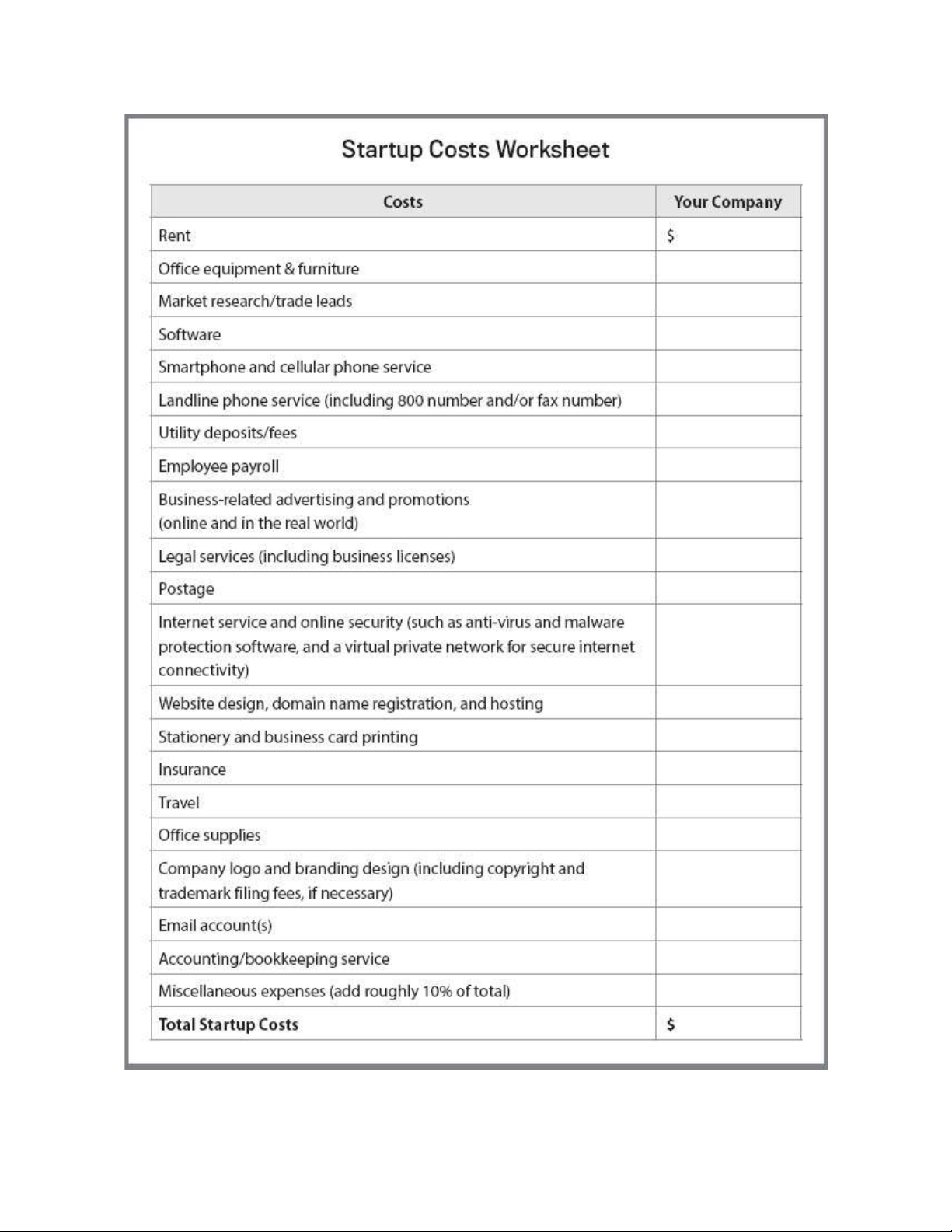
Use the Startup Costs Worksheet in Figure 4–1 on page 48 to calculate your company’s startup costs. The Trader’s Trunk
This part of the chapter explores the bottom of the trader’s trunk, those features
that form the basics of the business, from company name and legal structure to permits. Name Your Business
Every business, like every child, has to have a name. You should devote (almost)
as much thought to choosing your company’s name as you would for your
offspring. After all, you plan to have your business around for a long time. You
want a name you can be proud of, one that identifies your business—and by
extension, you—as worthy of your clients’ confidence.
FIGURE 4–1: Startup Costs Worksheet warning
When brainstorming a business name, be careful not to fence yourself in
with a moniker that may limit you later. If you’re starting out importing
Mexican pottery, for example, you may not want to call your company
Mexican Pottery Imports. Unless you’re certain that’s the country and
product category you’ll stick with for the life of your business, give
yourself some room for growth and expansion with a less restrictive name.
Because import/export is a more serious business than, say, pizza delivery or
greeting card design, you should probably rule out names like Thyme to Trade
(even if you specialize in herbs and spices). Instead, your name should call
attention to your expertise and efficiency. The terminally creative, however, can
take heart. Noncutesy doesn’t mean dull. Your name can—and should—deliver a snappy punch.
One trader attacked the name problem from the standpoint of his vision of
the company. “With Global Partners,” said Wahib Wahba, “we wanted to say that
we’re all partners, me and my clients and manufacturers. We all have to be partners to make it work.”
When brainstorming your company name, keep in mind that, with a few
exceptions, the people you’ll target won’t be using English as a native language.
So take care with the expressions you choose. Colloquialisms and slang words
sometimes aren’t clear even to people in different parts of the U.S. Don’t make
things more difficult by pressing them on non-Americans. Everyone in the
industry, on the other hand, easily understands international trade buzzwords,
like “global” and “overseas.”
Many importers and exporters incorporate the name of the region with which
they trade into their business moniker, for example, Far East Imports or Amazon
Traders. Or you might want to incorporate a geographic feature of your own
region, such as Desert Traders if you live in Palm Springs, or Sea-to-Sea Exports
if your office is near a seaport.
You might even decide on a variation of your own name. Lloyd Davidson,
owner of LND Export Management, used his initials as the basis for his
company name. Sam Nelson, owner of Nelisco Inc. in North Carolina, also used part of his name.
Whatever you go with, remember that you will be repeating your business
name every time you answer the phone. Sound out the title before you settle on
it. Some names look great in print but are difficult if not impossible to
understand over the phone. M&A Associates, for example, may seem like a
perfectly reasonable name for partners Marty and Andrea, but when spoken, it sounds like MNA. Talking Trade
Here’s a list of buzzwords you can use to help brainstorm a company name that has global appeal: Abroad Global Pacific Atlantic Inter-Continental Passport Caravan International Seven Seas Cargo Hemisphere Trader Compass Mediterranean Tropical Earth Overseas Worldwide
Most callers rate about a C-minus in listening comprehension. No matter
how clearly you enunciate, they aren’t going to understand M&A. So save
yourself hours of telephone frustration and choose something simple.
For a list of some words that might help get your creative gears cranking,
check out the international lexicon in “Talking Trade” (see above sidebar). Next,
use the brainstorming worksheet in Figure 4–2, page 51, to help craft your business name. Newly Registered
After you’ve decided on a name, you’ll need to register it. Basically, registering
your name means that you notify the proper authorities that you’re doing
business under a name other than your own. This lets the public know that
Tropical Trading Partners is owned by you, professional exporter.
The process varies in different regions of the country. In Florida, for
example, you access the state government website and click around until you
finally call up the page about fictitious business names. You’ll fill out a series of
forms, swear you are who you say you are, and enter your credit card number.
Eventually, you’ll receive a letter confirming that you registered your name with
the state. If you want a nice little certificate to frame and hang on your wall, you need to shell out extra bucks.
In California on the other hand, you file an application with the county clerk,
then advertise your name in a “general circulation” newspaper in that county for four weeks.
FIGURE 4–2: Business Name Brainstorming
Make Sure the .Com Website URL Is Available
Once you decide on a business name, visit any website domain name
registrar (such as godaddy.com), and make sure the dot-com domain name is available.
There are a lot of domain name extensions available, such as .info,
.biz., and .org, but you must own the domain name for your business
that ends in “.com.” This is what most web surfers type when using
their web browser, even if they’re told to use a different domain name extension.
Also, make sure your company name and website domain name are
easy to spell and remember, and won’t get easily confused with
another business or competitor.
For example, if your business name is ABC Imports, you should
register the domain name www.ABCImports.com. If you don’t have
the .com extension, chances are whoever does will wind up receiving a
large chunk of your website traffic, which means lost business.
Make sure your website domain and company name do not violate
another company’s copyrights or trademarks. Then at the same time
you register your website domain name, obtain business email
addresses that end with the same extension, such as Username@YourCompanyName.com.
Once that’s all said and done and you’ve paid the fee, you receive your
statement of registration. Check with your city, county, and state government to
find out what the story is in your state. Structurally Sound
To appease the IRS, your business must have a structure. You can operate it as a
sole proprietorship, a partnership, or as some type of corporation. Many
international traders go with the simplest version, the sole proprietorship. You’ll
probably be starting out on your own, so there’s no need to get complicated or
expensive. You can always switch to another business structure later if you take on partners and/or employees.
The differences in business structures center primarily on legal liability,
taxes, and paperwork/bureaucracy. Be sure to check with your attorney and
accountant before making a final decision about how you’ll structure your
business from a legal standpoint.
Beyond the basic structure for your company, various other international
trade configurations exist. There’s the joint venture, which is a sort of marriage
or partnership between two distinct and separate companies, for example, yours
and one in a foreign country. There’s also the strategic alliance, an agreement
between your company and another one to work toward a common goal. tip
Find everything you need to know about small-business tax issues by
visiting the IRS’s website (www.irs.gov/businesses/small-businesses-self-
employed). From deductible business expenses to applying for EINs
(employer ID numbers), the IRS has you covered. When it comes to filing
the correct paperwork, a fee-based company, like LegalZoom.com, can be helpful.
Why would you want to form a venture with an overseas company? One
reason is to get around trade barriers. If your company is part domestic in
whatever country you’re working with, you can skim around prohibitive tariffs
and quotas. Another reason? You can form a team or network with an in-country
company that already has effective trade channels in operation. A third reason is
to get into government-controlled infrastructure-type projects, like power plants or telecommunications.
Then there’s the wholly owned subsidiary or branch, in which your company
or your client’s company becomes owner of a firm. You can encounter a spider’s
web of entanglements in international arrangements of this type because the host
country often sets up all sorts of special rules, such as how long a “foreign”
company (that’s you) can own property or how much profit you can collect.
So why would anybody want to open a subsidiary or branch abroad? In a
word: profit. To vitalize their own economies by creating jobs and cash flow for
their people, emerging nations often offer hefty incentives to businesses from
more developed countries. If you do your homework and check out every
permutation of foreign business ownership laws, you’re less likely to get stung by unpleasant surprises.
There’s also the licensing or franchising type of business. With licensing,
you give a foreign company or licensee permission to sell your, or your client’s,
trademarked product and in return, they pay royalties on their sales. Everybody
recognizes the world’s preeminent licensing products: anything stamped with the
likeness of Mickey, Minnie, or their Disney cohorts. You might develop a gold
mine in licensing characters developed by a client with loveable little chaps just waiting to be discovered.
With a franchise, you give your or your client’s foreign buyer permission to
sell your licensed products with your special sales or service techniques.
The ultimate franchisor, known around the world, is McDonald’s. American
food franchises traditionally do very well abroad, but there are many other
franchises available or that you can put together yourself. All you need is your
imagination and some attention to detail. tip
Delve into Entrepreneur’s annual online resource for franchises at
www.entrepreneur.com/franchises/500. You’ll find lots of information on
each company listed, including their respective financials. Trading Places
Where should you locate your business? You have a lot of choices. Because most
of your business will be conducted long-distance via email, phone, and mail, you
won’t need to be available at set hours as you would if you were running a retail
establishment or restaurant. Because you will rarely have clients dropping in,
you will not need a receptionist, a lobby, or even meeting rooms. You also won’t
need signage or substantial client parking.
For these reasons, many of the traditional (and more expensive) options
aren’t the best choice. Instead of paying for retail or office park space, consider a
warehouse, if you anticipate having a lot of inventory or a home office.
If you plan to work from home, you should check into zoning regulations. A
small international trading company is not likely to attract much attention from
local authorities, but you should still play it safe. Find out from your local city or
county government whether any permits are necessary. While you’re at it, check
to see if you’ll need a business license, which is usually an official-looking piece
of paper you get in exchange for a nominal annual fee. Attorney with ELAN
Attorneys are like plumbers; you don’t want to think about them until you need
one. As a business owner, however, you should have a good, trustworthy, and
responsive attorney on call. Make sure it’s someone who knows and has
experience with international trade.
You’ll want your lawyer to look over any contracts you write or receive,
relating to working with manufacturers, representatives, or distributors, for
example, and to advise you on the fine points of foreign trade law. You likely
won’t need to call them every week, or even every month, but there’s no point
waiting until you have a pressing problem before you establish a relationship with a lawyer.
To get you off on the right foot and to answer any startup questions, the SBA
and the Federal Bar Association have developed The Export Legal Assistance
Network, otherwise known as ELAN. As an enticement to the red-tape-phobic
would-be trader, the ELAN folks will sit you down with a volunteer trade
attorney who’ll answer all your questions—for free! After the initial
consultation, you can either sign on with the volunteer as your permanent trade
attorney or take your newfound knowledge and hit the road without a backward glance.
You can also find a reliable import/export attorney by asking for referrals
from associates in the field or your international banker, but with the ELAN
program, what have you got to lose?
Contact the Export Legal Assistance Network at www.exportlegal.org, or
through the SBA’s Small Business Answer Desk at (800) U-ASK-SBA. You can