Sách Beginning C++ môn Lập trình C++ | Trường Đại học Kinh Doanh và Công Nghệ Hà Nội
Sách Beginning C++ môn Lập trình C++ | Trường Đại học Kinh Doanh và Công Nghệ Hà Nội. Tài liệu được sưu tầm giúp bạn tham khảo, ôn tập và đạt kết quả cao. Mời bạn đọc đón xem.
Môn: Lập trình với C++ (HUBT) 11 tài liệu
Trường: Trường Đại học Kinh Doanh và Công Nghệ Hà Nội 1.8 K tài liệu
Tác giả:






Preview text:
BOOKS FOR PROFESSIONALS BY PROFESSIONALS® Horton RELATED Beginning C++
Beginning C++ is a tutorial for beginners in C++ and discusses a subset of C++ that
is suitable for beginners. The language syntax corresponds to the C++14 standard.
This book is environment neutral and does not presume any specific operating system
or program development system. There is no assumption of prior programming knowledge.
All language concepts that are explained in the book are illustrated with working
program examples. Most chapters include exercises for you to test your knowledge.
Code downloads are provided for examples from the text and solutions to the
exercises and there is an additional download for a more substantial project for you to
try when you have finished the book.
This book introduces the elements of the C++ standard library that provide
essential support for the language syntax that is discussed. While the Standard
Template Library (STL) is not discussed to a significant extent, a few elements from the
STL that are important to the notion of modern C++ are introduced and applied. You’ll learn:
• How to work with fundamental C++ data types and do calculations
• How to build logic into a program using loops, choices, decisions and more
• How to work with arrays, vectors, and strings
• How to use raw pointers and smart pointers
• How to program with functions and deal with program files and pre-processing directives
• How to define your own data types using classes and class operations
• How to signal and handle errors using exceptions
• How to define and use function templates and class templates
• How to do file input and output with C++ Shelve in ISBN 978-1-4842-0008-7 Programming Languages/C++ 5 5 9 9 9 User level: Beginning–Advanced SOURCE CODE ONLINE 9 781484 200087 www.apress.com CuuDuongThanCong.com www.allitebooks.com
For your convenience Apress has placed some of the front
matter material after the index. Please use the Bookmarks
and Contents at a Glance links to access them. CuuDuongThanCong.com www.allitebooks.com Contents at a Glance
About the Author ������������������������������������������������������������������������������������������������������������� xxiii
About the Technical Reviewer ������������������������������������������������������������������������������������������ xxv
Introduction �������������������������������������������������������������������������������������������������������������������� xxvii Chapter 1 ■
: Basic Ideas ������������������������������������������������������������������������������������������������������1 Chapter 2 ■
: Introducing Fundamental Types of Data �������������������������������������������������������23 Chapter 3 ■
: Working with Fundamental Data Types ���������������������������������������������������������55 Chapter 4 ■
: Making Decisions ������������������������������������������������������������������������������������������79 Chapter 5 ■
: Arrays and Loops �����������������������������������������������������������������������������������������105 Chapter 6 ■
: Pointers and References ������������������������������������������������������������������������������151 Chapter 7 ■
: Working with Strings �����������������������������������������������������������������������������������185 Chapter 8 ■
: Defining Functions ���������������������������������������������������������������������������������������213 Chapter 9 ■
: Lambda Expressions ������������������������������������������������������������������������������������271 Chapter 10 ■
: Program Files and Preprocessing Directives ���������������������������������������������287 Chapter 11 ■
: Defining Your Own Data Types �������������������������������������������������������������������315 Chapter 12 ■
: Operator Overloading ���������������������������������������������������������������������������������365 Chapter 13 ■
: Inheritance ������������������������������������������������������������������������������������������������399 Chapter 14 ■
: Polymorphism ��������������������������������������������������������������������������������������������429 v CuuDuongThanCong.com www.allitebooks.com ■ Contents at a GlanCe Chapter 15 ■
: Runtime Errors and Exceptions �����������������������������������������������������������������463 Chapter 16 ■
: Class Templates �����������������������������������������������������������������������������������������495 Chapter 17 ■
: File Input and Output ���������������������������������������������������������������������������������533
Index ���������������������������������������������������������������������������������������������������������������������������������593 vi CuuDuongThanCong.com www.allitebooks.com Introduction
Welcome to Beginning C++. This is a revised and updated version of my previous book, Beginning ANSI C++. The C++
language has been extended and improved considerably since the previous book, so much so that it was no longer
possible to squeeze detailed explanations of all of C++ in a single book. This tutorial will teach enough of the essential
C++ language and Standard Library features to enable you to write your own C++ applications. With the knowledge
from this book you should have no difficulty in extending the depth and scope of your C++ expertise. C++ is much
more accessible than many people assume. I have assumed no prior programming knowledge. If you are keen to
learn and have an aptitude for thinking logically, getting a grip on C++ will be easier than you might imagine. By
developing C++ skills, you’ll be learning a language that is already used by millions, and that provides the capability
for application development in just about any context.
The C++ language in this book corresponds to the latest ISO standard, commonly referred to as C++ 14. C++ 14 is
a minor extension over the previous standard, C++ 11, so there is very little in the book that is C++ 14 specific. All the
examples in the book can be compiled and executed using C++ 11-conforming compilers that are available now. Using the Book
To learn C++ with this book, you’ll need a compiler that conforms reasonably well to the C++ 11 standard and a text
editor suitable for working with program code. There are several compilers available currently that are reasonably C++
11 compliant, some of which are free.
The GCC compiler that is produced by the GNU Project has comprehensive support for C++ 11 and it is open
source and free to download. Installing GCC and putting it together with a suitable editor can be a little tricky if you
are new to this kind of thing. An easy way to install GCC along with a suitable editor is to download Code::Blocks
from http://www.codeblocks.org. Code::Blocks is a free IDE for Linux, Apple Mac OS X, and Microsoft Windows. It
supports program development using several compilers including compilers for GCC, Clang, and open Watcom. This
implies you get support for C, C++, and Fortran.
Another possibility is to use Microsoft Visual C++ that runs under Microsoft Windows. It is not fully compliant
with C++ 11, but it’s getting there. The free version is available as Microsoft Visual Studio 2013 Express and at the
time of writing this will compile most of the examples, and should compile them all eventually. You can download
it from http://www.microsoft.com/en-us/download/details.aspx?id=43733. While the Microsoft Visual
C++ compiler is more limited than GCC, in terms of the extent to which C++ 11 is supported, you get a professional
editor and support for other languages such as C# and Basic. Of course, you can always install both! There are other
compilers that support C++ 11, which you can find with a quick online search.
I’ve organized the material in this book to be read sequentially, so you should start at the beginning and keep
going until you reach the end. However, no one ever learned programming by just reading a book. You’ll only learn
how to program in C++ by writing code, so make sure you key in all the examples—don’t just copy them from the
download files—and compile and execute the code that you’ve keyed in. This might seem tedious at times, but it’s
surprising how much just typing in C++ statements will help your understanding, especially when you may feel you’re
struggling with some of the ideas. If an example doesn’t work, resist the temptation to go straight back to the book to
see why. Try to figure out from your code what is wrong. This is good practice for what you’ll have to do when you are
developing C++ applications for real. xxvii CuuDuongThanCong.com www.allitebooks.com ■ IntroduCtIon
Making mistakes is a fundamental part of the learning process and the exercises should provide you with
ample opportunity for that. It’s a good idea to dream up a few exercises of your own. If you are not sure about
how to do something, just have a go before looking it up. The more mistakes you make, the greater the insight
you’ll have into what can, and does, go wrong. Make sure you attempt all the exercises, and remember, don’t look
at the solutions until you’re sure that you can’t work it out yourself. Most of these exercises just involve a direct
application of what’s covered in a chapter—they’re just practice, in other words—but some also require a bit of
thought or maybe even inspiration.
I wish you every success with C++. Above all, enjoy it! —Ivor Horton xxviii CuuDuongThanCong.com www.allitebooks.com Chapter 1 Basic Ideas
I’ll sometimes have to make use of things in examples before I have explained them in detail. This chapter is intended
to help when this occurs by giving you an overview of the major elements of C++ and how they hang together. I’ll also
explain a few concepts relating to the representation of numbers and characters in your computer. In this chapter you’ll learn:
• What is meant by Modern C++
• The elements of a C++ program
• How to document your program code
• How your C++ code becomes an executable program
• How object-oriented programming differs from procedural programming
• What binary, hexadecimal, and octal number systems are • What Unicode is Modern C++
Modern C++ is programming using of the features of the latest and greatest incarnation of C++. This is the
C++ language defined by the C++ 11 standard, which is being modestly extended and improved by the latest standard,
C++ 14. This book relates to C++ as defined by C++14.
There’s no doubt that C++ is the most widely used and most powerful programming language in the world
today. If you were just going to learn one programing language, C++ is the ideal choice. It is effective for developing
applications across an enormous range of computing devices and environments: for personal computers,
workstations, mainframe computers, tablets, and mobile phones. Just about any kind of program can be written in
C++ from device drivers to operating systems, from payroll and administrative programs to games. C++ compilers
are available widely too. There are up-to-date compilers that run on PCs, workstations, and mainframes, often
with cross-compiling capabilities, where you can develop the code in one environment and compile it to execute in another.
C++ comes with a very extensive Standard Library. This is a huge collection of routines and definitions that
provide functionality that is required by many programs. Examples are numerical calculations, string processing,
sorting and searching, organizing and managing data, and input and output. The Standard Library is so vast that we
will only scratch the surface of what is available in this book. It really needs several books to fully elaborate all the
capability it provides. Beginning STL is a companion book that is a tutorial on using the Standard Template Library,
which is the subset of the C++ Standard Library for managing and processing data in various ways. 1 CuuDuongThanCong.com www.allitebooks.com Chapter 1 ■ BasiC ideas
Given the scope of the language and the extent of the library, it’s not unusual for a beginner to find C++
somewhat daunting. It is too extensive to learn in its entirety from a single book. However, you don’t need to learn all
of C++ to be able to write substantial programs. You can approach the language step by step, in which case it really
isn’t difficult. An analogy might be learning to drive a car. You can certainly become a very competent and safe driver
without necessarily having the expertise, knowledge, and experience to drive in the Indianapolis 500. With this book
you can learn everything you need to program effectively in C++. By the time you reach the end, you’ll be confidently
writing your own applications. You’ll also be well equipped to explore the full extent of C++ and its Standard Library. C++ Program Concepts
There will be much more detail on everything I discuss in this section later in the book. I’ll jump straight in with the
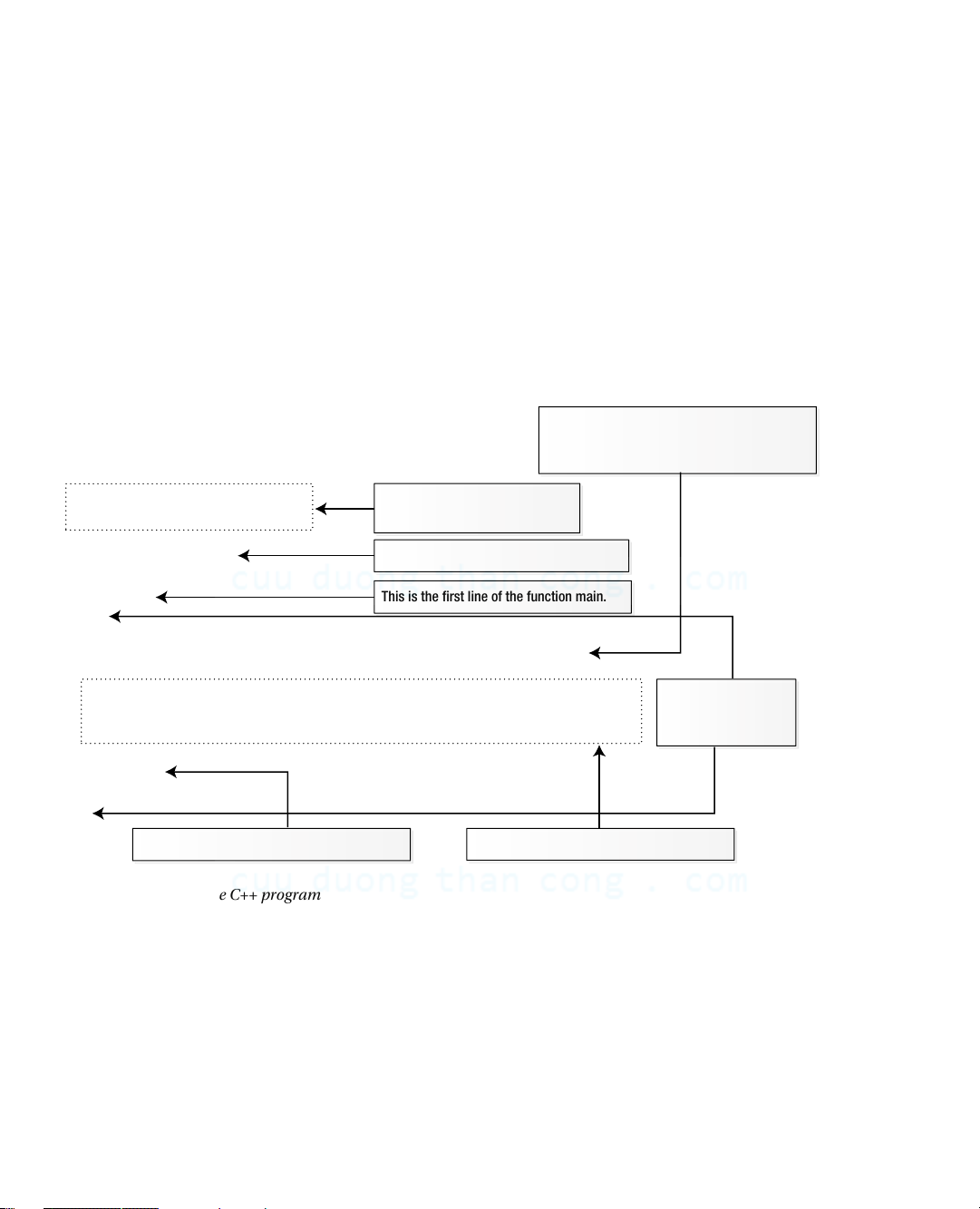
complete, fully working, C++ program shown in Figure 1-1, which explains what the various bits of it are. I’ll use
the example as a base for discussing some more general aspects of C++. This is a statement.
Statements end with a semicolon.
There is also a comment on this line. // Ex1_01.cpp These two lines are comments. // A complete C++ program Comments begin with // #include
This line adds input/output capability. int main ( )
This is the first line of the function main. {
int answer {42}; // Defines answer with value 42
std::cout << "The answer to life, the universe, and everything is " All the code in a << answer function is enclosed << std::endl; between braces. return 0; }
This statement ends the function main.
This statement is spread over three lines.
Figure 1-1. A complete C++ program Comments and Whitespace
The first two lines in Figure 1-1 are comments. You add comments that document your program code to make it easier
for someone else to understand how it works. The compiler ignores everything that follows two successive forward
slashes on a line so this kind of comment can follow code on a line. The first line is a comment that indicates the name
of the file containing this code. This file is in the code download for the book. I’ll identify the file for each working
example in the same way. The file extension, .cpp, indicates that this is a C++ source file. Other extensions such as .cc
are also used to identify a C++ source file. All the executable code for a program will be in one or more source files. 2 CuuDuongThanCong.com www.allitebooks.com Chapter 1 ■ BasiC ideas
There’s another form of comment that you can use when you need to spread a comment over several lines. For example: /* This comment is over two lines. */
Everything between /* and */ will be ignored by the compiler. You can embellish this sort of comment to make it stand out. For example: /************************ * This comment is * * over two lines. * ************************/
Whitespace is any sequence of spaces, tabs, newlines, form feed characters, and comments. Whitespace
is generally ignored by the compiler, except when it is necessary for syntactic reasons to distinguish one element from another.
Preprocessing Directives and Header Files
The third line in Figure 1-1 is a preprocessing directive. Preprocessing directives cause the source code to be modified
in some way before it is compiled to executable form. This preprocessing directive adds the contents of the standard
library header file with the name iostream to this source file, Ex1_01.cpp. The header file contents are inserted in
place of the #include directive.
Header files, which are sometimes referred to just as headers, contain definitions to be used in a source file.
iostream contains definitions that are needed to perform input from the keyboard and text output to the screen using
Standard Library routines. In particular, it defines std::cout and std::endl among many other things. You’ll be
including the contents of one or more standard library header files into every program and you’ll also be creating and
using your own header files that contain definitions that you construct later in the book. If the preprocessing directive
to include the iostream header was omitted from Ex1_01.cpp, the source file wouldn’t compile because the compiler
would not know what std::cout or std::endl are. The contents of header files are included into a source file before it is compiled. T
■ ip Note that there are no spaces between the angle brackets and the standard header file name. With some compilers,
spaces are significant between the angle brackets, < and >; if you insert spaces here, the program may not compile. Functions
Every C++ program consists of at least one and usually many more functions. A function is a named block of code
that carries out a well-defined operation such as “read the input data” or “calculate the average value” or “output
the results”. You execute or call a function in a program using its name. All the executable code in a program appears
within functions. There must be one function with the name main, and execution always starts automatically with
this function. The main() function usually calls other functions, which in turn can call other functions, and so on.
Functions provide several important advantages:
• A program that is broken down into discrete functions is easier to develop and test.
• You can reuse a function in several different places in a program, which makes the program
smaller than if you coded the operation in each place that it is needed. 3 CuuDuongThanCong.com www.allitebooks.com Chapter 1 ■ BasiC ideas
• You can often reuse a function in many different programs, thus saving time and effort.
• Large programs are typically developed by a team of programmers. Each team member is
responsible for programming a set of functions that are a well-defined subset of the whole
program. Without a functional structure, this would be impractical.
The program in Figure 1-1 consists of just the function main(). The first line of the function is: int main()
This is called the function header, which identifies the function. Here, int is a type name that defines the type of
value that the main() function returns when it finishes execution - an integer. In general, the parentheses following
a name in a function definition enclose the specification for information to be passed to the function when you call
it. There’s nothing between the parentheses in this instance but there could be. You’ll learn how you specify the
type of information to be passed to a function when it is executed in Chapter 5. I’ll always put parentheses after a
function name in the text to distinguish it from other things that are code. The executable code for a function is always
enclosed between braces and the opening brace follows the function header. Statements
A statement is a basic unit in a C++ program. A statement always ends with a semicolon and it’s the semicolon that
marks the end of a statement, not the end of the line. A statement defines something, such as a computation, or an
action that is to be performed. Everything a program does is specified by statements. Statements are executed in
sequence until there is a statement that causes the sequence to be altered. You’ll learn about statements that can
change the execution sequence in Chapter 4. There are three statements in main() in Figure 1-1. The first defines a
variable, which is a named bit of memory for storing data of some kind. In this case the variable has the name answer and can store integer values:
int answer {42}; // Defines answer with the value 42
The type, int, appears first, preceding the name. This specifies the kind of data that can be stored - integers.
Note the space between int and answer. One or more whitespace characters is essential here to separate the type
name from the variable name; without the space the compiler would see the name intanswer, which it would not
understand. An initial value for answer appears between the braces following the variable name so it starts out storing 42.
There’s a space between answer and {42} but it’s not essential. A brace cannot be part of a name so the compiler
can distinguish the name from the initial value specification in any event. However, you should use whitespace in a
consistent fashion to make your code more readable. There’s a somewhat superfluous comment at the end of the first
statement explaining what I just described but it does demonstrate that you can add a comments to a statement. The
whitespace preceding the // is also not mandatory but it is desirable.
You can enclose several statements between a pair of curly braces, { }, in which case they’re referred to as a
statement block. The body of a function is an example of a block, as you saw in Figure 1-1 where the statements in
main() function appear between curly braces. A statement block is also referred to as a compound statement because
in most circumstances it can be considered as a single statement, as you’ll see when we look at decision-making
capabilities in Chapter 4. Wherever you can put a single statement, you can equally well put a block of statements
between braces. As a consequence, blocks can be placed inside other blocks—this concept is called nesting. Blocks
can be nested, one within another, to any depth. 4 CuuDuongThanCong.com www.allitebooks.com Chapter 1 ■ BasiC ideas Data Input and Output
Input and output are performed using streams in C++. To output something, you write it to an output stream, and
to input data you read it from an input stream. A stream is an abstract representation of a source of data, or a data
sink. When your program executes, each stream is tied to a specific device that is the source of data in the case of
an input stream and the destination for data in the case of an output stream. The advantage of having an abstract
representation of a source or sink for data is that the programming is then the same regardless of the device the stream
represents. You can read a disk file in essentially the same way as you read from the keyboard. The standard output
and input streams in C++ are called cout and cin respectively and by default they correspond to your computer’s
screen and keyboard. You’ll be reading input from cin in Chapter 2.
The next statement in main() in Figure 1-1 outputs text to the screen:
std::cout << "The answer to life, the universe, and everything is " << answer << std::endl;
The statement is spread over three lines, just to show that it’s possible. The names cout and endl are defined in
the iostream header file. I’ll explain about the std:: prefix a little later in this chapter. << is the insertion operator
that transfers data to a stream. In Chapter 2 you’ll meet the extraction operator, >>, that reads data from a stream.
Whatever appears to the right of each << is transferred to cout. Writing endl to std::cout causes a new line to be
written to the stream and the output buffer to be flushed. Flushing the output buffer ensures that the output appears
immediately. The statement will produce the output:
The answer to life, the universe, and everything is 42
You can add comments to each line of a statement. For example:
std::cout << "The answer to life, the universe, and everything is " // This statement << answer // occupies
<< std::endl; // three lines
You don’t have to align the double slashes but it’s common to do so because it looks tidier and makes the code easier to read. return Statements
The last statement in main() is a return statement. A return statement ends a function and returns control to
where the function was called. In this case it ends the function and returns control to the operating system. A return
statement may or may not return a value. This particular return statement returns 0 to the operating system. Returning
0 to the operating system indicates that the program ended normally. You can return non-zero values such as 1, 2, etc.
to indicate different abnormal end conditions. The return statement in Ex1_01.cpp is optional, so you could omit it.
This is because if execution runs past the last statement in main(), it is equivalent to executing return 0. Namespaces
A large project will involve several programmers working concurrently. This potentially creates a problem with names.
The same name might be used by different programmers for different things, which could at least cause some confusion
and may cause things to go wrong. The Standard Library defines a lot of names, more than you can possibly remember.
Accidental use of Standard Library names could also cause problems. Namespaces are designed to overcome this difficulty. 5 CuuDuongThanCong.com Chapter 1 ■ BasiC ideas
A namespace is a sort of family name that prefixes all the names declared within the namespace. The names in
the standard library are all defined within a namespace that has the name std. cout and endl are names from the
standard library so the full names are std::cout and std::endl. Those two colons together, ::, have a very fancy
title: the scope resolution operator. I’ll have more to say about it later. Here, it serves to separate the namespace name,
std, from the names in the Standard Library such as cout and endl. Almost all names from the Standard Library are prefixed with std.
The code for a namespace looks like this: namespace ih_space {
// All names declared in here need to be prefixed
// with ih_space when they are reference from outside.
// For example, a min() function defined in here
// would be referred to outside this namespace as ih_space::min() }
Everything between the braces is within the ih_space namespace.
■ Caution the main() function must not be defined within a namespace. things that are not defined in a namespace
exist in the global namespace, which has no name. Names and Keywords
Ex1_01.cpp contains a definition for a variable with the name answer and it uses the names cout and endl that are
defined in the iostream Standard Library header. Lots of things need names in a program and there are precise rules for defining names:
• A name can be any sequence of upper or lowercase letters A to Z or a to z, the digits 0 to 9 and the underscore character, _.
• A name must begin with either a letter or an underscore. • Names are case sensitive.
Although it’s legal, it’s better not to choose names that begin with an underscore; they may clash with names
from the C++ Standard Library because it defines names in this way extensively. The C++ standard allows names to be
of any length, but typically a particular compiler will impose some sort of limit. However, this is normally sufficiently
large that it doesn’t represent a serious constraint. Most of the time you won’t need to use names of more than 12 to 15 characters. Here are some valid C++ names:
toe_count shoeSize Box democrat Democrat number1 x2 y2 pValue out_of_range
Uppercase and lowercase are differentiated so democrat is not the same name as Democrat. You can see a couple
of examples of conventions for writing names that consists of two or more words; you can capitalize the second and
subsequent words or just separate them with underscores.
Keywords are reserved words that have a specific meaning in C++ so you must not use them for other purposes.
class, double, throw, and catch are examples of keywords. 6 CuuDuongThanCong.com Chapter 1 ■ BasiC ideas Classes and Objects
A class is a block of code that defines a data type. A class has a name that is the name for the type. An item of data of
a class type is referred to as an object. You use the class type name when you create variables that can store objects of
your data type. Being able to defined you own data types enables you to specify a solution to a problem in terms of
the problem. If you were writing a program processing information about students for example, you could define a
Student type. Your Student type could incorporate all the characteristic of a student - such as age, gender, or school
record - that was required by the program. Templates
You sometimes need several similar classes or functions in a program where the code only differs in the kind of data
that is processed. A template is a recipe that you create to be used by the compiler to generate code automatically for a
class or function customized for particular type or types. The compiler uses a class template to generate one or more of
a family of classes. It uses a function template to generate functions. Each template has a name that you use when you
want the compiler to create an instance of it. The Standard Library uses templates extensively. Program Files
C++ code is stored in two kinds of files. Source files contain functions and thus all the executable code in a program.
The names of source files usually have the extension .cpp, although other extensions such as .cc are also used.
Header files contain definitions for things such as classes and templates that are used by the executable code in
a .cpp file. The names of header files usually have the extension .h although other extensions such as .hpp are also
used. Of course, a real-world program will typically include other kinds of files that contain stuff that has nothing to
do with C++, such as resources that define the appearance of a graphical user interface (GUI) for example. Standard Libraries
If you had to create everything from scratch every time you wrote a program, it would be tedious indeed. The same
functionality is required in many programs—reading data from the keyboard for example, or calculating a square root,
or sorting data records into a particular sequence. C++ comes with a large amount of prewritten code that provides
facilities such as these, so you don’t have to write the code yourself. All this standard code is defined in the Standard
Library. There is a subset of the standard library that is called the Standard Template Library (STL). The STL contains
a large number of class templates for creating types for organizing and managing data. It also contains many function
templates for operations such as sorting and searching collections of data and for numerical processing. You’ll learn
about a few features of the STL in this book but a complete discussion of it requires a whole book in its own right.
Beginning STL is a follow-on to this book that does exactly that. Code Presentation Style
The way in which you arrange your code can have a significant effect on how easy it is to understand. There are two
basic aspects to this. First, you can use tabs and/or spaces to indent program statements in a manner that provides
visual cues to their logic, and you can arrange matching braces that define program blocks in a consistent way so that
the relationships between the blocks are apparent. Second, you can spread a single statement over two or more lines
when that will improve the readability of your program. A particular convention for arranging matching braces and
indenting statements is a presentation style. 7 CuuDuongThanCong.com Chapter 1 ■ BasiC ideas
There are many different presentation styles for code. The following table shows three of many possible options
for how a code sample could be arranged: Style 1 Style 2 Style 3 namespace mine namespace mine{ namespace mine{ {
bool has_factor(int x, int y) bool has_factor(int x, int y) {
bool has_factor(int x, int y) { int f{ hcf(x, y) }; { int f{ hcf(x, y) }; if (f > 1){ int f{ hcf(x, y) }; if (f > 1) { return true; if (f > 1) return true; } { } else{ return true; else { return false; } return false; } else } } { } } return false; } } } }
I will use Style 1 for examples in the book. Creating an Executable
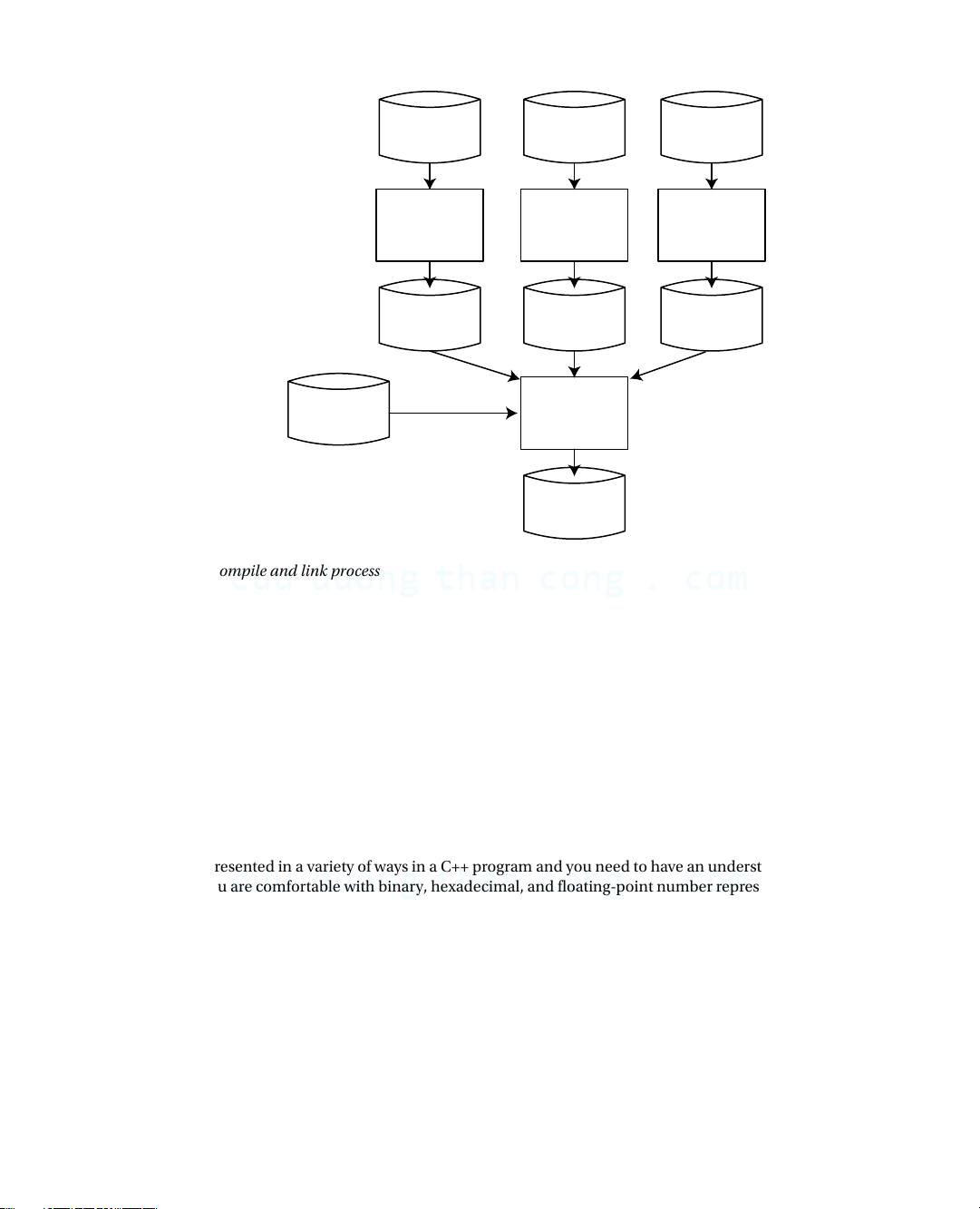
Creating an executable module from your C++ source code is basically a two-step process. In the first step, your
compiler processes each .cpp file to produce an object file that contains the machine code equivalent of the source file.
In the second step, the linker combines the object files for a program into a file containing the complete executable
program. Within this process, the linker will integrate any Standard Library functions that you use.
Figure 1-2 shows three source files being compiled to produce three corresponding object files. The filename
extension that’s used to identify object files varies between different machine environments, so it isn’t shown here.
The source files that make up your program may be compiled independently in separate compiler runs, or most
compilers will allow you to compile them in a single run. Either way, the compiler treats each source file as a separate
entity and produces one object file for each .cpp file. The link step then combines the object files for a program, along
with any library functions that are necessary, into a single executable file. 8 CuuDuongThanCong.com Chapter 1 ■ BasiC ideas The contents of header Source File Source File Source File files will be included (.cpp file) (.cpp file) (.cpp file) before compilation. Each .cpp file will result in Compiler Compiler Compiler one object file. Object File Object File Object File (machine code) (machine code) (machine code) The linker will combine all the object files plus Library Linker necessary library routines to produce the executable file. Executable (.exe file)
Figure 1-2. The compile and link process
In practice, compilation is an iterative process, because you’re almost certain to have made typographical and
other errors in the code. Once you’ve eliminated these from each source file, you can progress to the link step, where
you may find that yet more errors surface. Even when the link step produces an executable module, your program may
still contain logical errors; that is, it doesn’t produce the results you expect. To fix these, you must go back and modify
the source code and try to compile it once more. You continue this process until your program works as you think
it should. As soon as you declare to the world at large that your program works, someone will discover a number of
obvious errors that you should have found. It hasn’t been proven beyond doubt so far as I know, but it’s widely believed
that any program larger that a given size will always contain errors. It’s best not to dwell on this thought when flying. Representing Numbers
Numbers are represented in a variety of ways in a C++ program and you need to have an understanding of the
possibilities. If you are comfortable with binary, hexadecimal, and floating-point number representation you can safely skip this bit. Binary Numbers
First, let’s consider exactly what a common, everyday decimal number, such as 324 or 911 means. Obviously, what you mean
is “three hundred and twenty-four” or “nine hundred and eleven.” These are shorthand ways of saying “three hundreds” plus
“two tens” plus “four”, and “nine hundred” plus “one ten” plus “one”. Putting this more precisely, you really mean:
324 is 3 × 10² + 2 × 101 + 4 × 100, which is 3 × 10 × 10 + 2 × 10 + 4
911 is 9 × 10² + 1 × 101 + 1 × 100, which is 9 × 10 × 10 + 1 × 10 + 1 9 CuuDuongThanCong.com Chapter 1 ■ BasiC ideas
This is called decimal notation because it’s built around powers of 10. We also say that we are representing numbers
to base 10 here because each digit position is a power of 10. Representing numbers in this way is very handy for beings
with ten fingers and/or ten toes, or indeed ten of any kind of appendage that can be used for counting. Your PC is rather
less handy, being built mainly of switches that are either on or off. Your PC is OK for counting in twos, but not spectacular
at counting in tens. I’m sure you’re aware that this is why your computer represents numbers using base 2, rather than
base 10. Representing numbers using base 2 is called the binary system of counting. Numbers in base 10 have digits that
can be from 0 to 9. In general, for numbers in an arbitrary base, n, the digit in each position in a number can be from 0 to
n-1. Thus binary digits can only be 0 or 1. A binary number such as 1101 breaks down like this:
1 × 23 + 1 × 22 + 0 × 21 + 1 × 20, which is 1 × 2 × 2 × 2 + 1 × 2 × 2 + 0 × 2 + 1
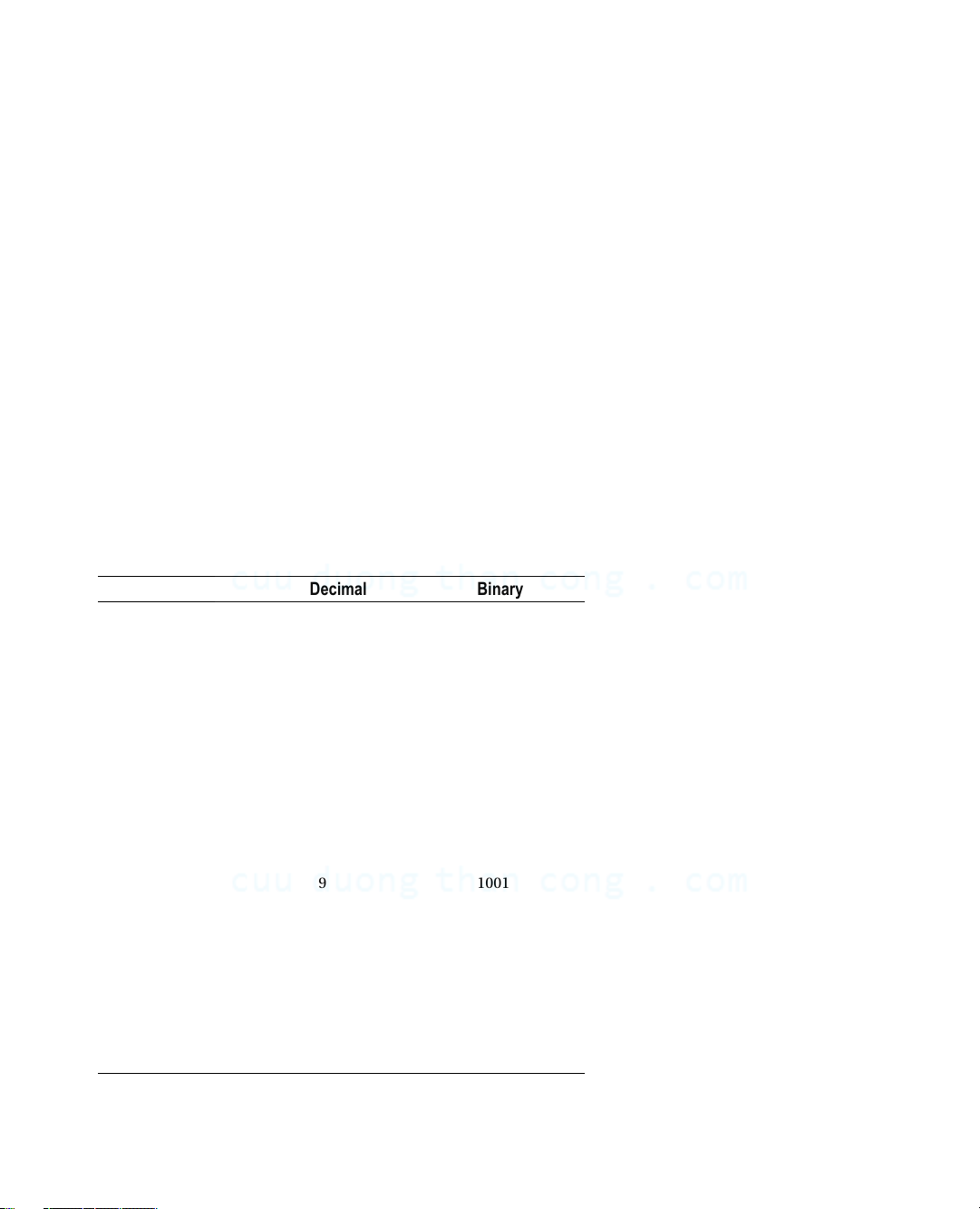
This is 13 in the decimal system. In Table 1-1, you can see the decimal equivalents of all the numbers you can
represent using eight binary digits, more commonly known as bits.
Table 1-1. Decimal Equivalents of 8-bit Binary Values Binary Decimal Binary Decimal 0000 0000 0 1000 0000 128 0000 0001 1 1000 0001 129 0000 0010 2 1000 0010 130 . . . . . . . . . . . . 0001 0000 16 1001 0000 144 0001 0001 17 1001 0001 145 . . . . . . . . . . . . 0111 1100 124 1111 1100 252 0111 1101 125 1111 1101 253 0111 1110 126 1111 1110 254 0111 1111 127 1111 1111 255
Using the first seven bits, you can represent positive numbers from 0 to 127, which is a total of 128 different
numbers. Using all eight bits, you get 256 or 28 numbers. In general, if you have n bits available, you can represent 2n
integers, with positive values from 0 to 2n–1.
Adding binary numbers inside your computer is a piece of cake, because the “carry” from adding corresponding
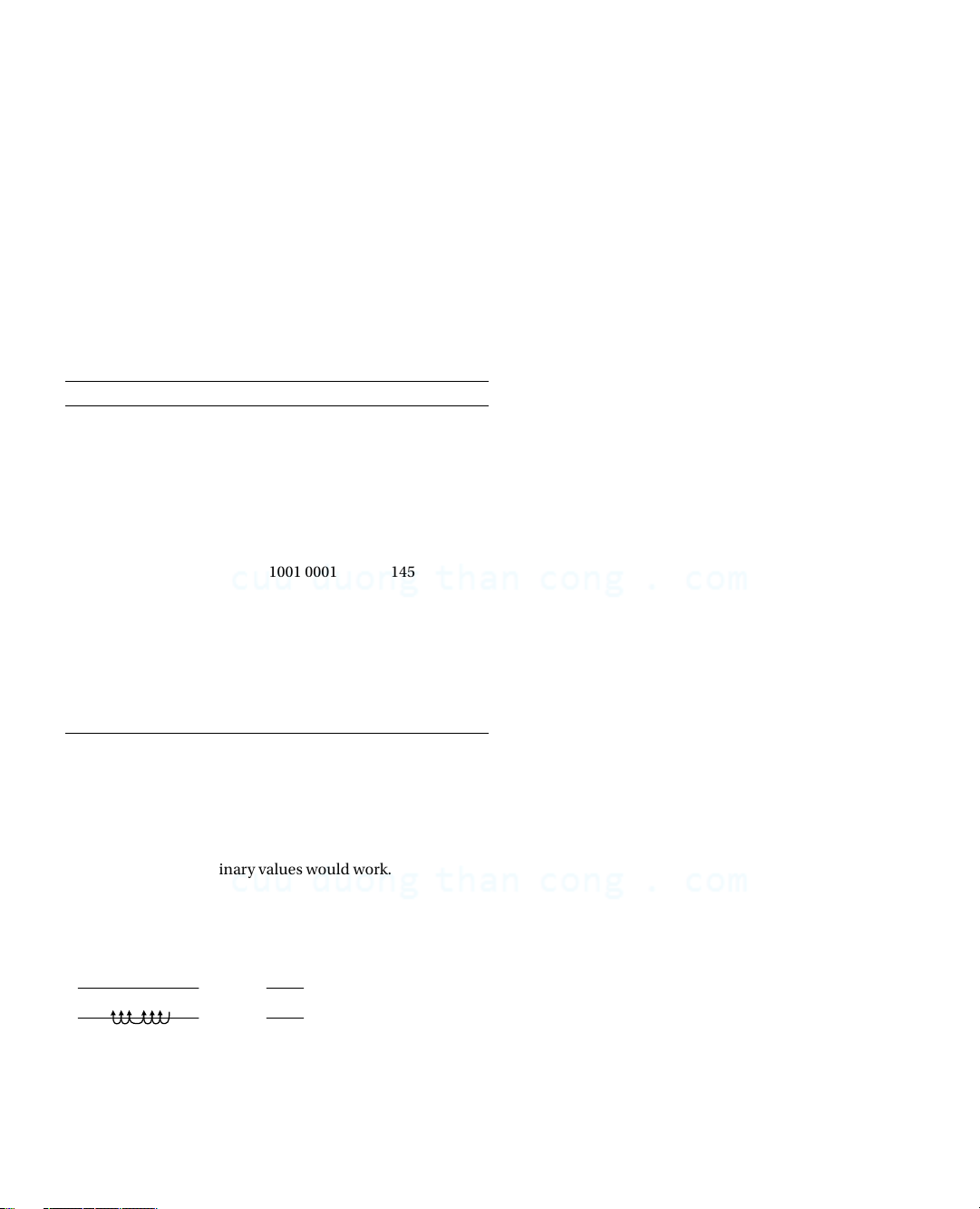
digits can only be 0 or 1. This means that very simple circuitry can handle the process. Figure 1-3 shows how the
addition of two 8-bit binary values would work. Binary Decimal 0001 1101 29 + 0010 1011 + 43 0100 1000 72 carries
Figure 1-3. Adding binary values 10 CuuDuongThanCong.com Chapter 1 ■ BasiC ideas
The addition operation adds corresponding bits in the operands, starting with the rightmost. Figure 1-3 shows
that there is a “carry” of 1 to the next bit position for each of the first six bit positions. This is because each digit can
only 0 or 1. When you add 1+1 the result cannot be stored in the current bit position and is equivalent to adding 1 in
the next bit position to the left. Hexadecimal Numbers
When you are dealing with larger binary numbers, a small problem arises with writing them. Look at this: 1111 0101 1011 1001 1110 0001
Binary notation here starts to be more than a little cumbersome for practical use, particularly when you consider
that this in decimal is only 16,103,905—a miserable eight decimal digits. You can sit more angels on the head of a pin
than that! Clearly you need a more economical way of writing this, but decimal isn’t always appropriate. You might
want to specify that the tenth and twenty-fourth bits from the right in a number are 1, for example. To figure out the
decimal integer for this is hard work, and there’s a good chance you’ll get it wrong anyway. An easier solution is to use
hexadecimal notation, in which the numbers are represented using base 16.
Arithmetic to base 16 is a much more convenient option, and it fits rather well with binary. Each hexadecimal
digit can have values from 0 to 15 and the digits from 10 to 15 are represented by the letters A to F (or a to f), as shown
in Table 1-2. Values from 0 to 15 happen to correspond nicely with the range of values that four binary digits can represent.
Table 1-2. Hexadecimal Digits and their Values in Decimal and Binary Hexadecimal Decimal Binary 0 0 0000 1 1 0001 2 2 0010 3 3 0011 4 4 0100 5 5 0101 6 6 0110 7 7 0111 8 8 1000 9 9 1001 A or a 10 1010 B or b 11 1011 C or c 12 1100 D or d 13 1101 E or e 14 1110 F or f 15 1111 11 CuuDuongThanCong.com Chapter 1 ■ BasiC ideas
Because a hexadecimal digit corresponds to four binary digits, you can represent any binary number in
hexadecimal simply by taking groups of four binary digits starting from the right, and writing the equivalent
hexadecimal digit for each group. Look at the following binary number: 1111 0101 1011 1001 1110 0001
Taking each group of four bits and replacing it with the corresponding hexadecimal digit from the table produces: F 5 B 9 E 1
You have six hexadecimal digits corresponding to the six groups of four binary digits. Just to prove that it all works
out with no cheating, you can convert this number directly from hexadecimal to decimal by again using the analogy
with the meaning of a decimal number. The value of this hexadecimal number therefore works out as follows.
F5B9E1 as a decimal value is given by
15 × 165 + 5 × 164 + 11 × 163 + 9 × 162 + 14 × 161 + 1 × 160 This turns out to be
15,728,640 + 327,680 + 45,056 + 2,304 + 224 + 1
Thankfully, this adds up to the same number you got when converting the equivalent binary number to a decimal
value: 16,103,905. In C++, hexadecimal values are written with 0x or 0X as a prefix, so in code the value would be
written as 0xF5B9E1. Obviously, this means that 99 is not at all the same as 0x99.
The other very handy coincidence with hexadecimal numbers is that modern computers store integers in words
that are an even number of bytes, typically 2, 4, 8, or 16 bytes. A byte is 8 bits, which is exactly two hexadecimal digits
so any binary integer word in memory always corresponds to an exact number of hexadecimal digits. Negative Binary Numbers
There’s another aspect to binary arithmetic that you need to understand: negative numbers. So far, I’ve assumed that
everything is positive—the optimist’s view—and so the glass is still half full. But you can’t avoid the negative side of
life—the pessimist’s perspective—that the glass is already half empty. How is a negative number represented in a
computer? Well, you have only binary digits at your disposal, so the solution has to be to use at least one of those to
indicate whether the number is negative or positive.:
For numbers that can be negative (referred to as signed numbers), you must first decide on a fixed length (in other
words, the number of binary digits) and then designate the leftmost binary digit as a sign bit. You have to fix the length
to avoid any confusion about which bit is the sign bit.
As you know, your computer’s memory consists of 8-bit bytes, so binary numbers are going to be stored in some
multiple (usually a power of 2) of 8 bits. Thus, you can have numbers with 8 bits, 16 bits, 32 bits, or whatever. As long
as you know what the length is in each case, you can find the sign bit—it’s just the leftmost bit. If the sign bit is 0, the
number is positive, and if it’s 1, the number is negative.
This seems to solve the problem. Each number consists of a sign bit that is 0 for positive values and 1 for negative
values, plus a given number of other bits that specify the absolute value of the number, the value without the sign in
other words. Changing +6 to –6 then just involves flipping the sign bit from 0 to 1. Unfortunately, this representation
carries a lot of overhead in terms of the complexity of the circuits that are needed to perform arithmetic. For this
reason, most computers take a different approach. You can get an idea of how this approach works by considering how
the computer would handle arithmetic with positive and negative values so that operations are as simple as possible.
Ideally, when two integers are added, you don’t want the computer to be messing about, checking whether
either or both of the numbers are negative. You just want to use simple “add” circuitry regardless of the signs of the
operands. The add operation will combine corresponding binary digits to produce the appropriate bit as a result, with
a carry to the next digit along where this is necessary. If you add –8 in binary to +12, you would really like to get the
answer +4 using the same circuitry that would apply if you were adding +3 and +8. 12 CuuDuongThanCong.com Chapter 1 ■ BasiC ideas
If you try this with the simplistic solution, which is just to set the sign bit of the positive value to 1 to make it
negative, and then perform the arithmetic with conventional carries, it doesn’t quite work: 12 in binary is 0000 1100
–8 in binary (you suppose) is 1000 1000
If you now add these together, you get 1001 0100
This seems to be –20, which isn’t what you wanted at all. It’s definitely not +4, which you know is 0000 0100. “Ah,”
I hear you say, “you can’t treat a sign just like another digit.” But that is just what you do want to do.
You can see how the computer would like to represent –8 by subtracting +12 from +4: +4 in binary is 0000 0100 +12 in binary is 0000 1100 Subtracting 12 from 4 you get 1111 1000
For each digit after the fourth from the right, you had to “borrow” 1 to do the subtraction, just as you would when
performing decimal arithmetic. This result is supposed to be –8, and even though it doesn’t look like it, that’s exactly
what it is. Just try adding it to +12 or +15 in binary, and you’ll see that it works! Of course, if you want to produce –8 you can always subtract +8 from 0.
What exactly did you get when you subtracted 12 from 4 or +8 from 0? What you have here is called the 2’s
complement representation of a negative binary number. You can produce the negative of any positive binary number
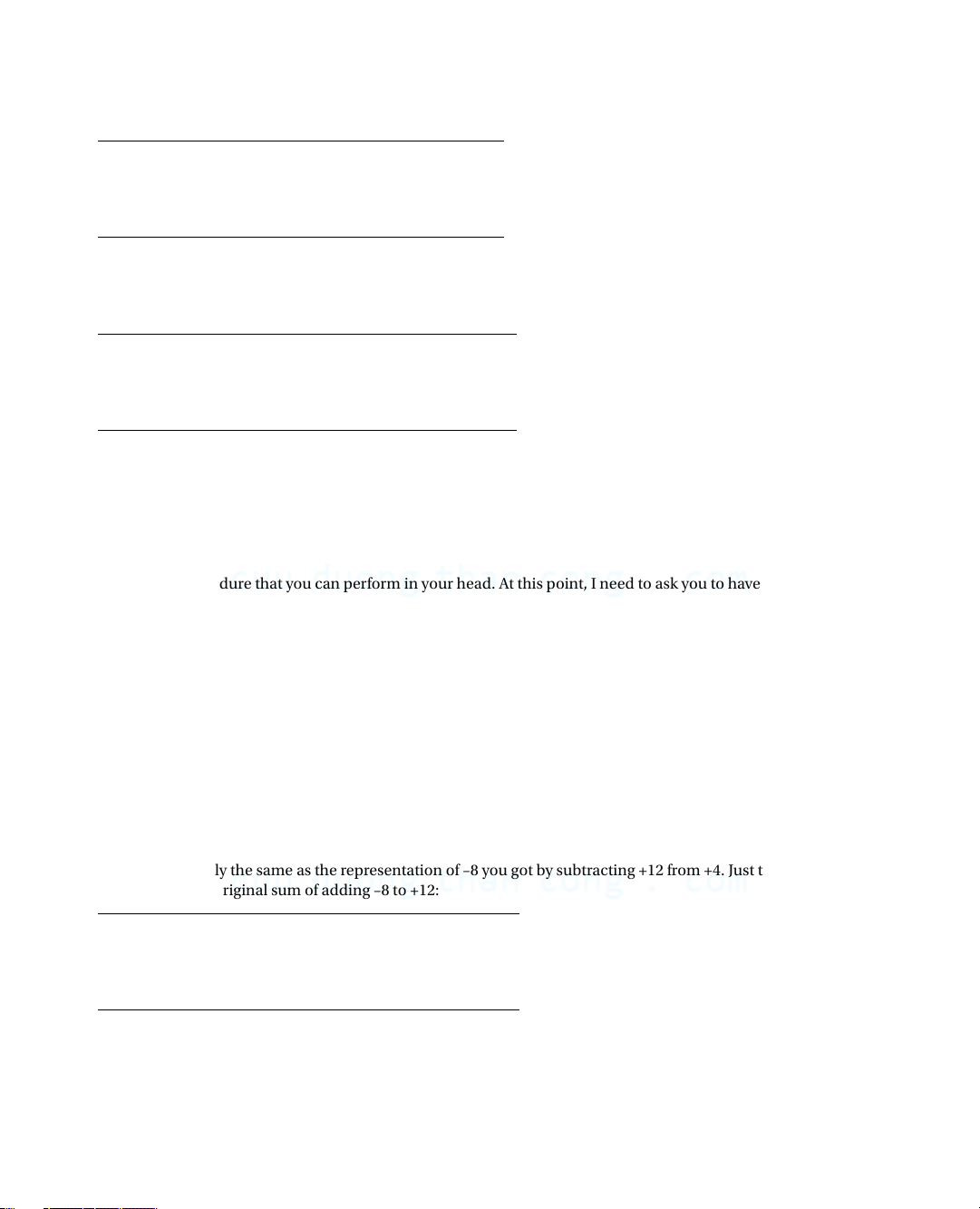
by a simple procedure that you can perform in your head. At this point, I need to ask you to have a little faith because
I’ll avoid getting into explanations of why it works. I’ll show you how you can create the 2’s complement form of a
negative number from a positive value, and you can prove to yourself that it does work. Let’s return to the previous
example, in which you need the 2’s complement representation of –8. You start with +8 in binary: 0000 1000
You “flip” each binary digit, changing 0s to 1s and vice versa: 1111 0111
This is called the 1’s complement form. If you add 1 to this, you’ll get the 2’s complement form: 1111 1000
This is exactly the same as the representation of –8 you got by subtracting +12 from +4. Just to make absolutely
sure, let’s try the original sum of adding –8 to +12: +12 in binary is 0000 1100 Your version of –8 is 1111 1000
If you add these together, you get 0000 0100
The answer is 4—magic. It works! The “carry” propagates through all the leftmost 1s, setting them back to 0. One fell
off the end, but you shouldn’t worry about that—it’s probably compensating for the one you borrowed from the end in the
subtraction you did to get –8. In fact, what’s happening is that you’re implicitly assuming that the sign bit, 1 or 0, repeats
forever to the left. Try a few examples of your own; you’ll find it always works, automatically. The great thing about the 2’s
complement representation of negative numbers is that it makes arithmetic very easy (and fast) for your computer. 13 CuuDuongThanCong.com Chapter 1 ■ BasiC ideas Octal Values
Octal integers :are numbers expressed with base 8. Digits in an octal value can only be from 0 to 7. Octal is used
rarely these days. It was useful in the days when computer memory was measured in terms of 36-bit words because
you could specify a 36-bit binary value by 12 octal digits. Those days are long gone so why am I introducing it? The
potential confusion it can cause is the answer. You can still write octal constants in C++. Octal values are written
with a leading zero, so while 76 is a decimal value, 076 is an octal value that corresponds to 64 in decimal. So, here’s a golden rule:
■ Note Never write decimal integers with a leading zero. You’ll get either a value different from what you intended, or
an error message from the compiler.
Big-Endian and Little-Endian Systems
Integers are stored in memory as binary values in a contiguous sequence of bytes, commonly groups of 2, 4, 8, or
16 bytes. The question of the sequence in which the bytes appear can be very important—it’s one of those things that
doesn’t matter until it matters, and then it really matters.
Let’s consider the decimal value 262,657 stored as a 4-byte binary value. I chose this value because in binary it happens to be
0000 0000 0000 0100 0000 0010 0000 0001
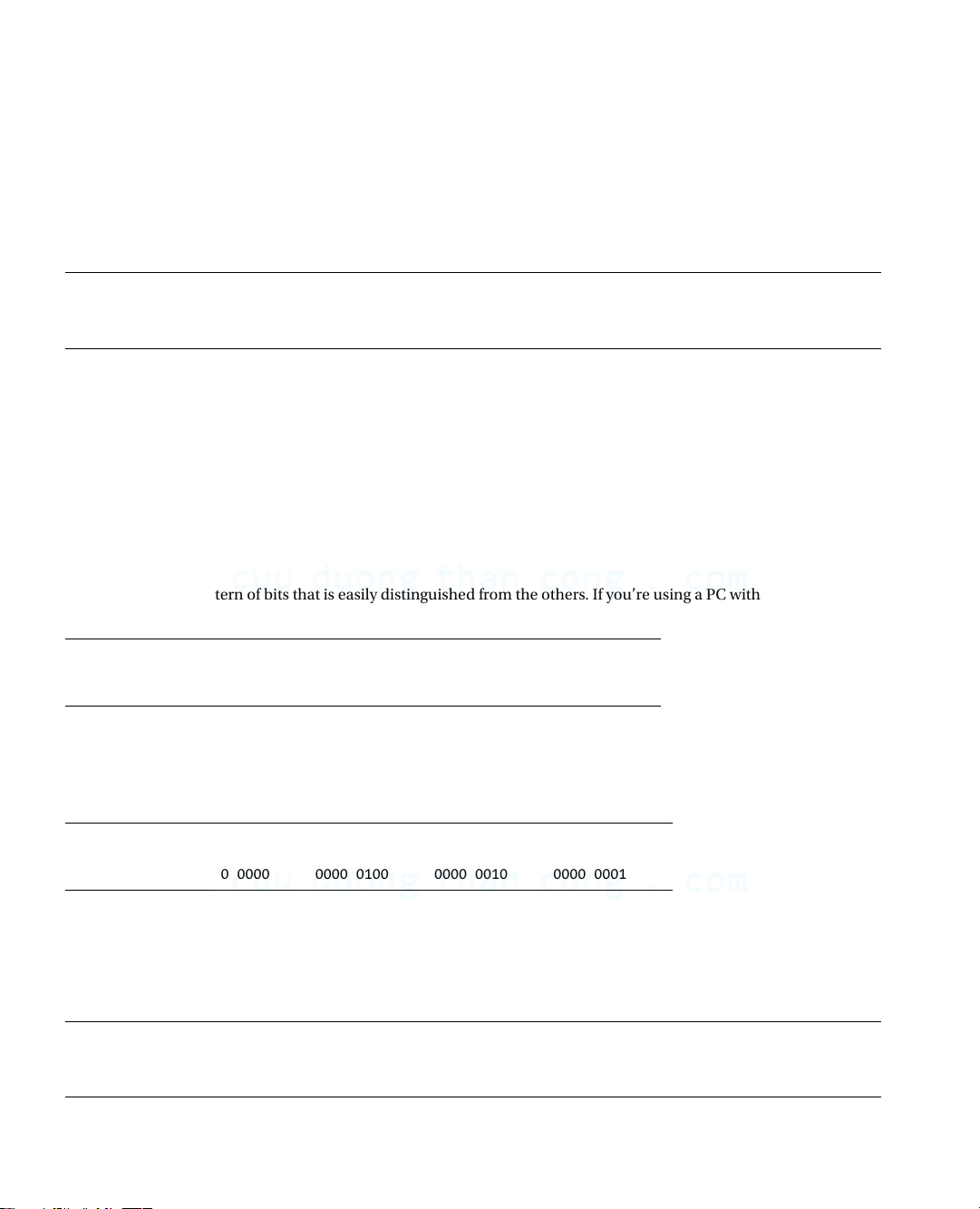
so each byte has a pattern of bits that is easily distinguished from the others. If you’re using a PC with an Intel
processor, the number will be stored as follows: Byte address: 00 01 02 03 Data bits: 0000 0001 0000 0010 0000 0100 0000 0000
As you can see, the most significant eight bits of the value—the one that’s all 0s—are stored in the byte with the
highest address (last, in other words), and the least significant eight bits are stored in the byte with the lowest address,
which is the leftmost byte. This arrangement is described as little-endian.
If you’re using a machine based on a Motorola processor, the same data is likely to be arranged in memory like this: Byte address: 00 01 02 03 Data bits: 0000 0000 0000 0100 0000 0010 0000 0001
Now the bytes are in reverse sequence with the most significant eight bits stored in the leftmost byte, which is the
one with the lowest address. This arrangement is described as big-endian. Some recent processors such as SPARC and
Power-PC processors are bi-endian, which means that the byte order for data is switchable between big-endian and little endian.
■ Note regardless of whether the byte order is big-endian or little-endian, the bits within each byte are arranged with
the most significant bit on the left and the least significant bit on the right. 14 CuuDuongThanCong.com www.allitebooks.com
Tài liệu liên quan:
-
Sách Starting out with C++ - From Control Structures through Objects môn Lập trình C++ | Trường Đại học Kinh Doanh và Công Nghệ Hà Nội
28 14 -

Giáo Trình Lập Trình C++ | Trường Đại học Kinh Doanh và Công Nghệ Hà Nội
36 18 -
Bài tập thực hành môn Lập trình C++ | Trường Đại học Kinh Doanh và Công Nghệ Hà Nội
45 23 -
Bài tập trắc nghiệm môn Lập trình với C++ | Trường Đại học Kinh Doanh và Công Nghệ Hà Nội
85 43