Thực Hành 2 Định Tuyến Động | Môn Thiết kế và triển khai mạng IP - Đại học Bách Khoa Hà Nội
Thực Hành 2 Định Tuyến Động Môn Thiết kế và triển khai mạng IP. Tài liệu được sưu tầm gồm 46 trang, giúp bạn ôn tập tốt hơn. Mời các bạn đón xem.
Môn: Thiết kế và triển khai mạng IP 25 tài liệu
Trường: Đại học Bách Khoa Hà Nội 5.6 K tài liệu
Tác giả:












Preview text:
lOMoAR cPSD| 61601435
Thiết kế & triển khai mạng IP
Bài thực hành số 2: Dynamic routing (version 4.0) Update:
• Version 4.0 (5/2024): bổ sung khai báo policy cho BGP (cần thiết cho frr version 7.5 trở lên)
Mục lục 1 Chuẩn bị môi trường ........................................................... Lỗi! Thẻ đánh dấu không được xác định.
2 Cài đặt routing protocol cho router.......................................................................................................................... 2
3 Thiết lập kết nối liên mạng bằng RIP ........................................................................................................................ 2
3.1 Cấu hình các router với RIP ............................................................................................................................... 3
3.2 Kiểm tra các tình huống đáp ứng topo mạng của RIP ....................................................................................... 5
3.3 Theo dõi các gói tin RIP ..................................................................................................................................... 7
3.4 Phân tích xử lý Route Poisoning ........................................................................................................................ 8
4 Kết nối liên mạng với OSPF Single Area .................................................................................................................... 8
4.1 Cấu hình các router OSPF trong một area ......................................................................................................... 9
4.2 Kiểm tra tính đáp ứng link state của OSPF ...................................................................................................... 10
4.3 Xem các dữ liệu OSPF ...................................................................................................................................... 14
5 Thiết lập kết nối liên mạng bằng OSPF Multi Area ................................................................................................. 15
5.1 Cấu hình OSPF multi area ................................................................................................................................ 15
5.2 Vai trò của Summary-LSA và tối ưu loan báo LSA giữa các phân vùng ............................................................ 16
5.3 Cập nhật đường đi ngắn nhất giữa các phân vùng ......................................................................................... 19
5.4 External-LSA .................................................................................................................................................... 20
5.5 Tối ưu OSPF Multi Area với Stub Area ............................................................................................................. 23
5.6 Tối ưu OSPF Multi Area với Totally Stub Area ................................................................................................. 26
6 Kết nối liên vùng (inter-AS) với BGP ....................................................................................................................... 28
6.1 BGP export định tuyến nội bộ ra bên ngoài AS ............................................................................................... 28
6.2 BGP routing policies ........................................................................................................................................ 31
6.3 Tích hợp BGP với IGP ....................................................................................................................................... 35
6.4 eBGP và iBGP ................................................................................................................................................... 40
1 Chuẩn bị môi trường Tham khảo:
• https://users.soict.hust.edu.vn/hoangph/textbook/ch01-4.html
• https://users.soict.hust.edu.vn/hoangph/textbook/ch01-5.html lOMoAR cPSD| 61601435
2 Cài đặt routing protocol cho router
1. Theo bài thực hành số 1, đảm bảo các router đã được cấu hình địa chỉ IP và kết nối được Internet (kiểm tra ping 8.8.8.8)
2. Thiết lập DNS server là 8.8.8.8 và kiểm tra ping google.com:
~$ sudo nano /etc/resolv.conf nameserver 8.8.8.8 ~$ ping google.com
PING google.com (142.251.220.110) 56(84) bytes of data.
64 bytes from hkg07s52-in-f14.1e100.net (142.251.220.110): icmp_seq=3 ttl=113 time=316 ms
64 bytes from hkg07s52-in-f14.1e100.net (142.251.220.110): icmp_seq=4 ttl=113 time=358 ms 3.
Cài đặt gói phần mềm frr để hỗ trợ dynamic routing cho các router
hp@R1:~$ sudo apt-get install frr Reading package lists... Done Building dependency tree
Reading state information... Done
The following additional packages will be installed:
frr-pythontools libc-ares2 libyang0.16 Suggested packages: frr- doc
The following NEW packages will be installed:
frr frr-pythontools libc-ares2 libyang0.16
0 upgraded, 4 newly installed, 0 to remove and 47 not upgraded.
Need to get 2,796 kB of archives.
After this operation, 10.4 MB of additional disk space will be used.
Do you want to continue? [Y/n] y
Get:1 http://vn.archive.ubuntu.com/ubuntu focal-updates/main amd64 libc-ares2 amd64 1.15.0-1ubuntu0.4 [36.9 kB]
Get:2 http://vn.archive.ubuntu.com/ubuntu focal/universe amd64 libyang0.16 amd64 0.16.105-3build1 [391 kB]
Get:3 http://vn.archive.ubuntu.com/ubuntu focal-updates/universe amd64 frr amd64 7.2.1-1ubuntu0.2 [2,350 kB]
86% [3 frr 2,226 kB/2,350 kB 95%] . . . 4.
Kiểm tra service frr đã chạy bằng lệnh systemctl:
hp@R1:~$ sudo systemctl status frr ● frr.service - FRRouting
Loaded: loaded (/lib/systemd/system/frr.service; enabled; vendor preset: enabled)
Active: active (running) since Mon 2023-10-23 06:51:30 UTC; 2s ago
Docs: https://frrouting.readthedocs.io/en/latest/setup.html
Process: 2451 ExecStart=/usr/lib/frr/frrinit.sh start (code=exited, status=0/SUCCESS) Tasks: 8 (limit: 2257) Memory: 8.7M
CGroup: /system.slice/frr.service
├─2476 /usr/lib/frr/watchfrr -d zebra ripd staticd
├─2492 /usr/lib/frr/zebra -d -A 127.0.0.1 -s 90000000
├─2497 /usr/lib/frr/ripd -d -A 127.0.0.1
└─2501 /usr/lib/frr/staticd -d -A 127.0.0.1
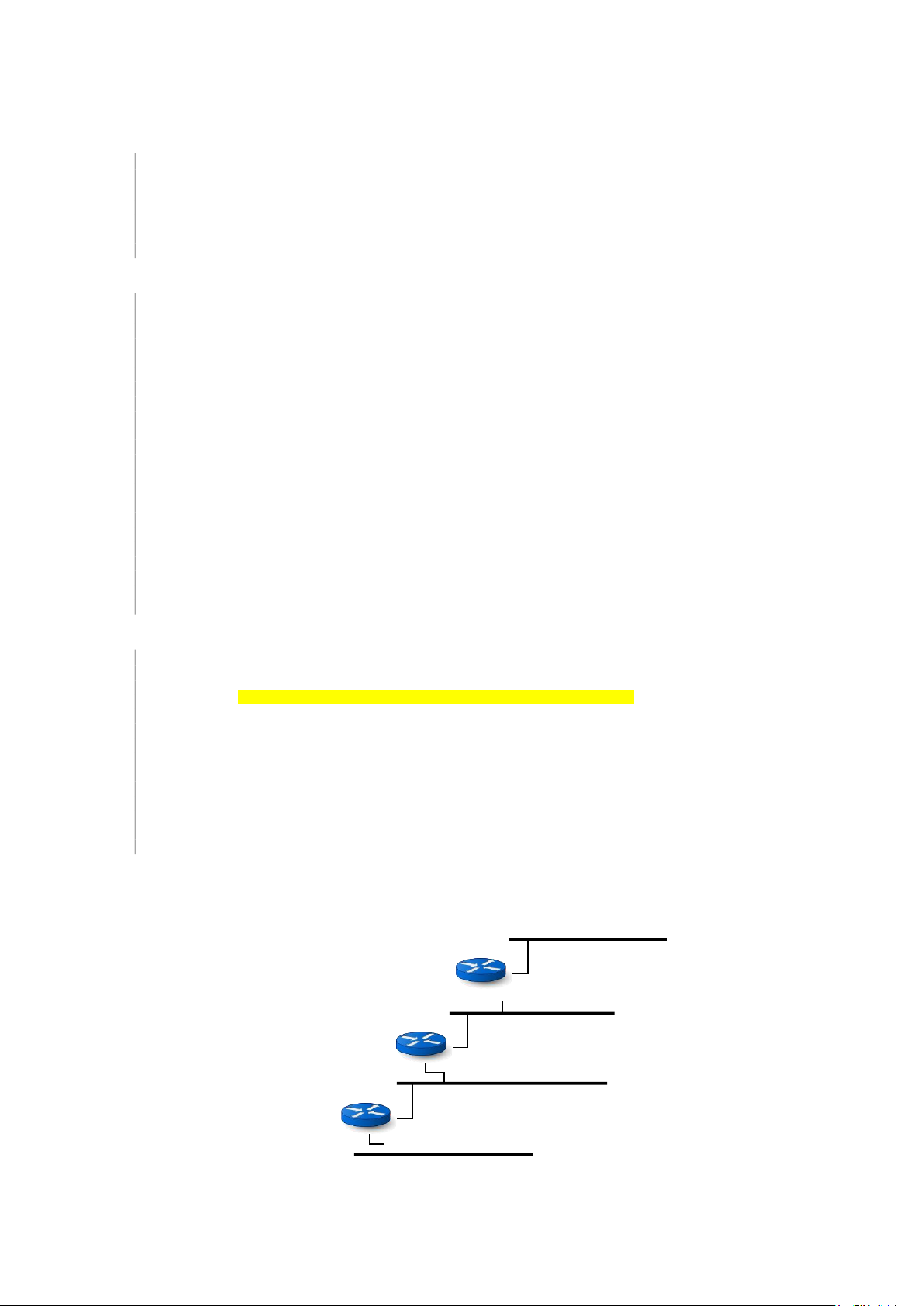
3 Thiết lập kết nối liên mạng bằng RIP Sơ đồ mạng: R1 192.168.0.0/24 192.168.0.1 192.168.1.1 R2 192.168.1.0/24 192.168.1.2 192.168.2.1 R3 192.168.2.0/24 192.168.2.2 192.168.3.1 192.168.3.0/24 lOMoAR cPSD| 61601435
3.1 Cấu hình các router với RIP
1. Sửa cấu hình frr để bật daemon RIP trên các router, khởi động lại service frr và kiểm tra frr service RIP đã chạy:
hp@R1:~$ sudo nano /etc/frr/daemons . . . ripd=yes . . . vtysh_enable=yes . . .
hp@R1:~$ sudo systemctl restart frr hp@R1:~$ sudo systemctl status frr ● frr.service - FRRouting
Loaded: loaded (/lib/systemd/system/frr.service; enabled; vendor preset: enabled)
Active: active (running) since Thu 2023-10-26 11:57:27 UTC; 4s ago
Docs: https://frrouting.readthedocs.io/en/latest/setup.html
Process: 1251 ExecStart=/usr/lib/frr/frrinit.sh start (code=exited, status=0/SUCCESS) Main PID: 1262 (watchfrr) Status: "FRR Operational" Tasks: 9 (limit: 1013) Memory: 11.3M CPU: 372ms
CGroup: /system.slice/frr.service
├─1262 /usr/lib/frr/watchfrr -d -F traditional zebra ripd staticd
├─1278 /usr/lib/frr/zebra -d -F traditional -A 127.0.0.1 -s 90000000
├─1283 /usr/lib/frr/ripd -d -F traditional -A 127.0.0.1
└─1286 /usr/lib/frr/staticd -d -F traditional -A 127.0.0.1
2. Cấu hình RIP trên các router R1 bằng vtysh để kích hoạt RIP trên các network: hp@R1:~$ sudo vtysh
Hello, this is FRRouting (version 8.1).
Copyright 1996-2005 Kunihiro Ishiguro, et al. R1# configure R1(config)# router rip
R1(config-router)# network 192.168.0.0/24
R1(config-router)# network 192.168.1.0/24 R1(config-router)# exit R1(config)# exit R1# write
Note: this version of vtysh never writes vtysh.conf Building Configuration...
Integrated configuration saved to /etc/frr/frr.conf [OK] R1# show running-config Building configuration... Current configuration: ! frr version 8.1 frr defaults traditional hostname R1 log syslog informational no ip forwarding no ipv6 forwarding
service integrated-vtysh-config ! router rip lOMoAR cPSD| 61601435 network 192.168.0.0/24 network 192.168.1.0/24 exit ! end
3. Cấu hình RIP trên các router R2 bằng vtysh để kích hoạt RIP trên các network (làm tươn tự với router R3): hp@R2:~$ sudo vtysh
Hello, this is FRRouting (version 8.1).
Copyright 1996-2005 Kunihiro Ishiguro, et al. R2# configure R2(config)# router rip
R2(config-router)# network 192.168.1.0/24
R2(config-router)# network 192.168.2.0/24 R2(config-router)# exit R2(config)# exit R2# write
Note: this version of vtysh never writes vtysh.conf Building Configuration...
Integrated configuration saved to /etc/frr/frr.conf [OK] R2# show running-config Building configuration... Current configuration: ! frr version 8.1 frr defaults traditional hostname R2 log syslog informational no ip forwarding no ipv6 forwarding service integrated-vtysh- config ! router rip network 192.168.1.0/24 network 192.168.2.0/24 exit ! end 4.
Xem thông tin Data Plane của RIP trên R1, thấy “đường đi” đến các prefix (network) ở xa đã được
tự động cập nhật vào bảng routing: R1# show ip route
Codes: K - kernel route, C - connected, S - static, R - RIP,
O - OSPF, I - IS-IS, B - BGP, E - EIGRP, N - NHRP,
T - Table, v - VNC, V - VNC-Direct, A - Babel, F - PBR, f - OpenFabric,
> - selected route, * - FIB route, q - queued, r - rejected, b - backup
t - trapped, o - offload failure
K>* 0.0.0.0/0 [0/100] via 10.0.2.2, enp0s3, src 10.0.2.15, 00:14:36 C>*
10.0.2.0/24 [0/100] is directly connected, enp0s3, 00:14:36
K>* 10.0.2.2/32 [0/100] is directly connected, enp0s3, 00:14:36
C>* 192.168.0.0/24 is directly connected, enp0s8, 00:14:36
C>* 192.168.1.0/24 is directly connected, enp0s9, 00:14:36
R>* 192.168.2.0/24 [120/2] via 192.168.1.2, enp0s9, weight 1
R>* 192.168.3.0/24 [120/2] via 192.168.1.2, enp0s9, weight 1 5.
Có thể thoát khỏi vtysh và xem Data Plan (routing table) với lệnh route -n: hp@R1:~$ route -n Kernel IP routing table
Destination Gateway Genmask Flags Metric Ref Use Iface
0.0.0.0 10.0.2.2 0.0.0.0 UG 100 0 0 enp0s3
10.0.2.0 0.0.0.0 255.255.255.0 U 100 0 0 enp0s3
10.0.2.2 0.0.0.0 255.255.255.255 UH 100 0 0 enp0s3
192.168.0.0 0.0.0.0 255.255.255.0 U 0 0 0 enp0s8
192.168.1.0 0.0.0.0 255.255.255.0 U 0 0 0 enp0s9
192.168.2.0 192.168.1.2 255.255.255.0 UG 20 0 0 enp0s9
192.168.3.0 192.168.1.2 255.255.255.0 UG 30 0 0 enp0s9 6.
Chú ý kiểm tra và bật trạng thái routing cho các router bằng cấu hình ip_forward
> sysctl net.ipv4.ip_forward net.ipv4.ip_forward = 1
7. Kiểm tra kết nối liên mạng bằng ping lOMoAR cPSD| 61601435
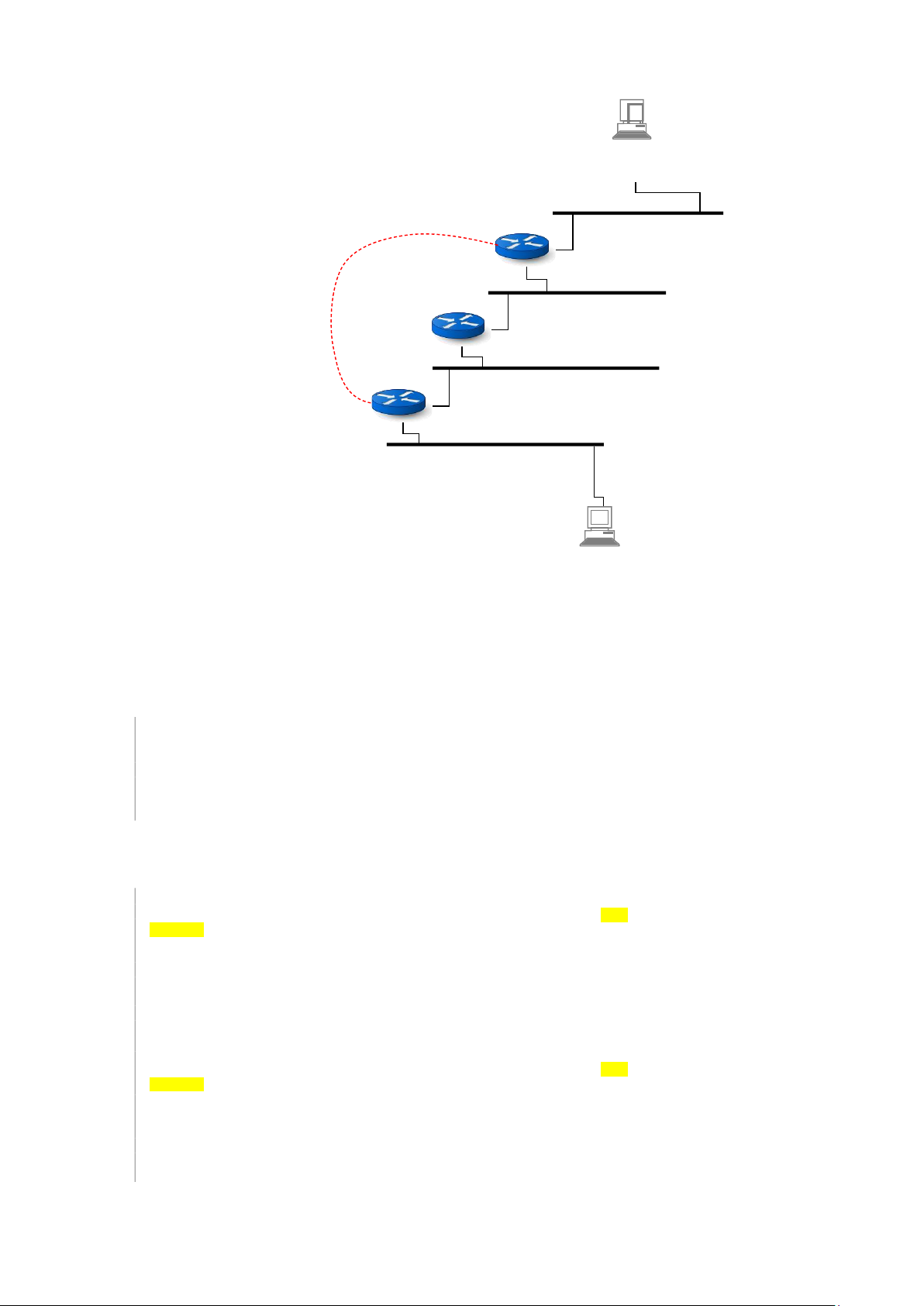
3.2 Kiểm tra các tình huống đáp ứng topo mạng của RIP
Thêm kết nối trực tiếp giữa R1 và R3 và kiểm tra các thay đổi routing của RIP. A IP = 192.168.0.20 GW = 192.168.0.1 R1 10.0.0.1 192.168.0.0/24 192.168.0.1 192.168.1.1 10.0.0.0/24 R2 192.168.1.0/24 192.168.1.2 192.168.2.1 R3 192.168.2.0/24 10.0.0.2 192.168.2.2 192.168.3.1 192.168.3.0/24 X IP = 192.168.3.21 GW = 192.168.3.1
1. Thêm các trạm làm việc A trong mạng 192.168.0.0/24 và X trong mạng 192.168.3.0/24. Cấu hình IP &
gateway. Kiểm tra kết nối từ các trạm này đến gateway tương ứng bằng ping và kiểm tra giữa A & X bằng ping.
2. Kiểm tra đường đi gói tin từ A sang X:
hp@pcA:~$ tracepath -n 192.168.3.21 1?: [LOCALHOST] pmtu 1500 1: 192.168.0.1 2: 192.168.1.2 3: 192.168.2.2 4: 192.168.3.21
3. Bổ sung Netwrok Adapter cho router R1 & R3, đặt kết nối là Internal Network “serial” 4. Thiếp lập địa chỉ
IP mạng 10.0.0.0/24 cho các kết nối của router R1 & R3 hp@R1:~$ ifconfig enp0s3
enp0s3: flags=4163 mtu 1500 inet
10.0.0.1 netmask 255.255.255.0 broadcast 10.0.0.255 inet6
fe80::a00:27ff:fe3e:101 prefixlen 64 scopeid 0x20
ether 08:00:27:3e:01:01 txqueuelen 1000 (Ethernet)
RX packets 48 bytes 16010 (16.0 KB)
RX errors 0 dropped 0 overruns 0 frame 0
TX packets 96 bytes 12589 (12.5 KB)
TX errors 0 dropped 0 overruns 0 carrier 0 collisions 0 hp@R3:~$ ifconfig enp0s3
enp0s3: flags=4163 mtu 1500 inet
10.0.0.2 netmask 255.255.255.0 broadcast 10.0.0.255 inet6
fe80::a00:27ff:fe75:301 prefixlen 64 scopeid 0x20
ether 08:00:27:75:03:01 txqueuelen 1000 (Ethernet)
RX packets 19 bytes 5216 (5.2 KB)
RX errors 0 dropped 0 overruns 0 frame 0
TX packets 64 bytes 8521 (8.5 KB)
TX errors 0 dropped 0 overruns 0 carrier 0 collisions 0
5. Kiểm tra kết nối trực tiếp giữa R1 và R3 qua đường serial vừa kết nối bằng lệnh ping -I enp0s3 (tham số -I
để chỉ định kết nối mạng cho ping sử dụng): lOMoAR cPSD| 61601435
hp@R1:~$ ping 10.0.0.2 -I enp0s3
PING 10.0.0.2 (10.0.0.2) from 10.0.0.1 enp0s3: 56(84) bytes of data.
64 bytes from 10.0.0.2: icmp_seq=1 ttl=64 time=0.791 ms 64
bytes from 10.0.0.2: icmp_seq=2 ttl=64 time=1.01 ms
64 bytes from 10.0.0.2: icmp_seq=3 ttl=64 time=0.371 ms
6. Bổ sung mạng 10.0.0.0/24 vào danh sách các network được kích hoạt RIP trên 2 router R1 và R3: hp@R1:~$ sudo vtysh
Hello, this is FRRouting (version 8.1).
Copyright 1996-2005 Kunihiro Ishiguro, et al. R1# show running-config Building configuration... Current configuration:
! frr version 8.1 frr defaults traditional hostname R1 log syslog informational no ip forwarding no ipv6 forwarding
service integrated-vtysh-config ! router rip network 192.168.0.0/24 network 192.168.1.0/24 exit ! end R1# configure R1(config)# router rip
R1(config-router)# network 10.0.0.0/24 R1(config-router)# exit R1(config)# exit R1# show running-config Building configuration... Current configuration:
! frr version 8.1 frr defaults traditional hostname R1 log syslog informational no ip forwarding no ipv6 forwarding
service integrated-vtysh-config ! router rip network 192.168.0.0/24 network 192.168.1.0/24 network 10.0.0.0/24 exit ! end R1# write
Note: this version of vtysh never writes vtysh.conf Building Configuration...
Integrated configuration saved to /etc/frr/frr.conf [OK]
7. Kiểm tra bảng routing được cập nhật trên R1 và R3. Đường đi đến các mạng ở xa đã được tự động lựa chọn
chuyển sang đường đi ngắn hơn (qua mạng serial 10.0.0.0) hp@R1:~$ route -n Kernel IP routing table
Destination Gateway Genmask Flags Metric Ref Use Iface
10.0.0.0 0.0.0.0 255.255.255.0 U 0 0 0 enp0s3
192.168.0.0 0.0.0.0 255.255.255.0 U 0 0 0 enp0s8
192.168.1.0 0.0.0.0 255.255.255.0 U 0 0 0 enp0s9
192.168.2.0 192.168.1.2 255.255.255.0 UG 20 0 0 enp0s9
192.168.3.0 10.0.0.2 255.255.255.0 UG 20 0 0 enp0s3 hp@R3:~$ route -n Kernel IP routing table
Destination Gateway Genmask Flags Metric Ref Use Iface
10.0.0.0 0.0.0.0 255.255.255.0 U 0 0 0 enp0s3
192.168.0.0 10.0.0.1 255.255.255.0 UG 20 0 0 enp0s3
192.168.1.0 192.168.2.1 255.255.255.0 UG 20 0 0 enp0s8
192.168.2.0 0.0.0.0 255.255.255.0 U 0 0 0 enp0s8
192.168.3.0 0.0.0.0 255.255.255.0 U 0 0 0 enp0s9
8. Có thể kiểm tra đường đi từ A sang X để thấy mạng 10.0.0.0 được sử dụng khi chuyển tiếp các gói tin, thay vì đi qua R2 như cũ: lOMoAR cPSD| 61601435
hp@pcA:~$ tracepath -n 192.168.3.21 1?: [LOCALHOST] pmtu 1500 1: 192.168.0.1 2: 10.0.0.2 3: 192.168.3.21
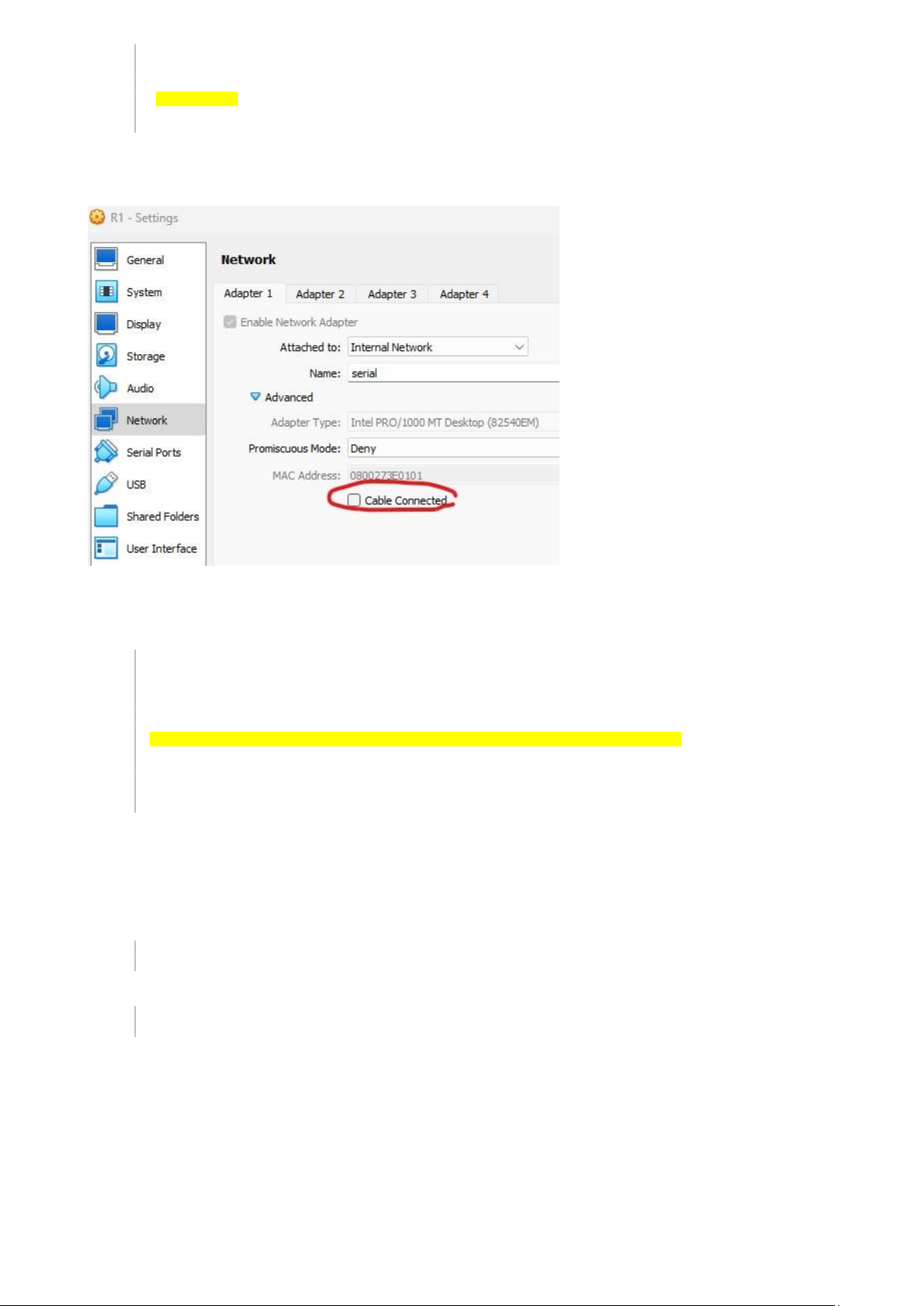
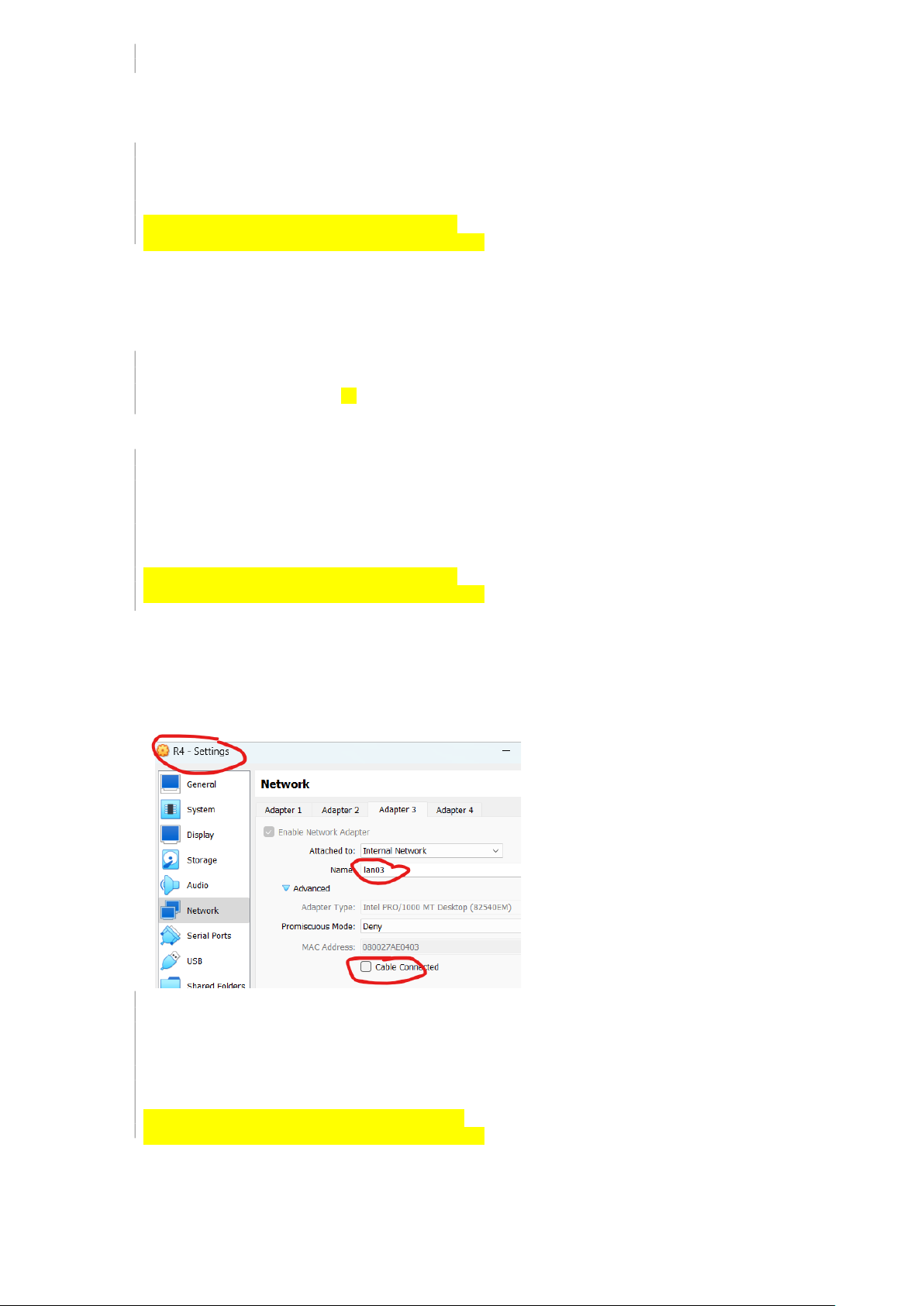
9. Ngắt kết nối serial giữa R1 và R3 bằng cách vào VirtualBox, mở network setting của R1 hoặc R3, chọn kết nối
serial và bỏ check “Cable Connected”
10. Đợi một khoảng thời gian để RIP cập nhật routing theo topo mạng mới, hoặc restart service frr. Kiểm tra
bảng routing thấy đường đi qua 10.0.0.0 đã được thay đổi lại thành đường đi qua R2:
hp@R3:~$ sudo systemctl restart frr hp@R3:~$ route -n Kernel IP routing table
Destination Gateway Genmask Flags Metric Ref Use Iface
10.0.0.0 0.0.0.0 255.255.255.0 U 0 0 0 enp0s3
192.168.0.0 192.168.2.1 255.255.255.0 UG 20 0 0 enp0s8
192.168.1.0 192.168.2.1 255.255.255.0 UG 20 0 0 enp0s8
192.168.2.0 0.0.0.0 255.255.255.0 U 0 0 0 enp0s8
192.168.3.0 0.0.0.0 255.255.255.0 U 0 0 0 enp0s9
192.168.56.0 0.0.0.0 255.255.255.0 U 0 0 0 enp0s10 11.
Có thể kiểm tra đường đi từ A đến X bằng lệnh tracepath để thấy gói tin IP đã được chuyển tiếp qua R2.
3.3 Theo dõi các gói tin RIP
1. Bắt gói tin tại kết nối giữa R1 với R2 bằng tcpdump:
hp@R1:~$ sudo tcpdump -i enp0s9 -nv 2.
Tại router láng giềng (R2), khởi động lại service frr để 2 router bắt đầu phiên liên lạc RIP:
hp@R2:~$ sudo systemctl restart frr lOMoAR cPSD| 61601435
3. Quan sát tcpdump bên R1, xuất hiện các gói tin trao đổi giữa R1 và R2 trong phiên liên lạc RIP (UDP cổng
520 trên địa chỉ unicast của router láng giềng hoặc địa chỉ multicast 224.0.0.9 – tất cả các router RIP đang
hoạt động trên local link):
hp@R1:~$ sudo tcpdump -i enp0s9 -nv
09:48:49.233605 IP (tos 0xc0, ttl 1, id 47469, offset 0, flags [DF], proto UDP (17), length 52)
192.168.1.1.520 > 224.0.0.9.520:
RIPv2, Response, length: 24, routes: 1 or less
AFI IPv4, 192.168.0.0/24, tag 0x0000, metric: 1, next-hop: self
09:48:49.704845 IP (tos 0xc0, ttl 1, id 43802, offset 0, flags [DF], proto UDP (17), length 52)
192.168.1.2.520 > 224.0.0.9.520:
RIPv2, Request, length: 24, routes: 1 or less
AFI 0, 0.0.0.0/0 , tag 0x0000, metric: 16, next-hop: self
09:48:49.704920 IP (tos 0xc0, ttl 64, id 21517, offset 0, flags [DF], proto UDP (17), length 52)
192.168.1.1.520 > 192.168.1.2.520:
RIPv2, Response, length: 24, routes: 1 or less
AFI IPv4, 192.168.0.0/24, tag 0x0000, metric: 1, next-hop: self
09:49:13.233946 IP (tos 0xc0, ttl 1, id 53260, offset 0, flags [DF], proto UDP (17), length 52)
192.168.1.1.520 > 224.0.0.9.520:
RIPv2, Response, length: 24, routes: 1 or less
AFI IPv4, 192.168.0.0/24, tag 0x0000, metric: 1, next-hop: self
09:49:42.236223 IP (tos 0xc0, ttl 1, id 58304, offset 0, flags [DF], proto UDP (17), length 52)
192.168.1.1.520 > 224.0.0.9.520:
RIPv2, Response, length: 24, routes: 1 or less
AFI IPv4, 192.168.0.0/24, tag 0x0000, metric: 1, next-hop: self
09:50:14.237431 IP (tos 0xc0, ttl 1, id 60611, offset 0, flags [DF], proto UDP (17), length 52)
192.168.1.1.520 > 224.0.0.9.520:
RIPv2, Response, length: 24, routes: 1 or less
AFI IPv4, 192.168.0.0/24, tag 0x0000, metric: 1, next-hop: self
09:50:37.239783 IP (tos 0xc0, ttl 1, id 60756, offset 0, flags [DF], proto UDP (17), length 52)
192.168.1.1.520 > 224.0.0.9.520:
RIPv2, Response, length: 24, routes: 1 or less
AFI IPv4, 192.168.0.0/24, tag 0x0000, metric: 1, next-hop: self
4. Trong các gói tin trao đổi giữa R1 và R2, một số gói tin IGMP phục vụ liên kết láng giềng (theo cơ chế multicast)
và một số gói tin RIP phục vụ trao đổi thông tin các RTE. Sinh viên cần tự phân tích các nội dung gói tin và
tham chiếu với các nội dung lý thuyết.
3.4 Phân tích xử lý Route Poisoning
1. Thiết lập topo mạng bao gồm có đường kết nối serial giữa R1 và R3, kiểm tra đường đi serial này được RIP
tính toán áp dụng cho đường đi giữa R1 và R3 (không đi qua R2): hp@R3:~$ route -n Kernel IP routing table
Destination Gateway Genmask Flags Metric Ref Use Iface
10.0.0.0 0.0.0.0 255.255.255.0 U 0 0 0 enp0s3
192.168.0.0 10.0.0.1 255.255.255.0 UG 20 0 0 enp0s3
192.168.1.0 192.168.2.1 255.255.255.0 UG 20 0 0 enp0s8
192.168.2.0 0.0.0.0 255.255.255.0 U 0 0 0 enp0s8
192.168.3.0 0.0.0.0 255.255.255.0 U 0 0 0 enp0s9 2.
Ngắt kết nối serial giữa R1 & R3 và theo dõi các gói tin RIP gửi từ R1 sang R2 thấy xuất hiện các gói
tin RIP chứa các RTE có metric 16 (tức là vô cùng):
hp@R2:~$ sudo tcpdump -i enp0s8 -nv
10:23:57.963533 IP (tos 0xc0, ttl 1, id 40915, offset 0, flags [DF], proto UDP (17), length 92)
192.168.1.1.520 > 224.0.0.9.520:
RIPv2, Response, length: 64, routes: 3 or less
AFI IPv4, 10.0.0.0/24, tag 0x0000, metric: 16 , next-hop: self
AFI IPv4, 192.168.2.0/24, tag 0x0000, metric: 16 , next-hop: self
AFI IPv4, 192.168.3.0/24, tag 0x0000, , next-metric: 16 ho p: self 3.
Sinh viên cần phân tích các giá trị trong các gói tin để giải thích cơ chế rout poisoning.
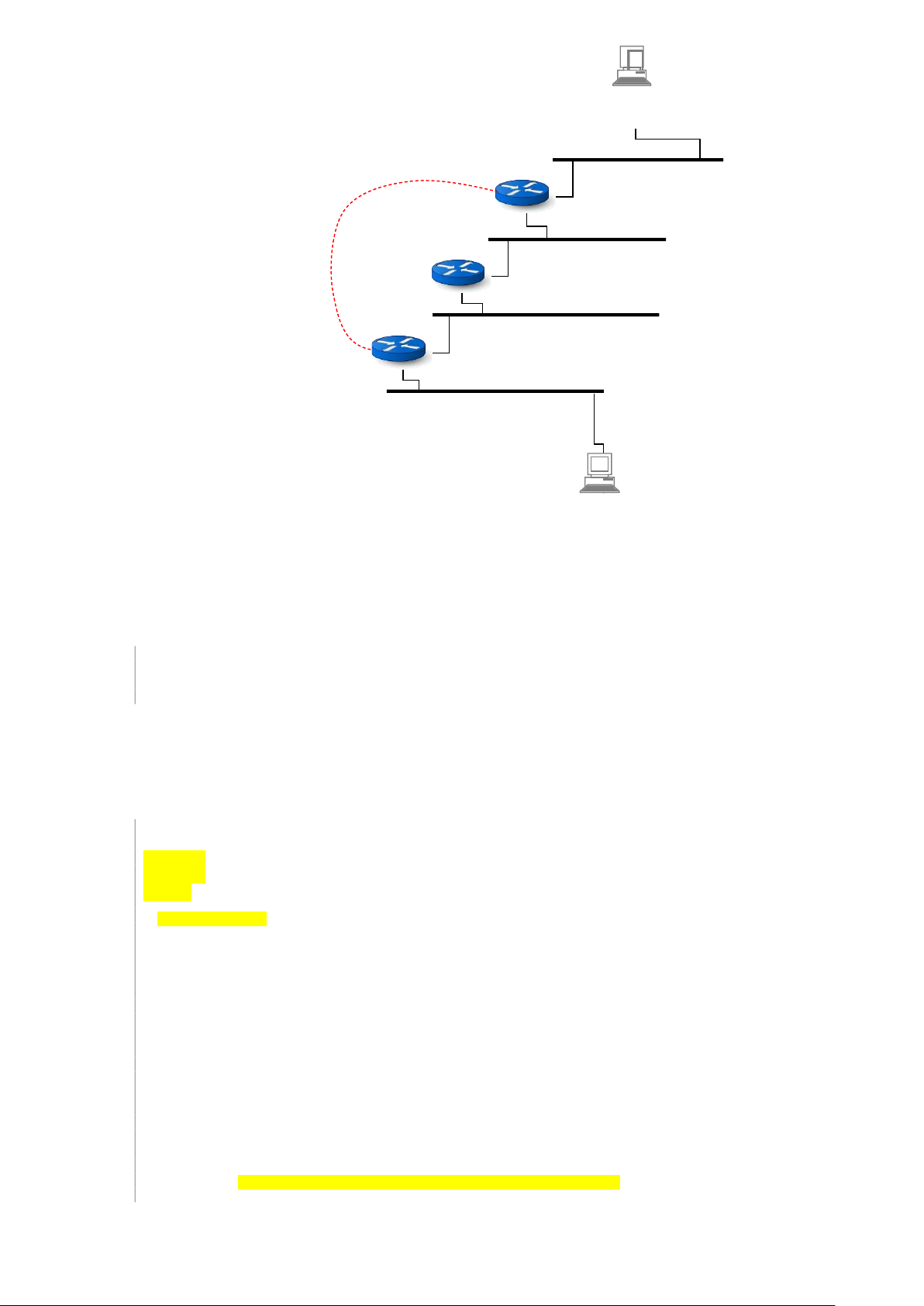
4 Kết nối liên mạng với OSPF Single Area
Tiếp tục sử dụng sơ đồ mạng như trong phần trên: lOMoAR cPSD| 61601435 A IP = 192.168.0.20 GW = 192.168.0.1 R1 10.0.0.1 192.168.0.0/24 192.168.0.1 192.168.1.1 10.0.0.0/24 R2 192.168.1.0/24 192.168.1.2 192.168.2.1 R3 192.168.2.0/24 10.0.0.2 192.168.2.2 192.168.3.1 192.168.3.0/24 X IP = 192.168.3.21 GW = 192.168.3.1
Chú ý phần này cần thao tác với các kết nối mạng của router nên thiết lập địa chỉ MAC theo qui tắc dễ nhớ:
Sửa địa chỉ MAC của các router theo qui tắc xx:xx:xx:xx:0x:0y trong đó x là mã số router, y là mã số kết nối mạng. Ví dụ:
R1.Network Adapter 1 xx:xx:xx:xx:01:01
R1.Network Adapter 2 xx:xx:xx:xx:01:02
R2.Network Adapter 1 xx:xx:xx:xx:02:01
R3.Network Adapter 2 xx:xx:xx:xx:03:02
4.1 Cấu hình các router OSPF trong một area
1. Sửa cấu hình frr để bật tắt daemon RIP và bật OSPF trên các router. Để tránh các thông số cấu hình bị lẫn lộn
giữa IPv4 và IPv6, tắt service ospfd6. Khởi động lại service frr và kiểm tra frr service OSPF đã chạy:
hp@R1:~$ sudo nano /etc/frr/daemons . . . ospfd=yes ospf6d=no ripd=no . . . vtysh_enable=yes . . .
hp@R1:~$ sudo systemctl restart frr hp@R1:~$ sudo systemctl status frr ● frr.service - FRRouting
Loaded: loaded (/lib/systemd/system/frr.service; enabled; vendor preset: enabled)
Active: active (running) since Thu 2023-11-02 11:15:47 UTC; 4s ago
Docs: https://frrouting.readthedocs.io/en/latest/setup.html
Process: 1032 ExecStart=/usr/lib/frr/frrinit.sh start (code=exited, status=0/SUCCESS) Main PID: 1042 (watchfrr) Status: "FRR Operational" Tasks: 9 (limit: 1013) Memory: 13.4M CPU: 381ms
CGroup: /system.slice/frr.service
├─1042 /usr/lib/frr/watchfrr -d -F traditional zebra ospfd staticd
├─1058 /usr/lib/frr/zebra -d -F traditional -A 127.0.0.1 -s 90000000
├─1063 /usr/lib/frr/ospfd -d -F traditional -A 127.0.0.1
└─1066 /usr/lib/frr/staticd -d -F traditional -A 127.0.0.1
2. Cấu hình service ospfd trên từng router, tất cả đều nằm trong area 1. Ví dụ trên R2: lOMoAR cPSD| 61601435 hp@R2:~$ sudo vtysh
Hello, this is FRRouting (version 8.1).
Copyright 1996-2005 Kunihiro Ishiguro, et al. R2# configure R2(config)# router ospf
R2(config-router)# ospf router-id 2.2.2.2
R2(config-router)# network 192.168.1.0/24 area 1
R2(config-router)# network 192.168.2.0/24 area 1 R2(config-router)# end R2# show running-config Building configuration... Current configuration: ! frr version 8.1 frr defaults traditional hostname R2 log stdout informational log syslog informational no ip forwarding no ipv6 forwarding service integrated-vtysh- config ! router ospf ospf router-id 2.2.2.2
network 192.168.1.0/24 area 1 network 192.168.2.0/24 area 1 exit ! end R2# write
Note: this version of vtysh never writes vtysh.conf Building Configuration...
Integrated configuration saved to /etc/frr/frr.conf [OK] 3.
Làm tương tự với các router R1 và R2. Xem bảng routing thấy các tuyến đường đã được tự động cập nhật: R3# show ip route
Codes: K - kernel route, C - connected, S - static, R - RIP,
O - OSPF, I - IS-IS, B - BGP, E - EIGRP, N - NHRP,
T - Table, v - VNC, V - VNC-Direct, A - Babel, F - PBR, f - OpenFabric,
> - selected route, * - FIB route, q - queued, r - rejected, b - backup
t - trapped, o - offload failure O
O>* 192.168.0.0/24 [110/300] via 192.168.2.1, enp0s8, weight 1, 00:05:24
O>* 192.168.1.0/24 [110/200] via 192.168.2.1, enp0s8, weight 1, 00:05:24
192.168.2.0/24 [110/100] is directly connected, enp0s8, weight 1, 00:05:34 C>*
192.168.2.0/24 is directly connected, enp0s8, 00:11:21
O 192.168.3.0/24 [110/100] is directly connected, enp0s9, weight 1, 00:05:32
C>* 192.168.3.0/24 is directly connected, enp0s9, 00:11:21 4.
Có thể thoát khỏi vtysh để xem bảng routing trong Data Plane: hp@R3:~$ route -n Kernel IP routing table
Destination Gateway Genmask Flags Metric Ref Use Iface
192.168.0.0 192.168.2.1 255.255.255.0 UG 20 0 0 enp0s8
192.168.1.0 192.168.2.1 255.255.255.0 UG 20 0 0 enp0s8
192.168.2.0 0.0.0.0 255.255.255.0 U 0 0 0 enp0s8
192.168.3.0 0.0.0.0 255.255.255.0 U 0 0 0 enp0s9
4.2 Kiểm tra tính đáp ứng link state của OSPF
1. Bổ sung kết nối đường serial giữa R1 với R3 và cấu hình địa chỉ IP 10.0.0.0/24: hp@R1:~$ ifconfig enp0s3
enp0s3: flags=4163 mtu 1500 inet
10.0.0.1 netmask 255.255.255.0 broadcast 10.0.0.255 inet6
fe80::a00:27ff:fe3e:101 prefixlen 64 scopeid 0x20 ether
08:00:27:3e:01:01 txqueuelen 1000 (Ethernet)
RX packets 10 bytes 834 (834.0 B)
RX errors 0 dropped 0 overruns 0 frame 0
TX packets 28 bytes 2130 (2.1 KB)
TX errors 0 dropped 0 overruns 0 carrier 0 collisions 0 lOMoAR cPSD| 61601435 hp@R3:~$ ifconfig enp0s3 lOMoAR cPSD| 61601435
enp0s3: flags=4163 mtu 1500 inet
10.0.0.2 netmask 255.255.255.0 broadcast 10.0.0.255 inet6
fe80::a00:27ff:fe75:301 prefixlen 64 scopeid 0x20
ether 08:00:27:75:03:01 txqueuelen 1000 (Ethernet)
RX packets 10 bytes 814 (814.0 B)
RX errors 0 dropped 0 overruns 0 frame 0
TX packets 32 bytes 2474 (2.4 KB)
TX errors 0 dropped 0 overruns 0 carrier 0 collisions 0
2. Bổ sung mạng 10.0.0.0/24 vào area 1 trên R1 và R3: R1# show running-config Building configuration... Current configuration: ! frr version 8.1 frr defaults traditional hostname R1 log syslog informational no ip forwarding no ipv6 forwarding service integrated-vtysh- config ! router ospf ospf router-id 1.1.1.1 network 10.0.0.0/24 area 1 network 192.168.0.0/24 area 1 network 192.168.1.0/24 area 1 exit ! End R3# show running-config Building configuration... Current configuration: ! frr version 8.1 frr defaults traditional hostname R3 log syslog informational no ip forwarding no ipv6 forwarding service integrated-vtysh- config ! router ospf ospf router-id 3.3.3.3 network 10.0.0.0/24 area 1 network 192.168.2.0/24 area 1 network 192.168.3.0/24 area 1 exit ! End 3.
Xem bảng routing thấy tự động cập nhật theo kết nối serial vừa thêm: từ R1 đi đến mạng
192.168.3.0/24 thì đi quá serial, không qua R2. Còn từ R1 đi đến 192.168.2.0/24 thì có 2 đường đi – qua serial hoặc qua
R2 (2 phương án này có tổng cost bằng nhau do Virtualbox mặc định đặt các kết nối mạng đều là 1Mbps): R1# show ip route
Codes: K - kernel route, C - connected, S - static, R - RIP,
O - OSPF, I - IS-IS, B - BGP, E - EIGRP, N - NHRP,
T - Table, v - VNC, V - VNC-Direct, A - Babel, F - PBR, f - OpenFabric,
> - selected route, * - FIB route, q - queued, r - rejected, b - backup
t - trapped, o - offload failure
O 192.168.0.0/24 [110/100] is directly connected, enp0s8, weight 1, 00:22:45
C>* 192.168.0.0/24 is directly connected, enp0s8, 00:28:10
O 192.168.1.0/24 [110/100] is directly connected, enp0s9, weight 1, 00:23:50
C>* 192.168.1.0/24 is directly connected, enp0s9, 00:28:10
O>* 192.168.2.0/24 [110/200] via 10.0.0.2, enp0s3, weight 1, 00:00:10
* via 192.168.1.2, enp0s9, weight 1, 00:00:10 4.
Cập nhật lại đường serial
O>* 192.168.3.0/24 [110/200] via 10.0.0.2, enp0s3, weight 1, 00:00:10 nối R1-R3 có bandwidth 64Kbps: R1# configure R1(config)# interface enp0s3 R1(config-if)# bandwidth 64 R1(config-if)# end R1# show running-config lOMoAR cPSD| 61601435 Building configuration... Current configuration: ! frr version 8.1 frr defaults traditional hostname R1 log syslog informational no ip forwarding no ipv6 forwarding service interface enp0s3 integrated- bandwidth 64 vtysh-config ! exit ! router ospf ospf router-id 1.1.1.1 network 192.168.0.0/24 area 1 network 192.168.1.0/24 area 1 exit ! End R3# configure R3(config)# interface enp0s3 R3(config-if)# bandwidth 64 R3(config-if)# end R3# show running-config Building configuration... Current configuration: ! frr version 8.1 frr defaults traditional hostname R3 log syslog informational no ip forwarding no ipv6 forwarding service interface enp0s3 integrated- bandwidth 64 vtysh-config ! exit ! router ospf ospf router-id 3.3.3.3 network 10.0.0.0/24 area 1 network 192.168.2.0/24 area 1 network 192.168.3.0/24 area 1 exit ! End
5. Xem cost của các kết nối mạng sẽ thấy được cập nhật theo bandwidth. Các kết nối LAN có cost 100 và
kết nối serial có cost 1563 R1# show ip ospf interface enp0s3 is up
ifindex 2, MTU 1500 bytes, BW 1544 Mbit
Internet Address 10.0.0.1/24, Broadcast 10.0.0.255, Area 0.0.0.1
MTU mismatch detection: enabled
Router ID 1.1.1.1, Network Type BROADCAST, Cost: 1563
Transmit Delay is 1 sec, State Backup, Priority 1
Designated Router (ID) 3.3.3.3 Interface Address 10.0.0.2/24
Backup Designated Router (ID) 1.1.1.1, Interface Address 10.0.0.1
Multicast group memberships: OSPFAllRouters OSPFDesignatedRouters
Timer intervals configured, Hello 10s, Dead 40s, Wait 40s, Retransmit 5 Hello due in 5.093s
Neighbor Count is 1, Adjacent neighbor count is 1 enp0s8 is up
ifindex 3, MTU 1500 bytes, BW 1000 Mbit
Internet Address 192.168.0.1/24, Broadcast 192.168.0.255, Area 0.0.0.1
MTU mismatch detection: enabled
Router ID 1.1.1.1, Network Type BROADCAST, Cost: 100
Transmit Delay is 1 sec, State DR, Priority 1
Designated Router (ID) 1.1.1.1 Interface Address 192.168.0.1/24
No backup designated router on this network
Multicast group memberships: OSPFAllRouters OSPFDesignatedRouters
Timer intervals configured, Hello 10s, Dead 40s, Wait 40s, Retransmit 5 lOMoAR cPSD| 61601435 Hello due in 4.854s
Neighbor Count is 0, Adjacent neighbor count is 0 enp0s9 is up
ifindex 4, MTU 1500 bytes, BW 1000 Mbit
Internet Address 192.168.1.1/24, Broadcast 192.168.1.255, Area 0.0.0.1
MTU mismatch detection: enabled
Router ID 1.1.1.1, Network Type BROADCAST, Cost: 100
Transmit Delay is 1 sec, State DR, Priority 1
Designated Router (ID) 1.1.1.1 Interface Address 192.168.1.1/24
Backup Designated Router (ID) 2.2.2.2, Interface Address 192.168.1.2
Saved Network-LSA sequence number 0x80000002
Multicast group memberships: OSPFAllRouters OSPFDesignatedRouters
Timer intervals configured, Hello 10s, Dead 40s, Wait 40s, Retransmit 5 Hello due in 0.432s
Neighbor Count is 1, Adjacent neighbor count is 1
6. Với cost đường serial thay đổi (từ 100 chuyển thành 1563), bảng routing trên R1 được tính toán lại.
Đường đi đến mạng 192.168.3.0/24 đã chuyển qua R2 và đường đi đến 192.168.2.0/24 cũng chỉ còn 1 đường qua R2. R1# show ip route
Codes: K - kernel route, C - connected, S - static, R - RIP,
O - OSPF, I - IS-IS, B - BGP, E - EIGRP, N - NHRP,
T - Table, v - VNC, V - VNC-Direct, A - Babel, F - PBR, f - OpenFabric,
> - selected route, * - FIB route, q - queued, r - rejected, b - backup
t - trapped, o - offload failure
O 192.168.0.0/24 [110/100] is directly connected, enp0s8, weight 1, 00:35:43
C>* 192.168.0.0/24 is directly connected, enp0s8, 00:41:08
O 192.168.1.0/24 [110/100] is directly connected, enp0s9, weight 1, 00:36:48
C>* 192.168.1.0/24 is directly connected, enp0s9, 00:41:08
O>* 192.168.2.0/24 [110/200] via 192.168.1.2, enp0s9, weight 1, 00:00:15
O>* 192.168.3.0/24 [110/300] via 192.168.1.2, enp0s9, weight 1, 00:00:15 4.3 Xem các dữ liệu OSPF
1. Sử dụng vtysh có thể xem được các thông tin chi tiết trong Control Plane của OSPF. 2. Xem bảng routing: R1# show ip route
Codes: K - kernel route, C - connected, S - static, R - RIP,
O - OSPF, I - IS-IS, B - BGP, E - EIGRP, N - NHRP,
T - Table, v - VNC, V - VNC-Direct, A - Babel, F - PBR, f - OpenFabric,
> - selected route, * - FIB route, q - queued, r - rejected, b - backup
t - trapped, o - offload failure
O 192.168.0.0/24 [110/100] is directly connected, enp0s8, weight 1, 00:22:45
C>* 192.168.0.0/24 is directly connected, enp0s8, 00:28:10
O 192.168.1.0/24 [110/100] is directly connected, enp0s9, weight 1, 00:23:50
C>* 192.168.1.0/24 is directly connected, enp0s9, 00:28:10
O>* 192.168.2.0/24 [110/200] via 10.0.0.2, enp0s3, weight 1, 00:00:10
* via 192.168.1.2, enp0s9, weight 1, 00:00:10
O>* 192.168.3.0/24 [110/200] via 10.0.0.2, enp0s3, weight 1, 00:00:10
3. Xem thông tin các router láng giềng, chú ý router ID được tự động thiết lập bằng giá trị địa chỉ IP lớn nhất
trong các network interface của nó, hoặc nhận giá trị do admin cấu hình: R1# show ip ospf neighbor 4.
Xem thông tin các kết nối mạng của router, chú ý kiểm tra các giá trị liên quan đến trạng thái kết nối: R1# show ip ospf interface
5. Xem thông tin link-state database, chú ý các dữ liệu LS age được tăng theo từng giây, LS sequence chỉ tăng
khi có phiên bản LSA mới: R1# show ip ospf database 6.
Xem thông tin chi tiết link-state database theo các router LSA, chú ý số lượng router LSA tương
đồng với số router trong hệ thống. Và số link (kết nối) trong mỗi router LSA tương đồng với số kết nối mạng của router này. lOMoAR cPSD| 61601435
R1# show ip ospf database router 7.
Xem thông tin chi tiết link-state database theo các network LSA. Lưu ý số lượng network LSA tương
đồng với số lượng network trong hệ thống
R1# show ip ospf database network
5 Thiết lập kết nối liên mạng bằng OSPF Multi Area
5.1 Cấu hình OSPF multi area
Sơ đồ kết nối mạng như hình vẽ. Sử dụng chia 2 vùng nghiệp vụ (area 1 và area 2) kết nối với nhau bằng vùng
backbone (area 0). Kết quả thấy các router được cập nhật đầy đủ đường đi đến tất cả các network trong hệ thống
giống như nếu đưa tất cả vào một vùng:
Area 1 R1 192.168.0.0/24 .1 .1
Area 0 R2 192.168.1.0/24 .2 .1
192.168. 2 .0/ 24 .2 . 3 R4 R3 .1 .1 192.168.3.0/24
Area 2
1. Cấu hình OSPF area trong R1: hp@R1:~$ sudo vtysh R1# show running-config Building configuration... router-id 1.1.1.1 ! router ospf
network 192.168.0.0/24 area 1
network 192.168.1.0/24 area 0 !
2. Cấu hình OSPF area trong R2: hp@R2:~$ sudo vtysh R2# show running-config Building configuration... router-id 2.2.2.2 ! router ospf
network 192.168.1.0/24 area 0
network 192.168.2.0/24 area 0 !
3. Cấu hình area trong R3: hp@R3:~$ sudo vtysh R3# show running- config Building configuration... lOMoAR cPSD| 61601435 router-id 3.3.3.3 ! router ospf
network 192.168.2.0/24 area 0
network 192.168.3.0/24 area 2 !
4. Cấu hình area trong R4: hp@R4:~$ sudo vtysh R4# show running-config Building configuration... router-id 4.4.4.4 router ospf
network 192.168.2.0/24 area 0 network 192.168.3.0/24 area 2 ! !
5. Xem bảng routting của các router, thấy xuất hiện đủ tất cả các network 192.168.x.x và đường đi được tự
động thiết lập cùng với thông số cost đi từ router đến các network: R1# show ip route
Codes: K - kernel route, C - connected, S - static, R - RIP,
O - OSPF, I - IS-IS, B - BGP, E - EIGRP, N - NHRP,
T - Table, v - VNC, V - VNC-Direct, A - Babel, D - SHARP, F - PBR, f - OpenFabric,
> - selected route, * - FIB route, q - queued route, r - rejected route
O 192.168.0.0/24 [110/100] is directly connected, enp0s8, 00:08:46 C>*
192.168.0.0/24 is directly connected, enp0s8, 00:08:46
O 192.168.1.0/24 [110/100] is directly connected, enp0s9, 00:07:45
C>* 192.168.1.0/24 is directly connected, enp0s9, 00:08:46
O>* ] via 192.168.1.2, enp0s9, 00:07:35 192.168.2.0/24
200 O>* ] via 192.168.1.2, enp0s9, 00:07:25 [110/ 192.168.3.0/24 300 [110/
5.2 Vai trò của Summary-LSA và tối ưu loan báo LSA giữa các phân vùng
1. Phân tích LS Database trên R1, tập trung vào Area 1. Lưu ý R1 tham gia vào 2 vùng là area 0 (backbone) và
area 1 (nghiệp vụ). Area 1 chỉ có 1 router-LSA do R1 quảng bá và 3 summary-LSA thông báo các network ở bên ngoài Area 1: R1# show ip ospf database
Router Link States (Area 0.0.0.1)
Link ID ADV Router Age Seq# CkSum Link count
1.1.1.1 1.1.1.1 928 0x80000003 0x1763 1
Summary Link States (Area 0.0.0.1)
Link ID ADV Router Age Seq# CkSum Route
192.168.1.0 1.1.1.1 907 0x80000002 0x7a0f 192.168.1.0/24
192.168.2.0 1.1.1.1 897 0x80000001 0x5dc7 192.168.2.0/24
192.168.3.0 1.1.1.1 887 0x80000001 0x3d82 192.168.3.0/24
2. Phân tích LS Database trên R1 hoặc R2, tập trung vào Area 0. Ngoài các router-LSA và network-LSA nội bộ
trong Area 0, có 3 summary-LSA được loan báo từ Area 1 và Area 2 vào Area 0 để thông báo về các mạng
nằm ngoài Area 0 (là 192.168.0.0/24 và 192.168.3.0/24). Chú ý rằng network 192.168.3.0/24 được loan báo
bằng 2 ABR là R3 và R4 vào Area 0 nên mặc dù chỉ có 2 network nằm ngoài Area 2 nhưng có 3 summary-
LSA được loan báo về thông tin của 2 network này: R2# show ip ospf database
OSPF Router with ID (2.2.2.2)
Router Link States (Area 0.0.0.0)
Link ID ADV Router Age Seq# CkSum Link count lOMoAR cPSD| 61601435
1.1.1.1 1.1.1.1 1595 0x80000005 0x6c9e 1
2.2.2.2 2.2.2.2 1543 0x80000007 0x684c 2 3.3.3.3
3.3.3.3 1544 0x80000005 0xed0b 1
4.4.4.4 4.4.4.4 1543 0x80000005 0xaf40 1
Net Link States (Area 0.0.0.0)
Link ID ADV Router Age Seq# CkSum
192.168.1.2 2.2.2.2 1595 0x80000001 0xfade
192.168.2.1 2.2.2.2 1543 0x80000002 0x5d5f
Summary Link States (Area 0.0.0.0)
Link ID ADV Router Age Seq# CkSum Route
192.168.0.0 1.1.1.1 1656 0x80000001 0x8704 192.168.0.0/24
192.168.3.0 3.3.3.3 1593 0x80000001 0x2a56 192.168.3.0/24
192.168.3.0 4.4.4.4 1547 0x80000001 0x0c70 192.168.3.0/24
3. Phân tích LS Database trên R3 hoặc R4, tập trung vào Area 2. Ngoài các router-LSA và network-LSA nội
bộ trong Area 2, có 6 summary-LSA được loan báo từ Area 0 vào Area 2 để thông báo về 3 mạng nằm ngoài
Area 2 (là 192.168.0.0/24, 192.168.1.0/24 và 192.168.2.0/24) bằng 2 ABR là R3 và R4: R3# show ip ospf database
Router Link States (Area 0.0.0.2)
Link ID ADV Router Age Seq# CkSum Link count
3.3.3.3 3.3.3.3 99 0x80000005 0xf502 1
4.4.4.4 4.4.4.4 114 0x80000005 0xb737 1
Net Link States (Area 0.0.0.2)
Link ID ADV Router Age Seq# CkSum
192.168.3.1 3.3.3.3 99 0x80000002 0x774c
Summary Link States (Area 0.0.0.2)
Link ID ADV Router Age Seq# CkSum Route
192.168.0.0 3.3.3.3 119 0x80000002 0x2099 192.168.0.0/24
192.168.0.0 4.4.4.4 104 0x80000002 0x02b3 192.168.0.0/24
192.168.1.0 3.3.3.3 129 0x80000002 0x2af2 192.168.1.0/24
192.168.1.0 4.4.4.4 94 0x80000002 0x0c0d 192.168.1.0/24
192.168.2.0 3.3.3.3 159 0x80000003 0x314e 192.168.2.0/24
192.168.2.0 4.4.4.4 54 0x80000003 0x1368 192.168.2.0/24
4. Thay đổi bandwidth của mạng 192.168.0.0/24 trong Area 1. Mỗi khi thay đổi bandwidth, xem LS
database trong Area 2 trên R3 thấy không xuất hiện router-LSA và network-LSA (các giá trị Seq# của các LSA
này giữ nguyên). Chỉ có summary-LSA liên quan đến prefix 192.168.0.0/24 là thay đổi Seq# rất nhiều. Tức
là khi có thay đổi về trạng thái một prefix trong area ở xa, các router-LSA và network-LSA không lan tỏa ra
ngoài area này (không tạo ra yêu cầu chạy lại thuật toán SPF), mà chỉ có summary-LSA liên quan đến prefix
đó được lan tỏa để cập nhật thông tin cost cho các router bên ngoài area. R1# configure R1(config)# interface enp0s8 R1(config-if)# bandwidth 64 R1(config-if)# bandwidth 50 R1(config-if)# bandwidth 128 R3# show ip ospf database
Router Link States (Area 0.0.0.2)
Link ID ADV Router Age Seq# CkSum Link count 3.3.3.3 3.3.3.3 99 0xf502 1 0x80000005 4.4.4.4 4.4.4.4 114 0xb737 1 0x80000005
Net Link States (Area 0.0.0.2)
Link ID ADV Router Age Seq# CkSum
192.168.3.1 3.3.3.3 99 0x80000002 0x774c
Summary Link States (Area 0.0.0.2)
Link ID ADV Router Age Seq# CkSum Route 0x4353 192.168.0.0/24 192.168.0.0 3.3.3.3 3 0x80000007 0x256d 192.168.0.0/24 192.168.0.0 4.4.4.4 4 0x80000007 19 2.168.1.0 3.3.3.3
129 0x80000002 0x2af2 192.168.1.0/24 lOMoAR cPSD| 61601435
192.168.1.0 4.4.4.4 94 0x80000002 0x0c0d 192.168.1.0/24
192.168.2.0 3.3.3.3 159 0x80000003 0x314e 192.168.2.0/24 lOMoAR cPSD| 61601435
192.168.2.0 4.4.4.4 54 0x80000003 0x1368 192.168.2.0/24
5. Xem cụ thể các thông số của summary-LSA từ R3 loan báo về prefix 192.168.0.0/24 mỗi khi thay đổi
bandwidth của R1 nối vào prefix này, thấy giá trị cost từ R3 đi đến prefix này được cập nhật bằng tổng cost
đi từ R3 đến R2 (là 100), đến R1 (là 100) và vào prefix này (là 108/bandwidth): R1(config-if)# bandwidth 64
R3# show ip ospf database summary self-originate
Summary Link States (Area 0.0.0.2) LS age: 4
Options: 0x2 : *|-|-|-|-|-|E|- LS Flags: 0xb LS Type: summary-LSA
Link State ID: 192.168.0.0 (summary Network Number) Advertising Router: 3.3.3.3 LS Seq Number: 80000009 Checksum: 0x6c89 Length: 28 Network Mask: /24 TOS: 0 Metric: 1763 R1(config-if)# bandwidth 1000
R3# show ip ospf database summary self-originate
Summary Link States (Area 0.0.0.2)
Summary Link States (Area 0.0.0.2) LS age: 3
Options: 0x2 : *|-|-|-|-|-|E|- LS Flags: 0xb LS Type: summary-LSA
Link State ID: 192.168.0.0 (summary Network Number) Advertising Router: 3.3.3.3 LS Seq Number: 8000000a Checksum: 0x10a1 Length: 28 Network Mask: /24 TOS: 0 Metric: 300
5.3 Cập nhật đường đi ngắn nhất giữa các phân vùng
Trong bài này, tạo sự thay đổi tốc độ đường truyền (bandwidth) của một network trong Area 2 và xem đường đi
ngắn nhất đến prefix này được cập nhật trong các area khác như thế nào (mặc dù không cần lan tỏa router-LSA và
network-LSA để không cần chạy lại thuật toán tìm đường đi ngắn nhất – SPF).
1. Trên R2, xem đường đi đến prefix 192.168.3.0/24 thấy có 2 đường (qua R3 và R4), với cùng cost là 300: R2# show ip ospf route
============ OSPF network routing table ============
N IA 192.168.0.0/24 [200] area: 0.0.0.0
via 192.168.1.1, enp0s8 N 192.168.1.0/24 [100] area: 0.0.0.0 directly
attached to enp0s8 N 192.168.2.0/24 [100] area: 0.0.0.0 directly attached to enp0s9 N IA 192.168.3.0/24 [ : 200 ] area 0.0.0.0 via , enp0s9 19 2. 16 8 .2. 2 via , enp0s9 192.168.2.3 2. Trên R3, thay đổi
bandwidth nối vào network 192.168.3.0/24 từ 1.000 (mặc định)
lên 10.000 (để cost giảm từ 100 xuống 10): R3# configure R3(config)# interface enp0s9
R3(config-if)# bandwidth 10000 lOMoAR cPSD| 61601435 3.
Xem bảng routing trên R2 thấy đường đi ngắn nhất là được chuyển sang 1 đường, đi qua R3
(192.168.2.2) với tổng cost là là 110: R2# show ip ospf route
============ OSPF network routing table ============ N
IA 192.168.0.0/24 [200] area: 0.0.0.0
via 192.168.1.1, enp0s8 N 192.168.1.0/24 [100] area: 0.0.0.0 directly
attached to enp0s8 N 192.168.2.0/24 [100] area: 0.0.0.0 directly
N IA 192.168.3.0/24 [110] area: 0.0.0.0 via 192.168.2.2, enp0s9 attached to enp0s9
4. Trên R3, thay đổi bandwidth nối vào network 192.168.3.0/24 từ 10.000 xuống 64 (để cost tăng từ 10 lên 1563): R3# configure R3(config)# interface enp0s9 R3(config-if)# bandwidth 64 5.
Xem bảng routing trên R2 thấy đường đi chuyển từ R3 sang R4 (192.168.2.3) và tổng cost là 200: R2# show ip ospf route
============ OSPF network routing table ============
N IA 192.168.0.0/24 [200] area: 0.0.0.0
via 192.168.1.1, enp0s8 N 192.168.1.0/24 [100] area: 0.0.0.0 directly
attached to enp0s8 N 192.168.2.0/24 [100] area: 0.0.0.0 directly
N IA 192.168.3.0/24 [200] area: 0.0.0.0 via 192.168.2.3, enp0s9 attached to enp0s9
6. Ngắt kết nối R4 vào network 192.168.3.0/24, đợi một lúc hoặc khởi động lại service frr trên R4 để phát hiện
đường truyền bị ngắt. Sau đó vào R2 xem bảng routing thấy đường đi đến prefix 192.168.3.0/24 đã được
chuyển sang R3 (192.168.2.2) với tổng cost là 1663: R2# show ip ospf route
============ OSPF network routing table ============
N IA 192.168.0.0/24 [200] area: 0.0.0.0
via 192.168.1.1, enp0s8 N 192.168.1.0/24 [100] area: 0.0.0.0 directly
attached to enp0s8 N 192.168.2.0/24 [100] area: 0.0.0.0 directly
N IA 192.168.3.0/24 [1663] area: 0.0.0.0 via 192.168.2.2, enp0s9 attached to enp0s9 5.4 External-LSA
Sơ đồ mạng: dùng kết nối với máy host (sử dụng Host-only Network Adapter) tại R2 để thiết lập mạng ngoài
Tài liệu liên quan:
-

tổng hợp câu hỏi cuối kì triết mác-lenin
31 16 -
Báo cáo Môn Thiết kế và triển khai mạng IP | Đại học Bách Khoa Hà Nội
52 26 -
Triển Khai Dynamic Routing & OSPF | Môn Thiết kế và triển khai mạng IP - Đại học Bách Khoa Hà Nội
52 26 -
Báo cáo Thực Hành Lab 01 Môn Thiết kế và triển khai mạng IP | Đại học Bách Khoa Hà Nội
79 40 -

Báo cáo Thiết kế mạng IP – Kết nối liên mạng | Môn Thiết kế và triển khai mạng IP - Đại học Bách Khoa Hà Nội
60 30