DataSheet SmartViewer 4913_220516 EN
DataSheet SmartViewer 4913_220516 EN
Môn: Tài liệu Tổng hợp 3.6 K tài liệu
Trường: Tài liệu khác 3.9 K tài liệu
Tác giả:

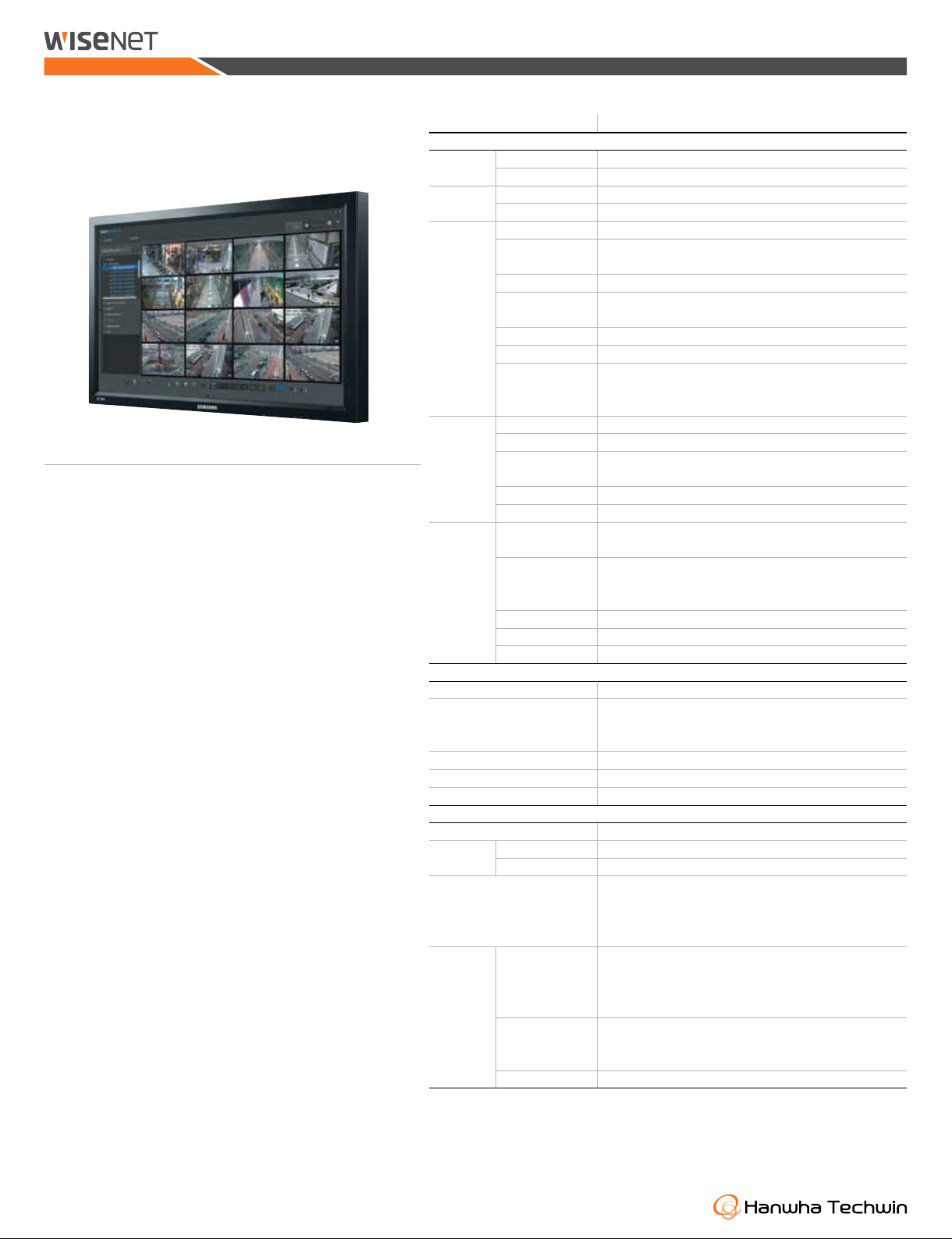
Preview text:
SmartViewer SmartViewer
Easy Central Management Software PERFORMANCE Supported Format H.265, H.264, MPEG-4, MJPEG Video
Supported Resolution Depending on the device Supported Format
G.711 u-law (PCM), G.723, G.726 (ADPCM), AAC Audio Functions
Bi-directional Audio (Listen / Talk) Multi-monitor Dual Monitor Support
(16 : 9) 1, 4, 9, 16, 25, 36 (Full screen) Split-screen Mode
(4 : 3) 1, 6, 12, 20, 30 (Full screen) Sequence Mode Up to 16-splits
Area zoom, Zoom, Swing / Autopan, Group / Scan, Trace / Pattern, Live PTZ Control
Preset, Iris / focus control, Home position, Auto tracking Monitoring Simple Recording
Recording of the selected video tile up to 2hours (SEC) Favorite List
Favorite view (Save the current split mode setting), Sequence of the favorite list
OSD on/off, Snapshot/prints image, Brightness/contrast control, Functions
Keep aspect ratio, Deinterlacing, Digital zoom, Defog,
Dewarping, Setting device config, Metadata off / on Search Mode
Date, Event, POS, Heatmap, Search based on DVR, NVR, Local folder Split-screen Mode
Up to 16 cameras can be played simultaneously Search &
Start/stop, Pause, Faster/slower forward/backward, Video Control Playback
Step forward/backward, Skip forward/backward Key Features Functions
Snapshot / Prints image, Digital zoom
• Up to 36 Cameras monitoring Backup
Local Storage, Backup Format (SEC, AVI)
• Dual monitor support(up to 72 cameras)
Shows real-time event list of the device (Event status, Type, device, Real-time event List
time(PC)), Viewing instant video image
• Support for full screen mode
Recording Type : Manual / schedule
• Drag & drop camera selection Event Searching events
Event Type : Sensor, Video Loss, Motion, VA (Passing, Entering, Exiting, Monitoring
(Dis)Appear, Tampering, Tracking, Face detection, Audio detection, Defocus)
• Support for sequence function (Automatic screen transition) History Support serach log
• Favorite view & sequence of favorites Instant Player
Plays the corresponding camera’s video image (DVR / NVR)
• Up to 16 Videos simultaneous playback event Action Sound, Instant player pop-up CONFIGURATION
• Support for Range Backup (Integrated viewer) User Management Admin 1, User 20
• Search and Play Recorded data from the DVR, NVR
Automatic device IP scanning, Viewing the device settings (Device webpage), • User Management Device Management
Exporting / Importing devices settings, Updating the device firmware,
Change devices password, Setting NAS
• Save device configuration and Smart Viewer configuration as a file Environment
OSD display, Date/time, Capture, Recording, Sequence, Receive events, Language
• Log search (search by the system, User, record or backup log, etc) System Settings
Export / Import SmartViewer settings Update
Automatic self upgrade (Using Hanwha upgrade server)
• Remote update Using the update server GENERAL Supported Devices
Wisenet N/W camera, Encoder, DVR / NVR Connections N/W Product
Up to 36 channels (Dual Monitor, up to 72 channels) (by group) DVR Up to 16 devices Total 24 languages Support
English, French, German, Spanish, Italian, Russian, Chinese, Japanese, Language
Korean, Turkish, Polish, Czech, Serbian, Romanian, Portuguese, Dutch,
Croatian, Hungarian, Greek, Taiwanese, Swedish, Danish, Finnish, Norwegian
CPU Intel i7 (Sandy bridge) above
RAM 4 GB above, Video Memory 1GB above, Recommended
HDD more than 200GB of free space for installation, DirectX 9.0 above. System
Display Resolution : 1024 x 768 above, OpenGL compatible Requirement
CPU Intel i3 above, RAM 3GB above, Video Memory 512GB above, Minimum
HDD 200GB above, DirectX 9.0 above.
Display Resolution : 1024 x 768 above, OpenGL compatible Operating System
Windows 7, Windows 8, Windows 8.1, Windows 10, Windows 11
* The lastest product information / specification can be found at hanwha-security.com
* Design and specifications are subject to change without notice.
* Wisenet is the proprietary brand of Hanwha Techwin, formerly known as Samsung Techwin Revised 05-2022 e
©2022 Hanwha Techwin Co., Ltd. All rights reserved.
Tài liệu liên quan:
-

Ung dung game hoa trong cac chien dich MKT
27 14 -
Bao cao Chi so TMDT Viet Nam 2025
30 15 -
Thông tư quy định về việc phân quyền, phân cấp và phân định thẩm quyền quản lý nhà nước về giáo dục cho chính quyền địa phương
31 16 -
Nghị quyết về phát huy các giá trị di sản văn hóa gắn với phát triên du lịch bền vững tỉnh Khánh Hòa đến năm 2025, định hướng đến năm 2030
33 17 -
Quyết định phê duyệt Chiến lược phát triển du lịch Việt Nam đến năm 2030
20 10