Đề thi giữa kì môn Cơ sở dữ liệu | Trường Đại học Sư Phạm Hà Nội
Đề thi giữa kì môn Cơ sở dữ liệu | Trường Đại học Sư Phạm Hà Nội. Tài liệu được sưu tầm giúp bạn tham khảo, ôn tập và đạt kết quả cao. Mời bạn đọc đón xem.
Môn: Cơ sở dữ liệu(CSDL) 12 tài liệu
Trường: Trường Đại học Sư Phạm Hà Nội 3.9 K tài liệu
Tác giả:


Preview text:
MidTerm – 2311COMP106401
Hình thức online, theo nhóm. Đại diện một thành viên trong nhóm nộp trên Google Form.
Thời gian làm bài: 8g – 10g30, hệ thống tự đóng lúc 10g45 phút (không giải quyết trường hơp nộp trễ vì đã cho 15 phút nộp bài) YÊU CẦU:
• Có bảng phân công trong nhóm ai làm việc gì,
• Mỗi công việc (task) tương ứng sinh viên push code phải ghi rõ message có tên task đó.
• Push code lên Git repo do nhóm đặt, repo dạng private, invite mình vào (hienlth)
• Trong repo có file Extract Database dạng script chứa dữ liệu đã nhập.
• Nén code + bảng phân công nộp lên Google Form.
• Không giải quyết nộp file bằng các hình thức khác và nộp trễ giờ.
Sử dụng cơ sở dữ liệu ở file script đính kèm, thực hiện các yêu cầu sau: 1 Phần 1 (2 đ) 1.1 Mô tả CSDL
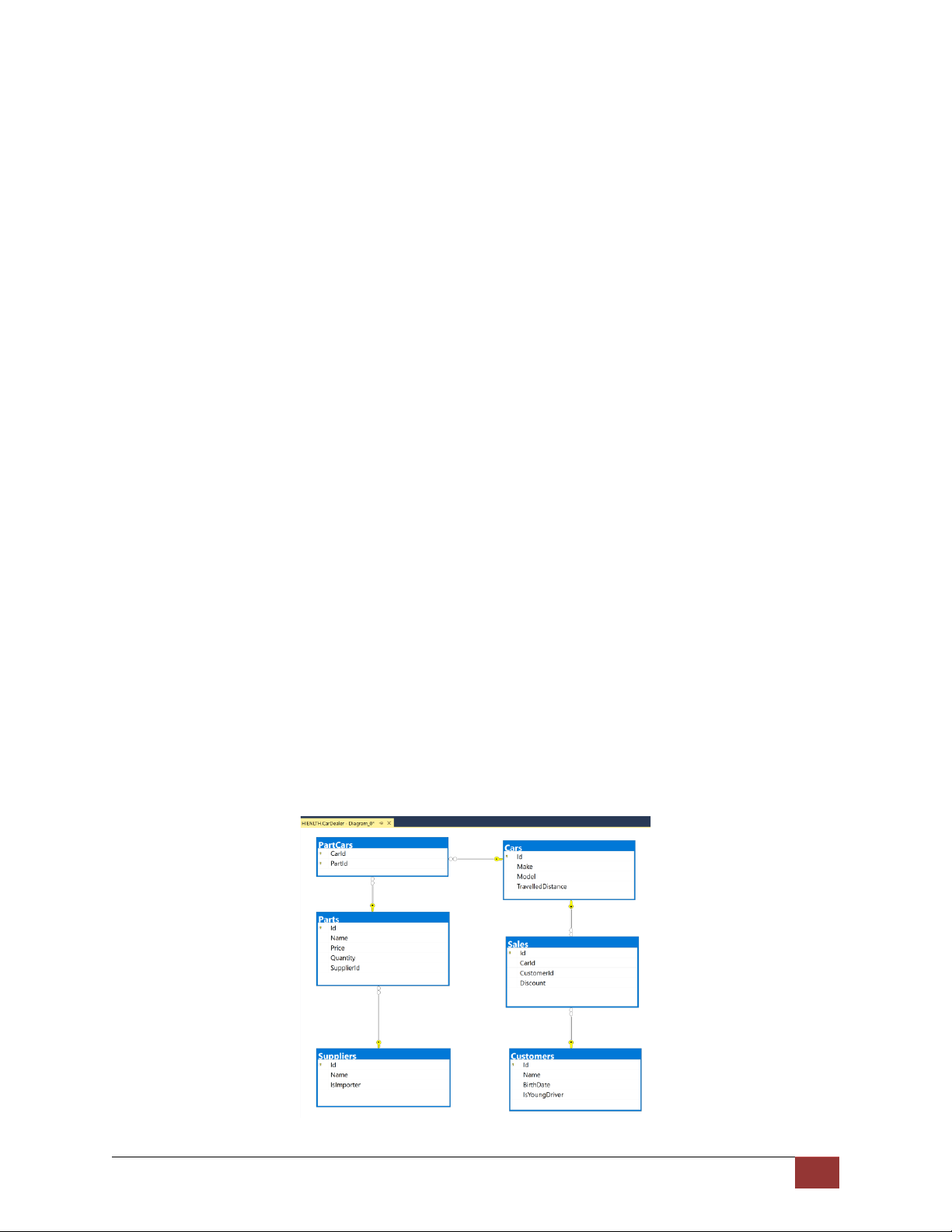
A car dealer needs information about cars, their parts, parts suppliers, customers and sales.
• Cars have make, model, travelled distance in kilometers
• Parts have name, price and quantity
• Part supplier have name and info whether he uses imported parts
• Customer has name, date of birth and info whether he is young driver (Young driver is a driver
that has less than 2 years of experience. Those customers get additional 5% off for the sale.)
• Sale has car, customer and discount percentage
A price of a car is formed by total price of its parts. 1 Relations between models:
• A car has many parts and one part can be placed in many cars
• One supplier can supply many parts and each part can be delivered by only one supplier
• In one sale, only one car can be sold
• Each sale has one customer and a customer can buy many cars
1.2 Tạo project và import database (1 đ) • Tạo project dạng MVC
• Dựng CSDL bằng cách import từ file script.
• Tạo mô hình Entity Framework Core theo hướng Database First.
1.3 Trang giới thiệu nhóm (0.5đ)
Chỉnh sửa action About hiển thị thông tin nhóm.
1.4 Chụp hình mô tả kết quả thực hiện các yêu cầu (0.5 đ)
Các chức năng ở yêu cầu 2, 3 sinh viên chộp hình bỏ vào file Word nộp kèm source code project.
2 Truy vấn đơn giản (4 đ)
Hiển thị kết quả truy vấn dạng bảng.
2.1 Query 1 – Ordered Customers (0.5 pt)
Get all customers ordered by their birth date ascending or descending. If two customers are born on
the same date first print those who are not young drivers (e.g. print experienced drivers first). Show
their name, birthdate and whether he is young driver or not. Example URLs
{host}/customers/all/ascending
{host}/customers/all/descending
2.2 Query 2 – Cars with Their List of Parts {by id} (1 pt)
Get all cars along with their list of parts. For the car get only make, model and travelled distance and
for the parts get only name and price. Example URL {host}/cars/{id}/parts
2.3 Query 3 – Total Sales by Customer (1pt)
Get a customer by ID and show his name, bought cars count and total spent money on cars. 2 Example URL {host}/customers/{id}
2.4 Query 4 – Sales with Applied Discount (1.5 pts)
Get all sales with information about the car (make, model, travelled distance), customer and price of
the sale with and without discount and the discount percent itself. Example URLs
{host}/Sales – list of all sales
{host}/Sales/{id} – more details about sale by provided Id (car make, car model, and customer name)
{host}/Sales/discounted – all sales that are discounted by any percentage
{host}/Sales/discounted/{percent} – all sales that are discounted with given percent 3 CUD – 4 pts
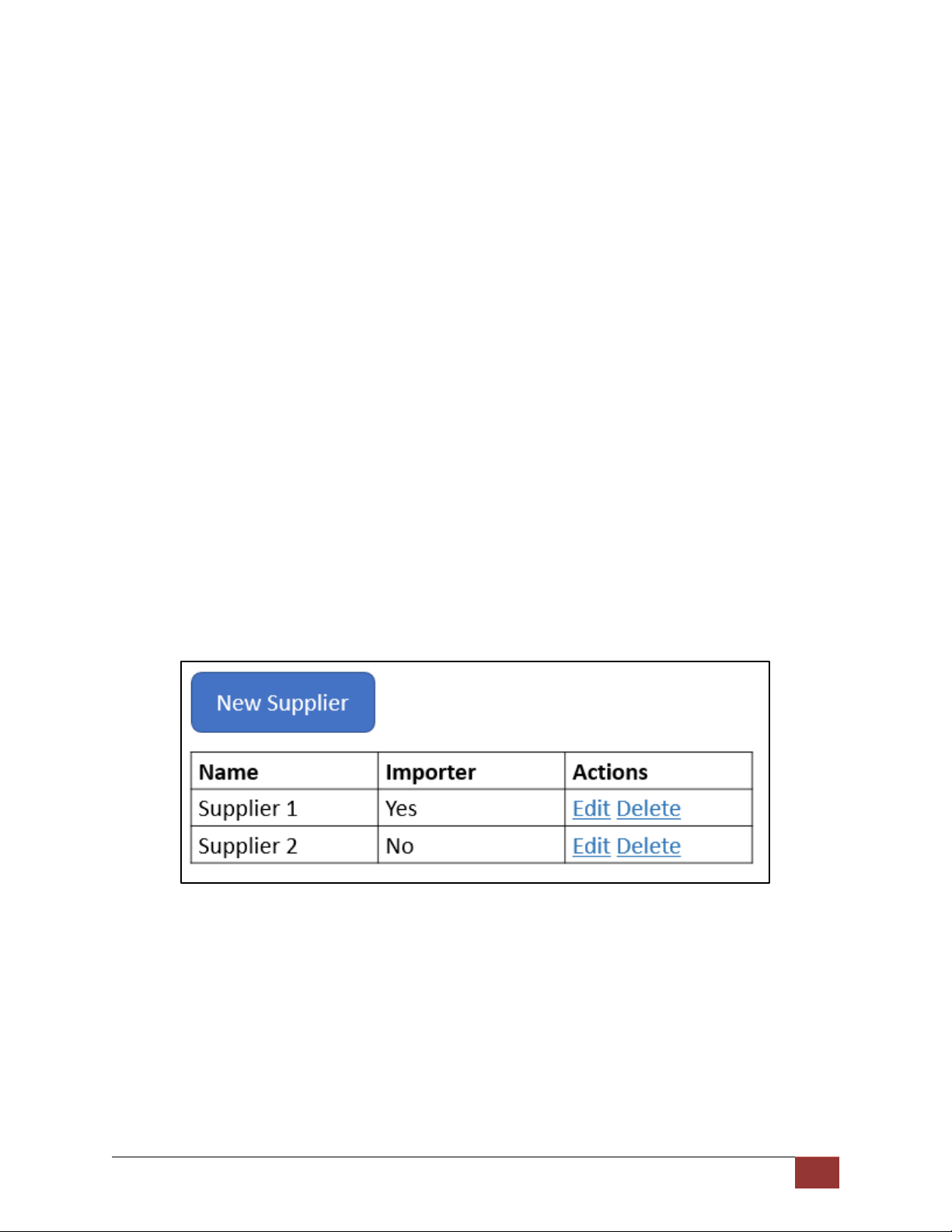
3.1 Add, Edit and Delete Suppliers (1.5 pts)
Add functionality to the logged users to add, edit and delete suppliers to/from the database. When
supplier is deleted all of his parts should be deleted.
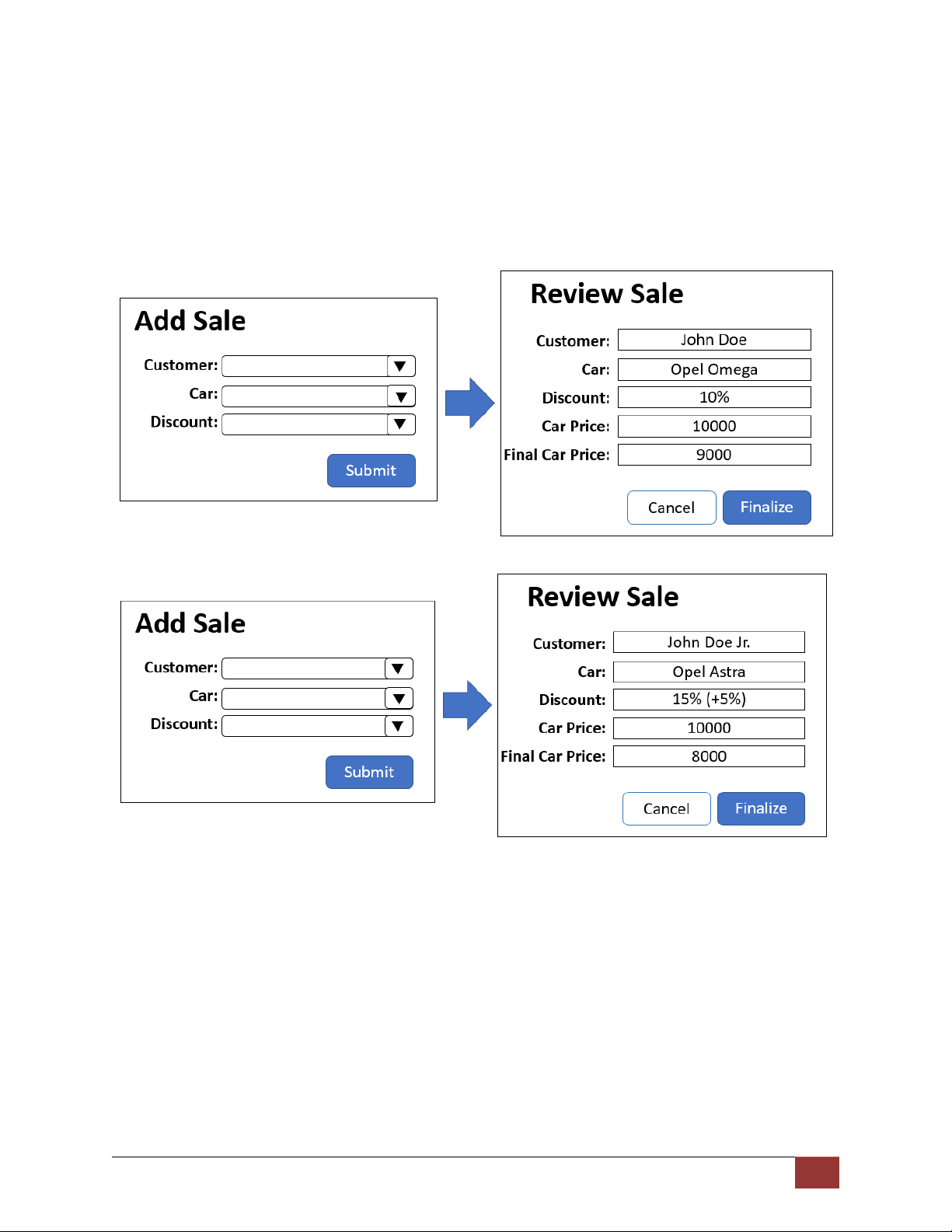
3.2 Add Sales (2.5 pts)
Users should have option to add sales. A sale requires the user to choose car and customer. Also, the
user should specify the discount percentage of the sale. After the user fill out the form when he submits
it, he should be redirected to a page that shows summarized information for the sale: • customer name
• car make and model
• total discount percentage
• price of the car before/after applied discount 3
On that page, there should be a button that finalizes the sale and add it to the database.
Note that if the selected customer is young driver additional 5% should be added to the discount percentage.
Once a sale is added to the database it should not be able to be edited or deleted. ---End--- 4