Wireshark Network Analysis: The Official Wireshark Certified Network Analyst Study Guide (Second Edition) | Học viện Công Nghệ Bưu Chính Viễn Thông
Wireshark Network Analysis: The Official Wireshark Certified Network Analyst Study Guide (Second Edition) | Học viện Công Nghệ Bưu Chính Viễn Thông. Tài liệu được sưu tầm giúp bạn tham khảo, ôn tập và đạt kết quả cao. Mời bạn đọc đón xem.
Môn: An toàn mạng (AT19) 12 tài liệu
Trường: Học viện Công Nghệ Bưu Chính Viễn Thông 1.8 K tài liệu
Tác giả:



















Preview text:
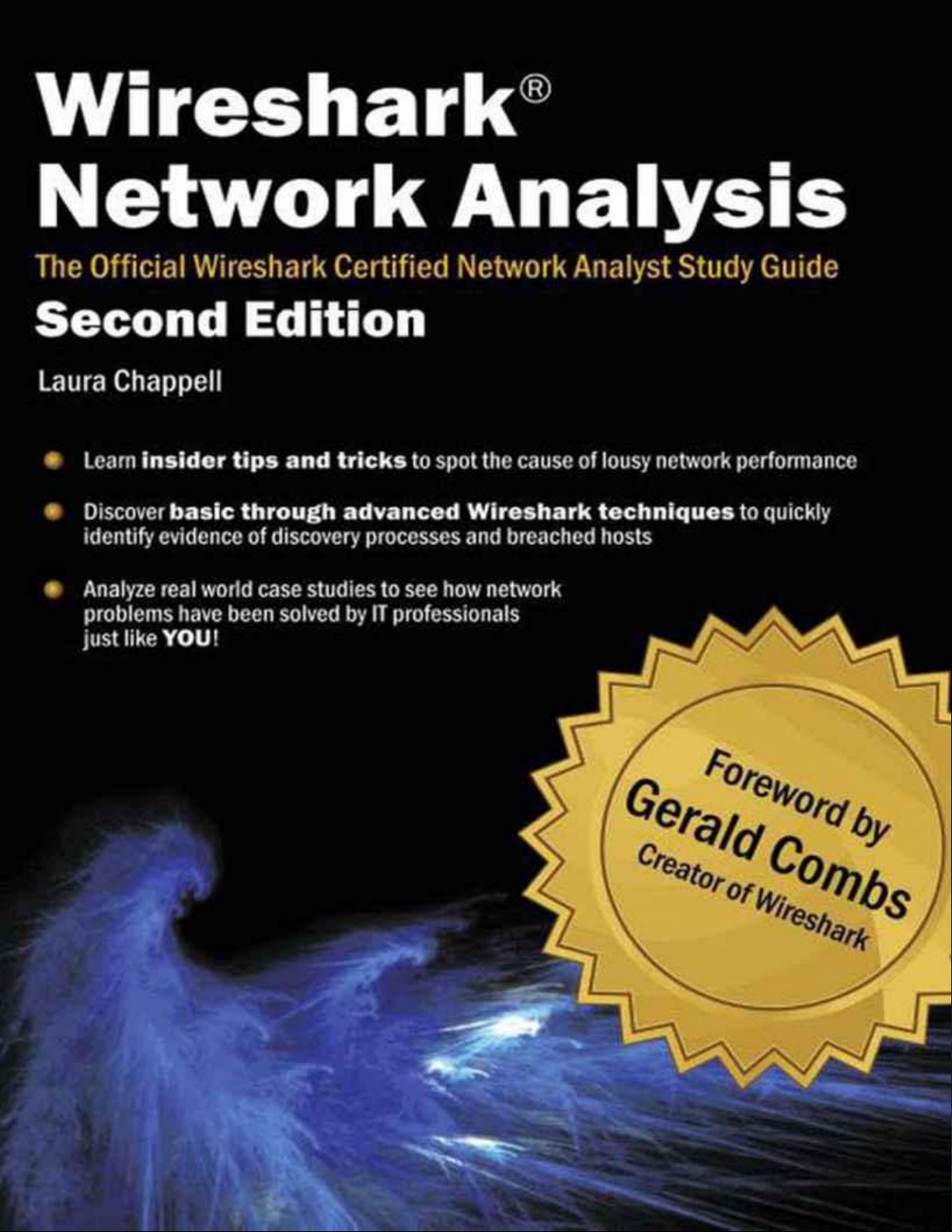
Wireshark® Network Analysis
The Official Wireshark Certified Network Analyst™ Study Guide 2nd Edition (Version 2.1b) Laura Chappell
Founder, Chappell University™
Founder, Wireshark University™
Readers interested in this book may also be interested in the associated Wireshark Certified Network Analyst
Official Exam Prep Guide – Second Edition.
10-digit ISBN: 1-893939-90-1
13-digit ISBN: 978-1-893939-90-5
Wireshark® Network Analysis
The Official Wireshark Certified Network Analyst™ Study Guide 2nd Edition (Version 2.1b)
Copyright 2012, Protocol Analysis Institute, Inc, dba Chappell University. All rights reserved. No part of this
ebook, or related materials, including interior design, cover design and contents of the referenced book
website, www.wiresharkbook.com, may be reproduced or transmitted in any form, by any means (electronic,
photocopying, recording or otherwise) without the prior written permission of the publisher.
To arrange bulk purchase discounts for sales promotions, events, training courses, or other purposes, please
contact Chappell University at the address listed on the next page.
Book URL: www.wiresharkbook.com
Paperback Book 13-digit ISBN: 978-1-893939-94-3
Paperback Book 10-digit ISBN: 1-893939-94-4
Distributed worldwide for Chappell University through Protocol Analysis Institute, Inc.
For general information on Chappell University or Protocol Analysis Institute, Inc, including information on
corporate licenses, updates, future titles or courses, contact the Protocol Analysis Institute, Inc at 408/378-
7841 or send email to info@chappellU.com.
For authorization to photocopy items for corporate, personal or educational use, contact Protocol Analysis
Institute, Inc at email to info@chappellU.com.
Trademarks. All brand names and product names used in this book or mentioned in this course are trade
names, service marks, trademarks, or registered trademarks of their respective owners. Wireshark and the
"fin" logo are registered trademarks of the Wireshark Foundation. Protocol Analysis Institute, Inc is the
exclusive developer for Chappell University.
Limit of Liability/Disclaimer of Warranty. The author and publisher have used their best efforts in
preparing this book and the related materials used in this book. Protocol Analysis Institute, Inc, Chappell
University and the author(s) make no representations or warranties or merchantability or fitness for a
particular purpose. Protocol Analysis Institute, Inc and Chappell University assume no liability for any damages
caused by following instructions or using the techniques or tools listed in this book or related materials used in
this book. Protocol Analysis Institute, Inc, Chappell University and the author(s) make no representations or
warranties that extend beyond the descriptions contained in this paragraph. No warranty may be created or
extended by sales representatives or written sales materials. The accuracy or completeness of the information
provided herein and the opinions stated herein are not guaranteed or warranted to produce any particular
result and the advice and strategies contained herein may not be suitable for every individual. Protocol
Analysis Institute, Inc, Chappell University and author(s) shall not be liable for any loss of profit or any other
commercial damages, including without limitation special, incidental, consequential, or other damages.
Always ensure you have proper authorization before you listen to and capture network traffic.
Copy Protection. In all cases, reselling or duplication of this book and related materials used in this training
course without explicit written authorization is expressly forbidden. We will find you, ya know. So don’t steal it or plagiarize this book.
This book and the book website, www.wiresharkbook.com, references Chanalyzer Pro software created by
MetaGeek (www.metageek.net/wiresharkbook).
This book and the book website, www.wiresharkbook.com, references GeoLite data created by MaxMind,
available from www.maxmind.com.
PhoneFactor™ SSL/TLS vulnerabilities documents and trace files referenced on the book website,
www.wiresharkbook.com, were created by Steve Dispensa and Ray Marsh (www.phonefactor.com).
This book and the book website, www.wiresharkbook.com, references trace files from Mu Dynamics (www.pcapr.net).
This book references rules released by Emerging Threats Copyright © 2003-2012, Emerging Threats. All rights
reserved. For more information, visit emergingthreats.net.
Protocol Analysis Institute, Inc. 5339 Prospect Road, # 343 San Jose, CA 95129 USA www.wiresharkbook.com
Also refer to Chappell University at the same address info@chappellU.com www.chappellU.com
Cover: Fractal image, Waves Envisioned during Late Nights at Work, by Scott Spicer Created with Apophysis 2.09 Dedication
This Second Edition is dedicated to Gerald Combs, creator of Wireshark (formerly Ethereal) and a good friend.
Twelve years ago, I sent Gerald a note—just out of the blue—"may I include Ethereal on my CD? I want to
give it away at conferences." Expecting some pushback—after all, he didn’t know who the heck I was—I was
amazed and thrilled to receive his response stating "sure, go ahead—that would be great!"
Gerald is more than the creator of Wireshark. Gerald is one of us. He struggled with a problem. He formulated
a solution. Then he did something extraordinary—he shared his solution with the world. In his typical unselfish
mode, Gerald opened up his project for the contribution and participation of others.
Ethereal morphed into Wireshark, and Wireshark continued to mature. Wireshark has surpassed every other
network analyzer product in the industry to become the de facto standard for network traffic analysis.
In 2011 Wireshark was voted the #1 Security Tool on the SecTools.org Top 125 Network Security Tools survey
(conducted by Gordon Lyons, creator of Nmap). This is a much deserved recognition that Wireshark and
packet analysis is a must-have skill for IT security professionals.
Throughout Wireshark’s rise in popularity, Gerald has remained one of the most honest, humble, dedicated professionals in our field. Thank you Gerald.
p.s. Again I want to express very special thanks to Gerald’s wife, Karen, and their absolutely cute-beyond-
belief, I-have-my-Daddy-wrapped-around-my-little-finger, smarty-pants-who-melts-your-heart daughter!
Gerald always beams when he talks about you two very special ladies and it is a treat spending time with you
both . I am grateful for the love, support and inspiration you have provided Gerald. Your
tremendous humor and joie de vivre inspires me! ACKs
There are many people who were directly and indirectly involved in creating the First and Second Editions of this book.
First and foremost, I would like to thank my children, Scott and Ginny, for your patience, support and humor
during the many hours I was huddled over my computer to complete this book. Your words of encouragement
really helped me balance work and life during some long days and nights of deadlines. It will be a treat to
write that "Cooking Badly" book with you someday!
Mom, Dad, Steve and Joe—ahh… yes, the "fam." You guys have given me so much humorous material for
my presentations! Can’t wait for "take your daughter to work day," Mom!
Special thanks to Brenda Cardinal and Jill Poulsen who have worked with me for over 10 years each—you
masochists! I am fortunate to have both of you around to brighten my days and put life in perspective.
To Colton Cardinal, who provided humorous distractions, smiles and, giggles—thanks for all the time staring
at the clocks during the past year and a half. I feel very fortunate to have the chance to watch you grow up!
Joy DeManty—I’m sure you’re sick of reading this book over and over and over again! I appreciate your keen
eye in reviewing this second edition. Let’s agree on this - no more 1,000 page books!
Lanell Allen—again you really pulled through for us on this project! Your tireless hours of work put into
finding my typos, half-sentences and dangling prepositions (he he) was invaluable. Thank you for taking on this project.
Gerald Combs—what can I say? You have selflessly shared with us a tremendous tool and I am so very
grateful for your devotion to Wireshark. The first and second editions of this book are dedicated to you.
The Wireshark developers—what a group! It has been a pleasure meeting so many of you in person at the
Sharkfest conferences. Your continued efforts to improve and enhance Wireshark have helped so many IT
professionals find the root of network issues. Thank you for the many hours you have dedicated to making
Wireshark the world’s most popular network analyzer solution! You can find the developer list at Help |
About Wireshark | Authors. I hope this book accurately explains the features you have spent so many
hours implementing. If I missed anything you’d like included in future editions of this book, please let me know.
Gordon "Fyodor" Lyon—the creation of the First Edition of this book was triggered when you released
"Nmap Network Scanning"—an excellent book that every networking person should own. I appreciate your
time and effort looking over the network scanning section. I look forward to working with you on some future
projects—there are so many possibilities!
Ryan Woodings and Mark Jensen of MetaGeek—it has been a pleasure collaborating with you folks on
ideas and microwave popping methods (g)! It has been a blast showing Wi-Spy/Chanalyzer Pro at conferences
and sharing these hot products with the IT community. I look forward to more brainstorming sessions. Special
thanks to Trent Cutler for reviewing the WLAN chapter and sending on some great feedback.
Steve Dispensa and Marsh Ray of PhoneFactor (www.phonefactor.com)—thank you both for kindly
allowing me to include your Renegotiating TLS document and trace files at www.wiresharkbook.com. You two
did a great job documenting this security issue and your work benefits us all.
Stig Bjørlykke, Wireshark Core Developer—you came up with so many great additions to the First Edition
of this book and recent versions of Wireshark! Your understanding of the inner workings of Wireshark as well
as the areas that often perplex people helped make this book much more valuable to the readers. We all
appreciate your development efforts to make Wireshark such a valuable tool!
Sean Walberg—Thanks for being such a great resource on the VoIP chapter. You really have such a
wonderful talent explaining the inner workings of VoIP communications. I loved your presentation at Sharkfest
—funny and geeky at the same time! I appreciate your efforts to clarify the VoIP chapter in this book.
Martin Mathieson, Wireshark Core Developer—I am so grateful for the fixes and tips you provided for
the VoIP chapter and the time you took to explain the duplicate IP address detection feature you added to
Wireshark. I appreciate you providing the RFC references to be included and understanding that the readers
may be new to VoIP analysis. The time and energy you have put into enhancing Wireshark are a benefit to us all!
Jim Aragon—Thanks so much for your tremendous feedback on the First Edition of this book and providing
the tip on capturing traffic. It’s always great to read your ideas and suggestions and you’ve given me loads of
ideas for future tips and training.
Sake Blok, Wireshark Core Developer—Don’t you ever sleep? Thanks for your feedback and
corrections on the First Edition of this book. It’s great having your case study, The Tale of the Missing ARP (in
Chapter 16: Analyze Address Resolution Protocol (ARP) Traffic). I really appreciate the changes you made to
Wireshark regarding the "field not in use, but existent" issue. Yippie!
Ron Nutter—Hey, buddy! Hard to believe we’ve known each other for a zillion years, eh? Thanks for adding
the Cisco spanning instructions in this Second Edition. I know the readers will appreciate that you shared your
tips for setting up an efficient capture with Cisco equipment.
Jeff Carrell—You jumped right in to clean up my messy draft of IPv6 introductory materials. You did a great
job refocusing me to ‘show them the packets.’ No wonder people love your IPv6 classes! Thank so much for
helping out over the holidays. I know you were working away on the "Guide to TCP/IP" book and your time is precious these days.
Betty DuBois—Thanks for all your review time and talent—not only on this book project, but also on the
Wireshark University Instructor-Led courses and the WCNA Exam. It’s always great to talk/work with a fellow packet-geekess!
Keith Parsons—Thanks for clarifying the concepts in the WLAN chapter and adding the awesome "To
DS/From DS" graphic and table! You always have great ideas and teaching methods—and you’re truly the "geek toy king" as well!
Anders Broman, Wireshark Core Developer—Thanks for taking the time to look through the VoIP chapter
and ensure the information was accurate and presented clearly. Thank you so much for all your efforts as a
Wireshark core developer and making so many of the changes I’ve whined about.
The pcapr Team—I appreciate you allowing me to provide readers with several trace files from your online
repository at www.pcapr.net. Thank you to Mu Dynamics (www.mudynamics.com) for supporting the pcapr.net project.
David Teng—Thanks for your thorough read through of the first edition and the numerous edits and
suggestions you provided. It is difficult to imagine the effort you put into translating this huge book to Chinese,
but I do hope to see it in print someday.
My Students—Sincere thanks to the hundreds of thousands of students who have taken my online
training courses, instructor-led courses and self-paced courses over 20 years of teaching. I’ve gotten to know
so many of you as friends. Your honest and direct feedback has always helped me hone my training materials (and my jokes).
Gary Lewis—you wild guy, you! If anyone out there needs graphic design services, Gary is the "go to" guy
with a great (and somewhat twisted) sense of humor. Thanks for a great cover design on the First Edition—
and a lovely rework of the Second Edition!
Case Study/Tip Submitters—Case studies were submitted from all around the world. Thanks to all of you
who overloaded my email with your Wireshark success stories. The following individuals provided case studies
that were included in this book to offer a glimpse into how folks use Wireshark to save time and money.
LabNuke99 - P.C. - Jim Aragon - Roy B. - Martin B. - Bill Back - Sake Blok - Jeff Carrell - Coleen D. - Todd
DeBoard and Team - Mitch Dickey - Thanassis Diogos - Steve Dispensa - Todd Dokey - Vik Evans - Russ F. -
Allen Gittelson - Richard Hicks - Rob Hulsebos - Mark Jensen - Jennifer Keels - Christian Kreide - Todd Lerdal -
Robert M. - Jim McMahon - Ron Nutter - Karl R. - Mark R. - Guy Talbot - Delfino L. Tiongco - Sean Walberg - Christy Z.
And of course—Finally, I’d like to thank those folks who create lousy applications, cruddy TCP/IP stacks,
scummy operating systems, pathetic interconnecting devices and sad default configurations and the users who
bring their muck onto the network— you make life so interesting!
If I’ve missed anyone in this ACK section, I apologize and plead brain-drain at this point! Contents at a Glance
Chapter 1: The World of Network Analysis
Chapter 2: Introduction to Wireshark Chapter 3: Capture Traffic
Chapter 4: Create and Apply Capture Filters
Chapter 5: Define Global and Personal Preferences Chapter 6: Colorize Traffic
Chapter 7: Define Time Values and Interpret Summaries
Chapter 8: Interpret Basic Trace File Statistics
Chapter 9: Create and Apply Display Filters
Chapter 10: Follow Streams and Reassemble Data
Chapter 11: Customize Wireshark Profiles
Chapter 12: Annotate, Save, Export and Print Packets
Chapter 13: Use Wireshark’s Expert System
Chapter 14: TCP/IP Analysis Overview
Chapter 15: Analyze Domain Name System (DNS) Traffic
Chapter 16: Analyze Address Resolution Protocol (ARP) Traffic
Chapter 17: Analyze Internet Protocol (IPv4/IPv6) Traffic
Chapter 18: Analyze Internet Control Message Protocol (ICMPv4/ICMPV6) Traffic
Chapter 19: Analyze User Datagram Protocol (UDP) Traffic
Chapter 20: Analyze Transmission Control Protocol (TCP) Traffic
Chapter 21: Graph IO Rates and TCP Trends
Chapter 22: Analyze Dynamic Host Configuration Protocol (DHCPv4/DHCPv6) Traffic
Chapter 23: Analyze Hypertext Transfer Protocol (HTTP) Traffic
Chapter 24: Analyze File Transfer Protocol (FTP) Traffic
Chapter 25: Analyze Email Traffic
Chapter 26: Introduction to 802.11 (WLAN) Analysis
Chapter 27: Introduction to Voice over IP (VoIP) Analysis
Chapter 28: Baseline "Normal" Traffic Patterns
Chapter 29: Find the Top Causes of Performance Problems
Chapter 30: Network Forensics Overview
Chapter 31: Detect Network Scanning and Discovery Processes
Chapter 32: Analyze Suspect Traffic
Chapter 33: Effective Use of Command Line Tools
Appendix A: Resources on the Book Website All Access Pass Training Offer Table of Contents Contents at a Glance List of Tips
Wireshark Certified Network Analyst Exam Topics
$100 Off All Access Pass (AAP) Online Training Dedication ACKs Foreword by Gerald Combs Preface About This Book
Wireshark Certified Network Analyst™ Program Overview
Wireshark University™ and Wireshark University™ Training Partners
Schedule Customized Onsite/Web-Based Training
Chapter 1: The World of Network Analysis Define Network Analysis Follow an Analysis Example
Walk-Through of a Troubleshooting Session
Walk-Through of a Typical Security Scenario (aka Network Forensics)
Understand Security Issues Related to Network Analysis
Overcome the "Needle in the Haystack Issue
Review a Checklist of Analysis Tasks
Understand Network Traffic Flows Launch an Analysis Session Case Study: Pruning the "Puke"
Case Study: The "Securely Invisible" Network Summary Practice What You’ve Learned Review Questions Answers to Review Questions
Chapter 2: Introduction to Wireshark
Wireshark Creation and Maintenance
Capture Packets on Wired or Wireless Networks Open Various Trace File Types
Understand How Wireshark Processes Packets Use the Start Page Identify the Nine GUI Elements
Navigate Wireshark’s Main Menu
Use the Main Toolbar for Efficiency
Focus Faster with the Filter Toolbar
Make the Wireless Toolbar Visible
Work Faster Using RightClick Functionality
Sign Up for the Wireshark Mailing Lists Join ask.wireshark.org! Know Your Key Resources Get Some Trace Files
Case Study: Detecting Database Death Summary Practice What You’ve Learned Review Questions Answers to Review Questions
Chapter 3: Capture Traffic
Know Where to Tap Into the Network Run Wireshark Locally
Capture Traffic on Switched Networks Analyze Routed Networks Analyze Wireless Networks
Capture at Two Locations (Dual Captures)
Select the Right Capture Interface
Capture on Multiple Adapters Simultaneously
Interface Details (Windows Only) Capture Traffic Remotely
Automatically Save Packets to One or More Files
Optimize Wireshark to Avoid Dropping Packets
Conserve Memory with Command-Line Capture
Case Study: Dual Capture Points the Finger
Case Study: Capturing Traffic at Home Summary Practice What You’ve Learned Review Questions Answers to Review Questions
Chapter 4: Create and Apply Capture Filters The Purpose of Capture Filters
Apply a Capture Filter to an Interface
Build Your Own Set of Capture Filters Filter by a Protocol
Filter Incoming Connection Attempts
Create MAC/IP Address or Host Name Capture Filters
Capture One Application’s Traffic Only
Use Operators to Combine Capture Filters
Create Capture Filters to Look for Byte Values
Manually Edit the Capture Filters File
Share Capture Filters with Others
Case Study: Kerberos UDP to TCP Issue Summary Practice What You’ve Learned Review Questions Answers to Review Questions
Chapter 5: Define Global and Personal Preferences
Find Your Configuration Folders
Set Global and Personal Configurations
Customize Your User Interface Settings
Define Your Capture Preferences
Automatically Resolve IP and MAC Names
Plot IP Addresses on a World Map with GeoIP
Resolve Port Numbers (Transport Name Resolution) Resolve SNMP Information Configure Filter Expressions Configure Statistics Settings
Define ARP, TCP, HTTP/HTTPS and Other Protocol Settings
Configure Protocol Settings with RightClick
Case Study: NonStandard Web Server Setup Summary Practice What You’ve Learned Review Questions Answers to Review Questions
Chapter 6: Colorize Traffic
Use Colors to Differentiate Traffic Types
Disable One or More Coloring Rules
Share and Manage Coloring Rules
Identify Why a Packet is a Certain Color
Create a "Butt Ugly" Coloring Rule for HTTP Errors
Color Conversations to Distinguish Them
Temporarily Mark Packets of Interest
Alter Stream Reassembly Coloring
Case Study: Colorizing SharePoint Connections During Login Summary Practice What You’ve Learned Review Questions Answers to Review Questions
Chapter 7: Define Time Values and Interpret Summaries
Use Time to Identify Network Problems
Send Trace Files Across Time Zones
Identify Delays with Time Values
Identify Client, Server and Path Delays
View a Summary of Traffic Rates, Packet Sizes and Overall Bytes Transferred
Case Study: Time Column Spots Delayed ACKs Summary Practice What You’ve Learned Review Questions Answers to Review Questions
Chapter 8: Interpret Basic Trace File Statistics Launch Wireshark Statistics
Identify Network Protocols and Applications
Protocol Settings Can Affect Your Results
Identify the Most Active Conversations
List Endpoints and Map Them on the Earth
Spot Suspicious Targets with GeoIP
List Conversations or Endpoints for Specific Traffic Types Evaluate Packet Lengths
List All IPv4/IPv6 Addresses in the Traffic
List All Destinations in the Traffic List UDP and TCP Usage Analyze UDP Multicast Streams Graph the Flow of Traffic Gather Your HTTP Statistics Examine All WLAN Statistics
Case Study: Application Analysis: Aptimize Website Accelerator™
Case Study: Finding VoIP Quality Issues Summary Practice What You’ve Learned Review Questions Answers to Review Questions
Chapter 9: Create and Apply Display Filters
Understand the Purpose of Display Filters
Create Display Filters Using Auto-Complete Apply Saved Display Filters
Use Expressions for Filter Assistance
Make Display Filters Quickly Using RightClick Filtering
Filter on Conversations and Endpoints
Filter on the Protocol Hierarchy Window
Understand Display Filter Syntax
Combine Display Filters with Comparison Operators
Alter Display Filter Meaning with Parentheses
Filter on the Existence of a Field
Filter on Specific Bytes in a Packet
Find Key Words in Upper or Lower Case More Interesting Regex Filters
Let Wireshark Catch Display Filter Mistakes
Use Display Filter Macros for Complex Filtering
Avoid Common Display Filter Mistakes
Manually Edit the dfilters File
Case Study: Using Filters and Graphs to Solve Database Issues
Case Study: The Chatty Browser
Case Study: Catching Viruses and Worms Summary Practice What You’ve Learned Review Questions Answers to Review Questions
Chapter 10: Follow Streams and Reassemble Data
The Basics of Traffic Reassembly
Follow and Reassemble UDP Conversations
Follow and Reassemble TCP Conversations
Follow and Reassemble SSL Conversations Reassemble an SMB Transfer
Case Study: Unknown Hosts Identified Summary Practice What You’ve Learned Review Questions Answers to Review Questions
Chapter 11: Customize Wireshark Profiles
Customize Wireshark with Profiles
Case Study: Customizing Wireshark for the Customer Summary Practice What You’ve Learned Review Questions Answers to Review Questions
Chapter 12: Annotate, Save, Export and Print Packets
Annotate a Packet or an Entire Trace File
Save Filtered, Marked and Ranges of Packets
Export Packet Content for Use in Other Programs Export SSL Keys
Save Conversations, Endpoints, IO Graphs and Flow Graph Information Export Packet Bytes
Case Study: Saving Subsets of Traffic to Isolate Problems Summary Practice What You’ve Learned Review Questions Answers to Review Questions
Chapter 13: Use Wireshark’s Expert System
Let Wireshark’s Expert Information Guide You
Understand TCP Expert Information
Case Study: Expert Info Catches Remote Access Headaches Summary Practice What You’ve Learned Review Questions Answers to Review Questions
Chapter 14: TCP/IP Analysis Overview TCP/IP Functionality Overview Build the Packet
Case Study: Absolving the Network from Blame Summary
Practice What You’ve Learned Review Questions Answers to Review Questions
Chapter 15: Analyze Domain Name System (DNS) Traffic The Purpose of DNS
Analyze Normal DNS Queries/Responses Analyze DNS Problems
Dissect the DNS Packet Structure Filter on DNS/MDNS Traffic
Case Study: DNS Killed Web Browsing Performance Summary Practice What You’ve Learned Review Questions Answers to Review Questions
Chapter 16: Analyze Address Resolution Protocol (ARP) Traffic Identify the Purpose of ARP
Analyze Normal ARP Requests/Responses Analyze Gratuitous ARPs Analyze ARP Problems
Dissect the ARP Packet Structure Filter on ARP Traffic Case Study: Death by ARP
Case Study: The Tale of the Missing ARP Summary Practice What You’ve Learned Review Questions Answers to Review Questions
Chapter 17: Analyze Internet Protocol (IPv4/IPv6) Traffic Identify the Purpose of IP Analyze Normal IPv4 Traffic Analyze IPv4 Problems
Dissect the IPv4 Packet Structure
An Introduction to IPv6 Traffic
Dissect the IPv6 Packet Structure Basic IPv6 Addressing
Sanitize Your IP Addresses in Trace Files
Set Your IPv4 Protocol Preferences
Troubleshoot Encrypted Communications Filter on IPv4 Traffic Filter on IPv6 Traffic
Case Study: Everyone Blamed the Router
Case Study: It’s Not the Network’s Problem!
Case Study: IPv6 Addressing Mayhem Summary Practice What You’ve Learned Review Questions Answers to Review Questions
Chapter 18: Analyze Internet Control Message Protocol (ICMPv4/ICMPV6) Traffic The Purpose of ICMP Analyze Normal ICMP Traffic Analyze ICMP Problems
Dissect the ICMP Packet Structure Basic ICMPv6 Functionality
Filter on ICMP and ICMPv6 Traffic
Case Study: The Dead-End Router Summary Practice What You’ve Learned Review Questions Answers to Review Questions
Chapter 19: Analyze User Datagram Protocol (UDP) Traffic The Purpose of UDP Analyze Normal UDP Traffic Analyze UDP Problems
Dissect the UDP Packet Structure Filter on UDP Traffic
Case Study: Troubleshooting Time Synchronization Summary Practice What You’ve Learned Review Questions Answers to Review Questions
Chapter 20: Analyze Transmission Control Protocol (TCP) Traffic The Purpose of TCP
Analyze Normal TCP Communications Analyze TCP Problems
Dissect the TCP Packet Structure Filter on TCP Traffic Set TCP Protocol Preferences
Case Study: Connections Require Four Attempts Summary Practice What You’ve Learned Review Questions Answers to Review Questions
Chapter 21: Graph IO Rates and TCP Trends Use Graphs to View Trends Generate Basic IO Graphs Filter IO Graphs Generate Advanced IO Graphs
Compare Traffic Trends in IO Graphs Graph Round Trip Time Graph Throughput Rates
Graph TCP Sequence Numbers over Time
Case Study: Watching Performance Levels Drop
Case Study: Graphing RTT to the Corporate Office
Case Study: Testing QoS Policies Summary Practice What You’ve Learned Review Questions Answers to Review Questions
Chapter 22: Analyze Dynamic Host Configuration Protocol (DHCPv4/DHCPv6) Traffic The Purpose of DHCP Analyze Normal DHCP Traffic Analyze DHCP Problems
Dissect the DHCP Packet Structure An Introduction to DHCPv6 Display BOOTP-DHCP Statistics Filter on DHCP/DHCPv6 Traffic Case Study: Declining Clients Summary Practice What You’ve Learned Review Questions Answers to Review Questions
Chapter 23: Analyze Hypertext Transfer Protocol (HTTP) Traffic The Purpose of HTTP
Analyze Normal HTTP Communications Analyze HTTP Problems Dissect HTTP Packet Structures
Filter on HTTP or HTTPS Traffic Export HTTP Objects Display HTTP Statistics Graph HTTP Traffic Flows Set HTTP Preferences Analyze HTTPS Communications
Case Study: HTTP Proxy Problems Summary Practice What You’ve Learned Review Questions Answers to Review Questions
Chapter 24: Analyze File Transfer Protocol (FTP) Traffic The Purpose of FTP
Analyze Normal FTP Communications Analyze FTP Problems
Dissect the FTP Packet Structure Filter on FTP Traffic Reassemble FTP Traffic
Case Study: Secret FTP Communications Summary Practice What You’ve Learned Review Questions Answers to Review Questions
Chapter 25: Analyze Email Traffic The Purpose of POP
Analyze Normal POP Communications Analyze POP Problems
Dissect the POP Packet Structure Filter on POP Traffic The Purpose of SMTP
Analyze Normal SMTP Communications Analyze SMTP Problems
Dissect the SMTP Packet Structure Filter on SMTP Traffic
Case Study: SMTP Problem—Scan2Email Job Summary Practice What You’ve Learned Review Questions Answers to Review Questions
Chapter 26: Introduction to 802.11 (WLAN) Analysis Analyze WLAN Traffic
Analyze Signal Strength and Interference Capture WLAN Traffic
Understand 802.11 Traffic Basics
Analyze Normal 802.11 Communications
Dissect the 802.11 Frame Structure Filter on All WLAN Traffic
Analyze Frame Control Types and Subtypes
Customize Wireshark for WLAN Analysis
Case Study: Cruddy Barcode Communications Case Study: Cooking the WLAN Summary Practice What You’ve Learned Review Questions Answers to Review Questions
Chapter 27: Introduction to Voice over IP (VoIP) Analysis Understand VoIP Traffic Flows
Session Bandwidth and RTP Port Definition Analyze VoIP Problems Examine SIP Traffic Examine RTP Traffic Play Back VoIP Conversations RTP Player Marker Definitions Create a VoIP Profile Filter on VoIP Traffic Case Study: Lost VoIP Tones Summary Practice What You’ve Learned Review Questions Answers to Review Questions
Chapter 28: Baseline "Normal" Traffic Patterns
Understand the Importance of Baselining Case Study: Login Log Jam
Case Study: Solving SAN Disconnects Summary Practice What You’ve Learned Review Questions Answers to Review Questions
Chapter 29: Find the Top Causes of Performance Problems
Troubleshoot Performance Problems Identify High Latency Times Point to Slow Processing Times
Practice Working with Time Issues
Find the Location of Packet Loss
Watch Signs of Misconfigurations Analyze Traffic Redirections Watch for Small Payload Sizes Look for Congestion Identify Application Faults
Note Any Name Resolution Faults
An Important Note about Analyzing Performance Problems Case Study: One-Way Problems
Case Study: The Perfect Storm of Network Problems Summary Practice What You’ve Learned Review Questions Answers to Review Questions
Chapter 30: Network Forensics Overview
Compare Host vs. Network Forensics Gather Evidence Avoid Detection Handle Evidence Properly
Recognize Unusual Traffic Patterns Color Unusual Traffic Patterns
Check Out Complementary Forensic Tools
Case Study: SSL/TLS Vulnerability Studied Summary Practice What You’ve Learned Review Questions Answers to Review Questions
Chapter 31: Detect Network Scanning and Discovery Processes
The Purpose of Discovery and Reconnaissance Processes
Detect ARP Scans (aka ARP Sweeps) Detect ICMP Ping Sweeps
Detect Various Types of TCP Port Scans Detect UDP Port Scans Detect IP Protocol Scans Understand Idle Scans Know Your ICMP Types and Codes Try These Nmap Scan Commands
Analyze Traceroute Path Discovery
Detect Dynamic Router Discovery
Understand Application Mapping Processes
Use Wireshark for Passive OS Fingerprinting
Detect Active OS Fingerprinting Identify Attack Tools
Identify Spoofed Addresses in Scans
Case Study: Learning the Conficker Lesson Summary Practice What You’ve Learned Review Questions Answers to Review Questions
Chapter 32: Analyze Suspect Traffic What is "Suspect" Traffic?
Identify Vulnerabilities in the TCP/IP Resolution Processes Identify Unacceptable Traffic
Build Filters and Coloring Rules from IDS Rules Case Study: The Flooding Host
Case Study: Catching Keylogging Traffic
Case Study: Passively Finding Malware Summary
Practice What You’ve Learned Review Questions Answers to Review Questions
Chapter 33: Effective Use of Command Line Tools
Understand the Power of Command-Line Tools
Use Wireshark.exe (Command-Line Launch) Capture Traffic with Tshark
List Trace File Details with Capinfos Edit Trace Files with Editcap
Merge Trace Files with Mergecap Convert Text with Text2pcap Capture Traffic with Dumpcap Understand Rawshark
Case Study: Getting GETS and a Suspect Summary Practice What You’ve Learned Review Questions Answers to Review Questions
Appendix A: Resources on the Book Website Video Starters
Chanalyzer Pro/Wi-Spy Recordings (.wsx Files)
MaxMind GeoIP Database Files (.dat Files)
PhoneFactor SSL/TLS Vulnerabilities Documents/Trace Files Wireshark Customized Profiles Practice Trace Files List of Tips
Download the Supplements from www.wiresharkbook.com
Wireshark is Constantly Changing Avoid Prison Time
Get Notified of New Wireshark Releases
Access the Wireshark Developer Guide No Interface? No Capture! Avoid File | Merge Issues Frames vs. Packets Overloading HTTP Object Export
Use Packet Marking to Identify Interesting Packets
Use the Perfect Time Display Format for Troubleshooting
Don’t Let Wireshark Flood a DNS Server
Editing Wireshark’s Services File is OK, but…
Compare Packets with Side-by-Side Views
Practice Jumping Between Corresponding Packets
See Packet Counts Without Capturing Anything
Disabling a Protocol May Blind You
Reassemble Streams for Faster Interpretations
When Wireshark Doesn’t Recognize RTP Traffic
Learn Where Your Wireshark Components Reside
The Packet Number Never Changes
Don’t Kill Wireshark Performance
Easily Resolve a Single IP Address
Get Notified When New Wireshark Versions are Released
Hubs are Only a Half-Duplex Option
Watch Timestamp Issues on Multiple NIC Captures
Cheating on Your Spanning [Contributor: Jim Aragon]
Monitor Mode Blocks Other Connectivity
Toggle Capture Interface Information to IPv4 Addresses
Experiment with Remote Capture Traffic
Select Multiple Criteria for Capture Stop
Easily Remove Duplicate Packets in Your Capture
Understand Why There are Checksum Errors on YOUR Traffic Only
Wireshark Says "Where," but Not Always "Why"
Use Capture Filters Sparingly and Display Filters Generously
Avoid host Capture Filters with Web Browsing Sessions
When to Use MAC Capture Filters Instead of IP Address Filters Make Wireshark More Efficient
Add a TCP Window Size Field Column to Spot Problems
Be Careful when Hiding Interfaces
Network Name Resolution Can Slow Wireshark to a Crawl
Warnings about Using a Special Wireshark hosts File
Warnings about SNMP Object Dissection Support
Use New Filter Expression Buttons for Faster Troubleshooting Checksum Validation Settings
Checksum Errors and Coloring Rules
Coloring Rules are Processed in Order Top to Bottom
Use Packet Marking to Save Non-Contiguous Packets
Handshakes Provide a Nice Snapshot of Latency
Characterize All Protocols and Applications Used by a Host
Database Communications are Weird Interesting!
ARP Packets Do Not Match IP Address Filters
Use Flow Graphs to Spot Web Browsing Issues
Use Your Display Filters in Command Line Capture
How to Ensure Your Display Filter is Saved
Understand Wireshark Warnings on Using
Add an Inclusion Field with Exclusion Field Filters
Consider VLC Player to Play Back Exported Video Files
Create from a Master Profile First Be Careful Sharing Profiles Import Some Profiles
Avoid the "Needle in the Haystack Issue" by Saving Subsets
Print Packet Summaries in Landscape Mode
Use Your Own Screen Capture Utility
Check out Cascade Pilot™ for Graphing
Check Expert Notes AND Warnings
Always Double-Check Expert Findings
Use a tcp.analysis.flags Filter Expression Button
What Makes an Item a Warning vs. a Note?
When to Consider Trashing a Trace File
Window Update Packets Were Colorized Incorrectly (prior to Wireshark 1.8)
Disable Wireshark’s Expert Feature… with Caution
Use the Best TCP Setting for Analyzing HTTP Traffic Quickly Detect DNS Errors ARP is Local Only Watch Out for Proxy ARP
Use the IP ID Field to Spot Looping Packets
Microsoft Changed Their IPv6 SLAAC Default Setting IPv6 Address Sanitization
Measure Round Trip Time Using an ICMP Filter
You Should Know About Jon Postel Extending ICMP FIN Doesn’t Mean "Shut Up"
Follow Along with the Trace File
Move Wireshark Around when Packet Loss is Identified
Send Buffers and Application Limitation Issues
The TCP Window Size > Zero Can Still Stop Data Transfer
Watch for SYN/ACKs After a Full Handshake
Filter on the TCP Flags Summary Line Watch Out for Altered Options
Watch Out for Bytes in Flight Values During SACK
Use Wireshark's TCP Timestamp for Troubleshooting
Empty Graphs May Indicate You Selected the Wrong Packet
Red is Bad, Green is Good—Using Color Assumptions
Consider Using a Logarithmic Scale on Your IO Graph
Use the IO Graph to Prioritize Your Troubleshooting Focus
Understand and Plot TCP Packet Loss Recovery Processes
Use Capinfos –S Setting to Time-Shift Trace Files
Screen Capture those TCP Time-Sequence Graphs
The Time-Sequence Graph Reigns Supreme
Using tcp.analysis.rtt vs. tcp.time_delta
Disable Stream Reassembly to See HTTP More Clearly
Watch Out For Cache-Loaded Web Pages
Don’t Troubleshoot Large Delays before FIN or Reset Packets
Don’t Use the http Filter to Analyze Web Browsing
Create a Flow Graph to Spot Web Site Dependencies
Follow Along with an HTTPS Handshake Analysis
Delays Before Encrypted Alerts May be OK
Is There a Worm in the Trace File?
Rule Out the Wired Network to Point to the WLAN
Get Help Setting Up WLAN Capture The Missing Details Button
Let Wireshark Resolve WLAN Decryption Key Conflicts
Put Most Often Used Decryption Keys on Top of the Key List
Use a Radiotap or PPI Header to Filter on WLAN Channels
Translate WLAN Type/Subtype Values to Hex for Easy Filtering
Filter on a Conversation Before Sorting the Time Column
Beware of frame.time_delta_displayed
Use Packet Marking to Speed Up Your Troubleshooting
Use a tcp.len Column to Easily See Payload Size 4 NOPS Expert Warning
Use Nmap on Your Network (with Permission)
Watch for Microsoft-Limited Connection Attempts Don’t Create a Black Hole
Generate Your HTTP UserAgent Value
You Need to Order the Nmap Book… Now!
Anyone Can Spoof a MAC Address!
Filter on Upper OR Lower Case Characters Filter on the Macof Signature
Catch the Traffic When You Run Malicious Tools Add Wireshark to Your Path
View Numerous Statistics with One Tshark Command Line
Use Editcap to Split a Large Trace into File Sets
Merge Traces to Compare Them Side by Side in an IO Graph
Foreword by Gerald Combs, Creator of Wireshark
Wireshark was created to answer a question: "What's on my network?"
As our society relies more and more on network connectivity this question has increased in importance. You
can't effectively manage, troubleshoot, and secure a network if you don't know what it's doing at a
fundamental level. That's why it's important for you (yes, you!) to be well-versed in protocol analysis. Fortunately there's help.
Wireshark has a large ecosystem of users, developers, educators, and companies dedicated to finding out
exactly what's happening on the network. Professionals in every branch of networking have contributed code
and ideas to Wireshark to make it work better in their environment. I am continually amazed by their talent, wisdom, and skill.
Laura is a vital part of this ecosystem. She is the best instructor I've ever met. Each time I've had the
opportunity to see her teach I've been impressed with her ability to convey the most arcane technical details in
an easy-going, down-to-earth way. She has a unique talent for making protocol analysis accessible and fun.
This book reflects her knack for presenting packet analysis in an accessible way while at the same time
inspiring the excitement and thrill of discovery from finding out how your network really works. It's also
comprehensive, which is readily apparent if you try to lift a paper copy.
My heartfelt thanks go to Laura for her integral part in building Wireshark's user community and for being such a great friend. Preface
Wireshark is a FIRST RESPONDER tool that should be employed immediately when the cries of "the network is
slow" or "I think my computer is infected" echo through the company halls.
In the first case, you are using Wireshark to quickly identify the cause of performance issues. In the second
case you are using network forensics to look for evidence of a security breach. In both cases you are looking
for signatures in the traffic or packets—the ultimate purpose being isolation of unusual or unacceptable patterns.
I’ve used the phrase "the packets never lie" for years now. It is true.
Twenty years ago I presented a session on ARCnet communications to a group of peer instructors. I delved
into the idea of packet structure and the mythical belief at that time that everyone cared. Somehow though, I
related the ARCnet networking rules and limitations to Sister Gerald, the militant no-nonsense nun who was
the head of discipline at my Catholic boarding school… and I got a few laughs. Imagine that… networking can be funny!
Now—before you think I’m going to mention any of the other nuns, my techno-challenged father, my WoW-
addicted son (go Alliance!), my iPhone toting daughter (who I hope will grow up and make iTunes a less
pathetic application) and my Pavlovian response to a trace file filled with hideous communications issues and
delicious security flaws—this book is not a breezy stroll through the world of packets.
This book is packed with basic through advanced techniques, tips and tricks to analyze a variety of network
types. It is designed to get you from point A to point Z (or perhaps I should say point 0x00 to point 0xFF) as
fast as possible with a solid understanding of the processes, protocols, and putrid things that occur under our
noses (or under our feet or over our heads).
If you don’t have Wireshark loaded on every computer within reach, stop now! Wireshark is the best
girlfriend/boyfriend, wife/husband, mother/father, sister/brother, dog/cat or lover your network will ever have.
Who is always there to listen to you with a patient and understanding silence when you are crying in your latte
because the users keep complaining about network performance? Wireshark!
Who never threatens to fire you if you don’t get those file transfers to occur at ‘acceptable speeds’ before lunch today? Wireshark!
Who smiles and sits around all day long just waiting for the moment you say "I need help"? Wireshark! That’s right!
So… it’s time to elevate your copy of Wireshark from "network wallflower" to network powerhouse. It’s time to
roll up your sleeves, get rid of the training wheels, put on your helmet and reflective gear, tell everyone to get
the hell out of your way, get on that bike—and ride!
By the way—you have no idea how difficult it was to refrain from adding humor (or at least what I call humor)
to this book. It crept in at various points—some I left in, most I simply moved aside for a later book that might
focus on the humorous side of packet analysis. We will have to wait and see… Laura Chappell Founder, Chappell University Founder, Wireshark University About This Book
Wireshark Network Analysis: the Official Wireshark Certified Network Analyst™ Study Guide—Second Edition
offers you a solid foundation in the key skills of network analysis, troubleshooting, optimization and security.
By purchasing this book, you have indicated your desire to learn packet-level communications and develop
skills necessary to analyze, troubleshoot and secure networks more efficiently and achieve the Wireshark
Certified Network Analyst certification.
Download the Supplements from www.wiresharkbook.com.
Each chapter concludes with a "Practice What You’ve Learned" section that references traffic files (trace files),
configuration files and other files related to the current chapter. These files are available for download at
www.wiresharkbook.com. Before delving into this book, it is recommended that you install the latest version of
Wireshark www.wireshark.org[1] and download the trace files from www.wiresharkbook.com. Create a \traces
directory on your local system and copy these trace files into that directory. Who is This Book For?
This book offers an ideal reference for information technologists responsible for key network tasks including:
identify poor network performance due to high path latency
locate internetwork devices that drop packets
validate optimal configuration of network hosts
analyze application functionality and dependencies
optimize application behavior for best performance
learn how TCP/IP networks function
analyze network capacity before application launch
verify application security during launch, log in and data transfer
identify unusual network traffic indicating potentially compromised hosts
studying for the Wireshark Certified Network Analyst Exam
How is This Book Organized?
Chapter 1: The World of Network Analysis explains the key uses of network analysis and provides lists of tasks
used for troubleshooting, securing and optimizing network traffic. This chapter also provides insight into the
"needle in the haystack issue" that overwhelms many new network analysts.
Chapter 2: Introduction to Wireshark details Wireshark internals, the elements of the Wireshark graphical
interface and functions of the Main Menu, Main Toolbar, Filter Toolbar, Wireless Toolbar, and Status Bar. In
addition, this chapter offers a list of resources recommended for network analysts.
The next eleven chapters (Chapter 3 through Chapter 13) focus on Wireshark functionality with numerous
examples of use and references to trace files available at www.wiresharkbook.com. If you are new to
Wireshark, focus on these sections to obtain foundational skills used in later chapters.
Chapter 14 through Chapter 25 concentrate on the key protocols and applications of the TCP/IP suite including
ARP, DNS, IPv4/IPv6, TCP, UDP, and ICMPv4/ICMPv6. Identifying or absolving TCP/IP as part of the
troubleshooting process helps isolate the cause of performance issues and locate security holes. In addition,
these are the chapters you should focus on if you are troubleshooting DHCP-based configurations or HTTP/HTTPS sessions.
Chapter 26: Introduction to 802.11 (WLAN) Analysis explains how to capture wireless traffic, identify basic
WLAN problems caused by RF (radio frequency) interference, WLAN retries and access point availability. This
Tài liệu liên quan:
-

Câu hỏi ôn tập an ninh mạng-PTIT
41 21 -
Bài tập lớn môn An toàn mạng truyền thông | Học viện Công nghệ Bưu chính Viễn thông
596 298 -
Đề cương ôn tập An ninh mạng nội dung chương 1 | Học viện Công nghệ Bưu chính Viễn thông
424 212 -
Bài tiểu luận môn An toàn mạng đề tài "Giải pháp an ninh mạng với Honeypot thông minh"
784 392