System Design Interview: An Insider’s Guide môn Phân tích thiết kế hệ thống | Học viện Công Nghệ Bưu Chính Viễn Thông
System Design Interview: An Insider’s Guide môn Phân tích thiết kế hệ thống | Học viện Công Nghệ Bưu Chính Viễn Thông. Tài liệu được sưu tầm giúp bạn tham khảo, ôn tập và đạt kết quả cao. Mời bạn đọc đón xem.
Môn: Phân tích thiết kế hệ thống thông tin 32 tài liệu
Trường: Học viện Công Nghệ Bưu Chính Viễn Thông 1.8 K tài liệu
Tác giả:











Preview text:
System Design Interview: An Insider’s Guide
All rights reserved. This book or any portion thereof may not be reproduced or used in any
manner whatsoever without the express written permission of the publisher except for the use
of brief quotations in a book review. About the author:
Alex Xu is an experienced software engineer and entrepreneur. Previously, he worked at
Twitter, Apple, Zynga and Oracle. He received his M.S. from Carnegie Mellon University.
He has a passion for designing and implementing complex systems.
Please subscribe to our email list if you want to be notified when new chapters are available: https://bit.ly/3dtIcsE
For more information, contact systemdesigninsider@gmail.com Editor: Paul Solomon Table of Contents
System Design Interview: An Insider’s Guide FORWARD
CHAPTER 1: SCALE FROM ZERO TO MILLIONS OF USERS
CHAPTER 2: BACK-OF-THE-ENVELOPE ESTIMATION
CHAPTER 3: A FRAMEWORK FOR SYSTEM DESIGN INTERVIEWS
CHAPTER 4: DESIGN A RATE LIMITER
CHAPTER 5: DESIGN CONSISTENT HASHING
CHAPTER 6: DESIGN A KEY-VALUE STORE
CHAPTER 7: DESIGN A UNIQUE ID GENERATOR IN DISTRIBUTED SYSTEMS
CHAPTER 8: DESIGN A URL SHORTENER
CHAPTER 9: DESIGN A WEB CRAWLER
CHAPTER 10: DESIGN A NOTIFICATION SYSTEM
CHAPTER 11: DESIGN A NEWS FEED SYSTEM
CHAPTER 12: DESIGN A CHAT SYSTEM
CHAPTER 13: DESIGN A SEARCH AUTOCOMPLETE SYSTEM CHAPTER 14: DESIGN YOUTUBE
CHAPTER 15: DESIGN GOOGLE DRIVE
CHAPTER 16: THE LEARNING CONTINUES AFTERWORD FORWARD
We are delighted that you have decided to join us in learning the system design interviews.
System design interview questions are the most difficult to tackle among all the technical
interviews. The questions require the interviewees to design an architecture for a software
system, which could be a news feed, Google search, chat system, etc. These questions are
intimidating, and there is no certain pattern to follow. The questions are usually very big
scoped and vague. The processes are open-ended and unclear without a standard or correct answer.
Companies widely adopt system design interviews because the communication and problem-
solving skills tested in these interviews are similar to those required by a software engineer’s
daily work. An interviewee is evaluated based on how she analyzes a vague problem and how
she solves the problem step by step. The abilities tested also involve how she explains the
idea, discusses with others, and evaluates and optimizes the system. In English, using “she”
flows better than “he or she” or jumping between the two. To make reading easier, we use the
feminine pronoun throughout this book. No disrespect is intended for male engineers.
The system design questions are open-ended. Just like in the real world, there are many
differences and variations in the system. The desired outcome is to come up with an
architecture to achieve system design goals. The discussions could go in different ways
depending on the interviewer. Some interviewers may choose high-level architecture to cover
all aspects; whereas some might choose one or more areas to focus on. Typically, system
requirements, constraints and bottlenecks should be well understood to shape the direction of
both the interviewer and interviewee.
The objective of this book is to provide a reliable strategy to approach the system design
questions. The right strategy and knowledge are vital to the success of an interview.
This book provides solid knowledge in building a scalable system. The more knowledge
gained from reading this book, the better you are equipped in solving the system design questions.
This book also provides a step by step framework on how to tackle a system design question.
It provides many examples to illustrate the systematic approach with detailed steps that you
can follow. With constant practice, you will be well-equipped to tackle system design interview questions.
CHAPTER 1: SCALE FROM ZERO TO MILLIONS OF USERS
Designing a system that supports millions of users is challenging, and it is a journey that
requires continuous refinement and endless improvement. In this chapter, we build a system
that supports a single user and gradually scale it up to serve millions of users. After reading
this chapter, you will master a handful of techniques that will help you to crack the system design interview questions. Single server setup
A journey of a thousand miles begins with a single step, and building a complex system is no
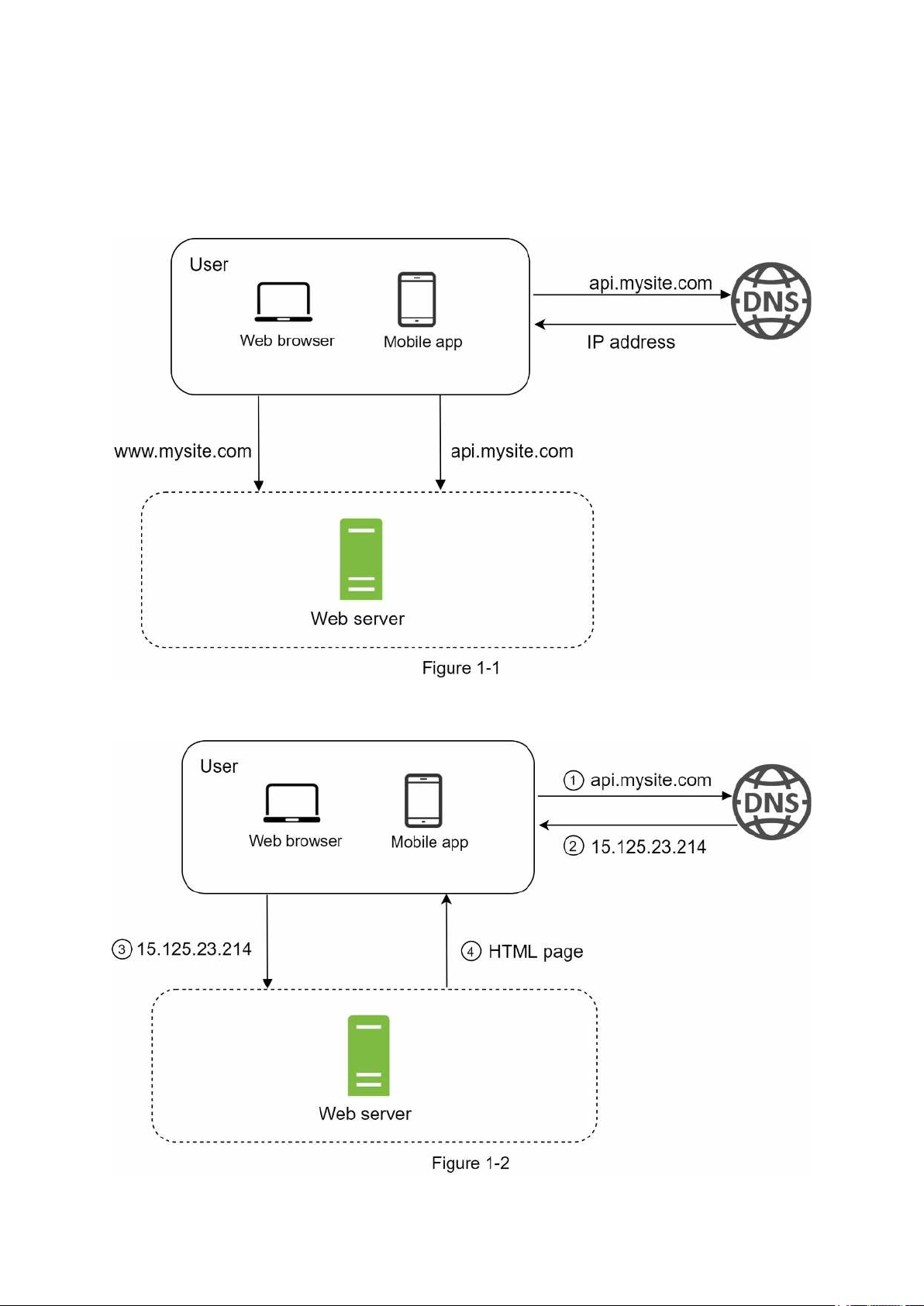
different. To start with something simple, everything is running on a single server. Figure 1-1
shows the illustration of a single server setup where everything is running on one server: web app, database, cache, etc.
To understand this setup, it is helpful to investigate the request flow and traffic source. Let us
first look at the request flow (Figure 1-2).
1. Users access websites through domain names, such as api.mysite.com. Usually, the
Domain Name System (DNS) is a paid service provided by 3rd parties and not hosted by our servers.
2. Internet Protocol (IP) address is returned to the browser or mobile app. In the example,
IP address 15.125.23.214 is returned.
3. Once the IP address is obtained, Hypertext Transfer Protocol (HTTP) [1] requests are
sent directly to your web server.
4. The web server returns HTML pages or JSON response for rendering.
Next, let us examine the traffic source. The traffic to your web server comes from two
sources: web application and mobile application.
• Web application: it uses a combination of server-side languages (Java, Python, etc.) to
handle business logic, storage, etc., and client-side languages (HTML and JavaScript) for presentation.
• Mobile application: HTTP protocol is the communication protocol between the mobile
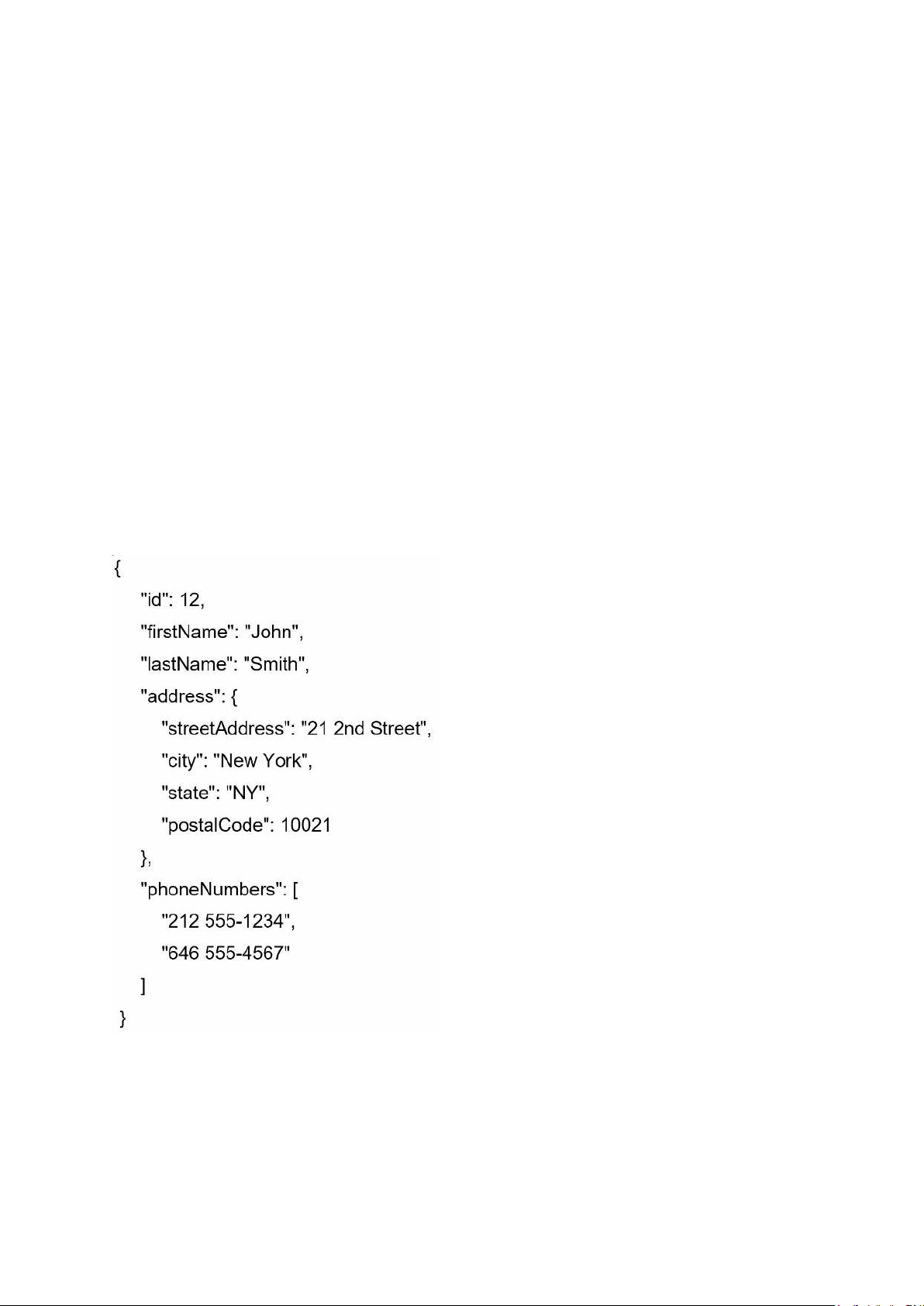
app and the web server. JavaScript Object Notation (JSON) is commonly used API
response format to transfer data due to its simplicity. An example of the API response in JSON format is shown below:
GET /users/12 – Retrieve user object for id = 12 Database
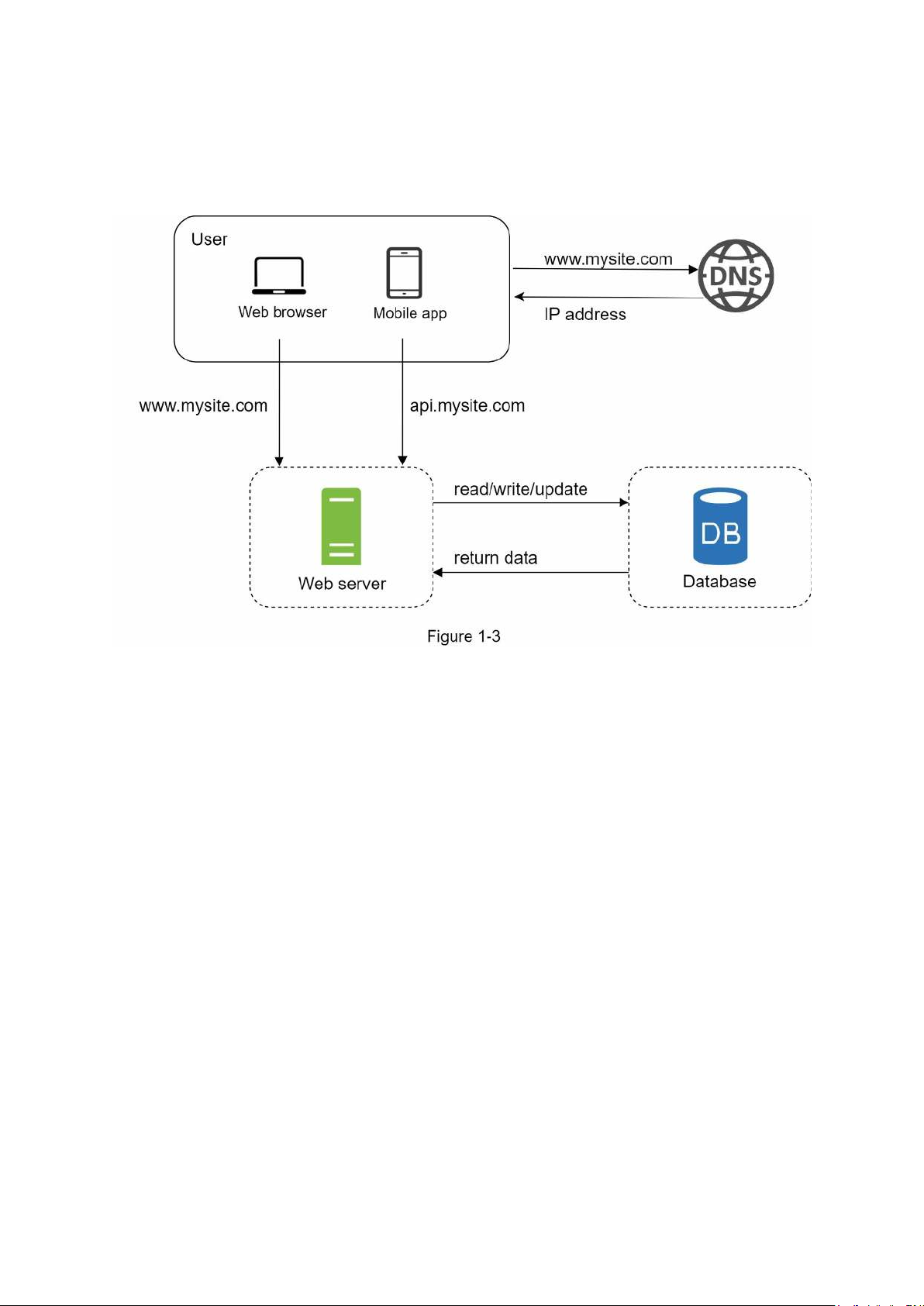
With the growth of the user base, one server is not enough, and we need multiple servers: one
for web/mobile traffic, the other for the database (Figure 1-3). Separating web/mobile traffic
(web tier) and database (data tier) servers allows them to be scaled independently. Which databases to use?
You can choose between a traditional relational database and a non-relational database. Let us examine their differences.
Relational databases are also called a relational database management system (RDBMS) or
SQL database. The most popular ones are MySQL, Oracle database, PostgreSQL, etc.
Relational databases represent and store data in tables and rows. You can perform join
operations using SQL across different database tables.
Non-Relational databases are also called NoSQL databases. Popular ones are CouchDB,
Neo4j, Cassandra, HBase, Amazon DynamoDB, etc. [2]. These databases are grouped into
four categories: key-value stores, graph stores, column stores, and document stores. Join
operations are generally not supported in non-relational databases.
For most developers, relational databases are the best option because they have been around
for over 40 years and historically, they have worked well. However, if relational databases
are not suitable for your specific use cases, it is critical to explore beyond relational
databases. Non-relational databases might be the right choice if:
• Your application requires super-low latency.
• Your data are unstructured, or you do not have any relational data.
• You only need to serialize and deserialize data (JSON, XML, YAML, etc.).
• You need to store a massive amount of data.
Vertical scaling vs horizontal scaling
Vertical scaling, referred to as “scale up”, means the process of adding more power (CPU,
RAM, etc.) to your servers. Horizontal scaling, referred to as “scale-out”, allows you to scale
by adding more servers into your pool of resources.
When traffic is low, vertical scaling is a great option, and the simplicity of vertical scaling is
its main advantage. Unfortunately, it comes with serious limitations.
• Vertical scaling has a hard limit. It is impossible to add unlimited CPU and memory to a single server.
• Vertical scaling does not have failover and redundancy. If one server goes down, the
website/app goes down with it completely.
Horizontal scaling is more desirable for large scale applications due to the limitations of vertical scaling.
In the previous design, users are connected to the web server directly. Users will unable to
access the website if the web server is offline. In another scenario, if many users access the
web server simultaneously and it reaches the web server’s load limit, users generally
experience slower response or fail to connect to the server. A load balancer is the best
technique to address these problems. Load balancer
A load balancer evenly distributes incoming traffic among web servers that are defined in a
load-balanced set. Figure 1-4 shows how a load balancer works.
As shown in Figure 1-4, users connect to the public IP of the load balancer directly. With this
setup, web servers are unreachable directly by clients anymore. For better security, private
IPs are used for communication between servers. A private IP is an IP address reachable only
between servers in the same network; however, it is unreachable over the internet. The load
balancer communicates with web servers through private IPs.
In Figure 1-4, after a load balancer and a second web server are added, we successfully
solved no failover issue and improved the availability of the web tier. Details are explained below:
• If server 1 goes offline, all the traffic will be routed to server 2. This prevents the website
from going offline. We will also add a new healthy web server to the server pool to balance the load.
• If the website traffic grows rapidly, and two servers are not enough to handle the traffic,
the load balancer can handle this problem gracefully. You only need to add more servers
to the web server pool, and the load balancer automatically starts to send requests to them.
Now the web tier looks good, what about the data tier? The current design has one database,
so it does not support failover and redundancy. Database replication is a common technique
to address those problems. Let us take a look. Database replication
Quoted from Wikipedia: “Database replication can be used in many database management
systems, usually with a master/slave relationship between the original (master) and the copies (slaves)” [3].
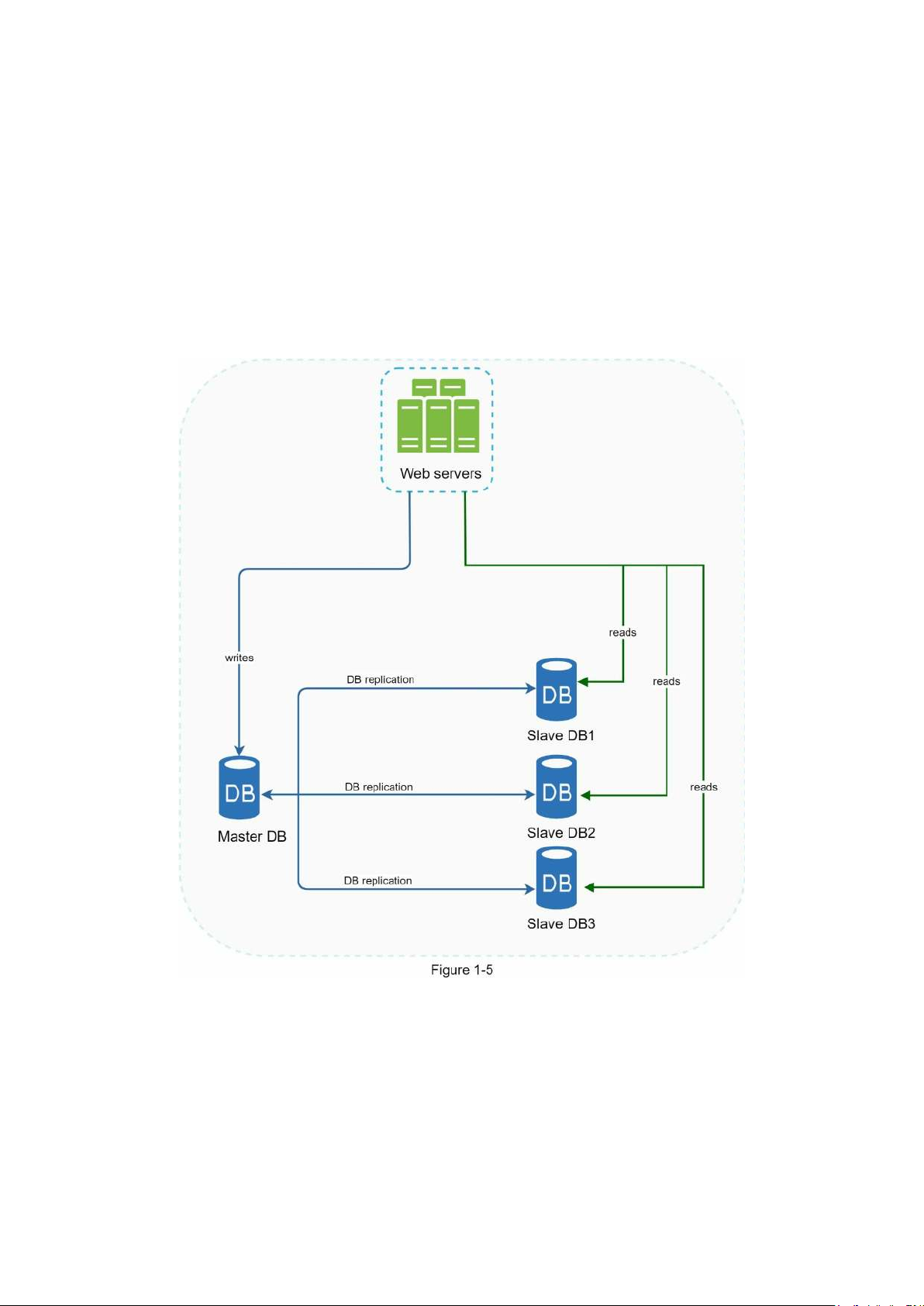
A master database generally only supports write operations. A slave database gets copies of
the data from the master database and only supports read operations. All the data-modifying
commands like insert, delete, or update must be sent to the master database. Most
applications require a much higher ratio of reads to writes; thus, the number of slave
databases in a system is usually larger than the number of master databases. Figure 1-5 shows
a master database with multiple slave databases.
Advantages of database replication:
• Better performance: In the master-slave model, all writes and updates happen in master
nodes; whereas, read operations are distributed across slave nodes. This model improves
performance because it allows more queries to be processed in parallel.
• Reliability: If one of your database servers is destroyed by a natural disaster, such as a
typhoon or an earthquake, data is still preserved. You do not need to worry about data loss
because data is replicated across multiple locations.
• High availability: By replicating data across different locations, your website remains in
operation even if a database is offline as you can access data stored in another database server.
In the previous section, we discussed how a load balancer helped to improve system
availability. We ask the same question here: what if one of the databases goes offline? The
architectural design discussed in Figure 1-5 can handle this case:
• If only one slave database is available and it goes offline, read operations will be directed
to the master database temporarily. As soon as the issue is found, a new slave database
will replace the old one. In case multiple slave databases are available, read operations are
redirected to other healthy slave databases. A new database server will replace the old one.
• If the master database goes offline, a slave database will be promoted to be the new
master. All the database operations will be temporarily executed on the new master
database. A new slave database will replace the old one for data replication immediately.
In production systems, promoting a new master is more complicated as the data in a slave
database might not be up to date. The missing data needs to be updated by running data
recovery scripts. Although some other replication methods like multi-masters and circular
replication could help, those setups are more complicated; and their discussions are
beyond the scope of this book. Interested readers should refer to the listed reference materials [4] [5].
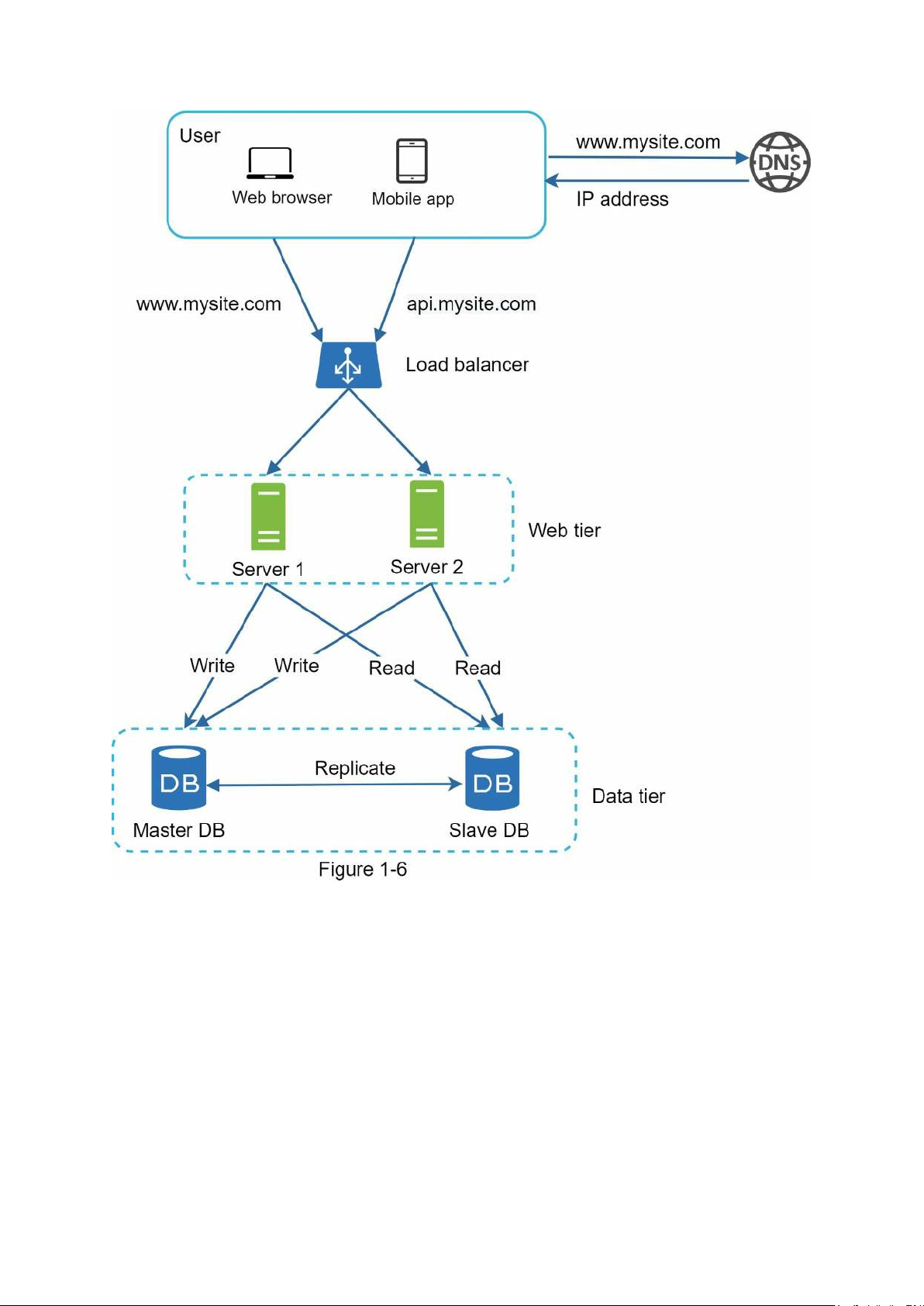
Figure 1-6 shows the system design after adding the load balancer and database replication.
Let us take a look at the design:
• A user gets the IP address of the load balancer from DNS.
• A user connects the load balancer with this IP address.
• The HTTP request is routed to either Server 1 or Server 2.
• A web server reads user data from a slave database.
• A web server routes any data-modifying operations to the master database. This includes
write, update, and delete operations.
Now, you have a solid understanding of the web and data tiers, it is time to improve the
load/response time. This can be done by adding a cache layer and shifting static content
(JavaScript/CSS/image/video files) to the content delivery network (CDN). Cache
A cache is a temporary storage area that stores the result of expensive responses or frequently
accessed data in memory so that subsequent requests are served more quickly. As illustrated
in Figure 1-6, every time a new web page loads, one or more database calls are executed to
fetch data. The application performance is greatly affected by calling the database repeatedly.
The cache can mitigate this problem. Cache tier
The cache tier is a temporary data store layer, much faster than the database. The benefits of
having a separate cache tier include better system performance, ability to reduce database
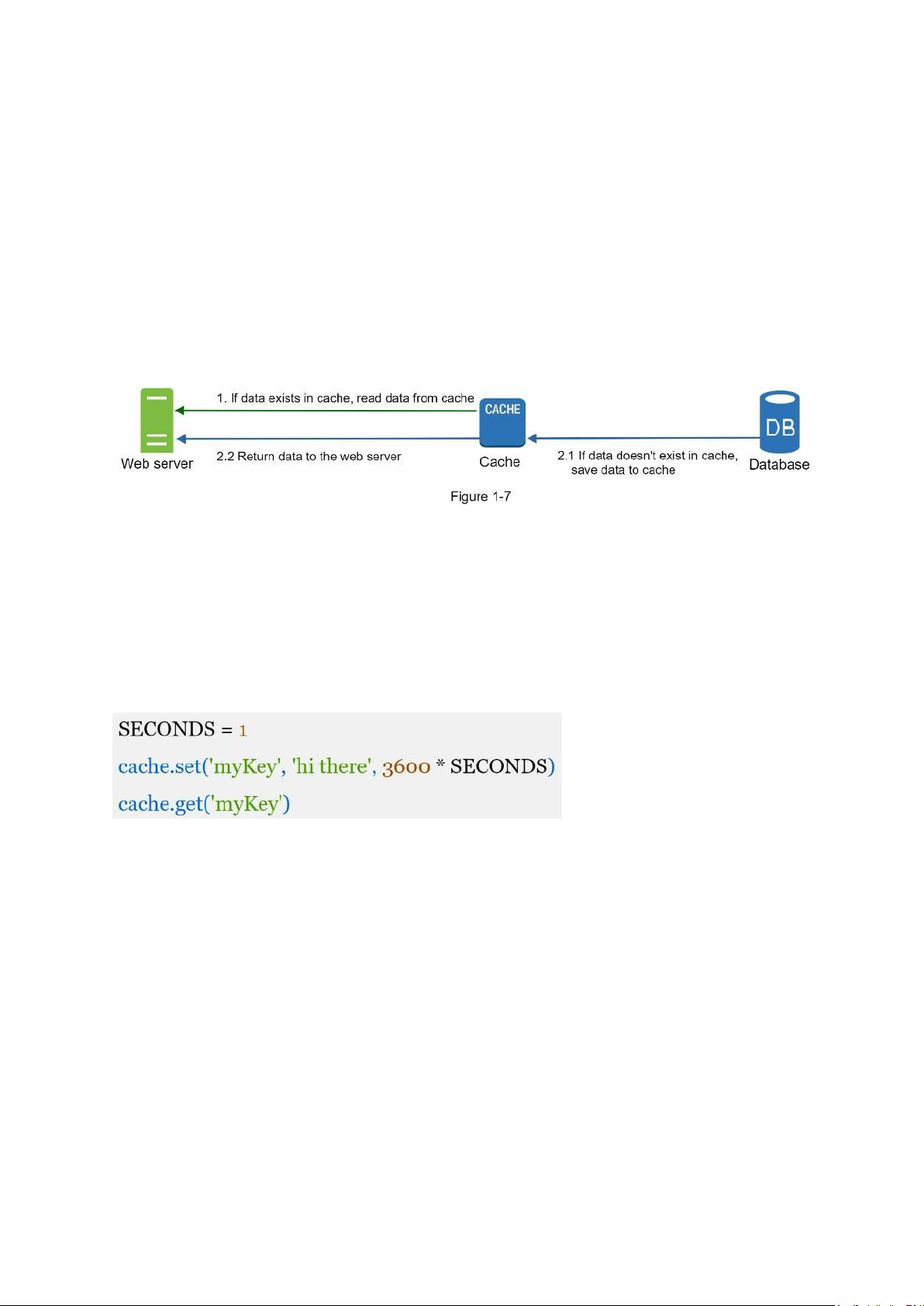
workloads, and the ability to scale the cache tier independently. Figure 1-7 shows a possible setup of a cache server:
After receiving a request, a web server first checks if the cache has the available response. If
it has, it sends data back to the client. If not, it queries the database, stores the response in
cache, and sends it back to the client. This caching strategy is called a read-through cache.
Other caching strategies are available depending on the data type, size, and access patterns. A
previous study explains how different caching strategies work [6].
Interacting with cache servers is simple because most cache servers provide APIs for
common programming languages. The following code snippet shows typical Memcached APIs:
Considerations for using cache
Here are a few considerations for using a cache system:
• Decide when to use cache. Consider using cache when data is read frequently but
modified infrequently. Since cached data is stored in volatile memory, a cache server is
not ideal for persisting data. For instance, if a cache server restarts, all the data in memory
is lost. Thus, important data should be saved in persistent data stores.
• Expiration policy. It is a good practice to implement an expiration policy. Once cached
data is expired, it is removed from the cache. When there is no expiration policy, cached
data will be stored in the memory permanently. It is advisable not to make the expiration
date too short as this will cause the system to reload data from the database too frequently.
Meanwhile, it is advisable not to make the expiration date too long as the data can become stale.
• Consistency: This involves keeping the data store and the cache in sync. Inconsistency
can happen because data-modifying operations on the data store and cache are not in a
single transaction. When scaling across multiple regions, maintaining consistency between
the data store and cache is challenging. For further details, refer to the paper titled
“Scaling Memcache at Facebook” published by Facebook [7].
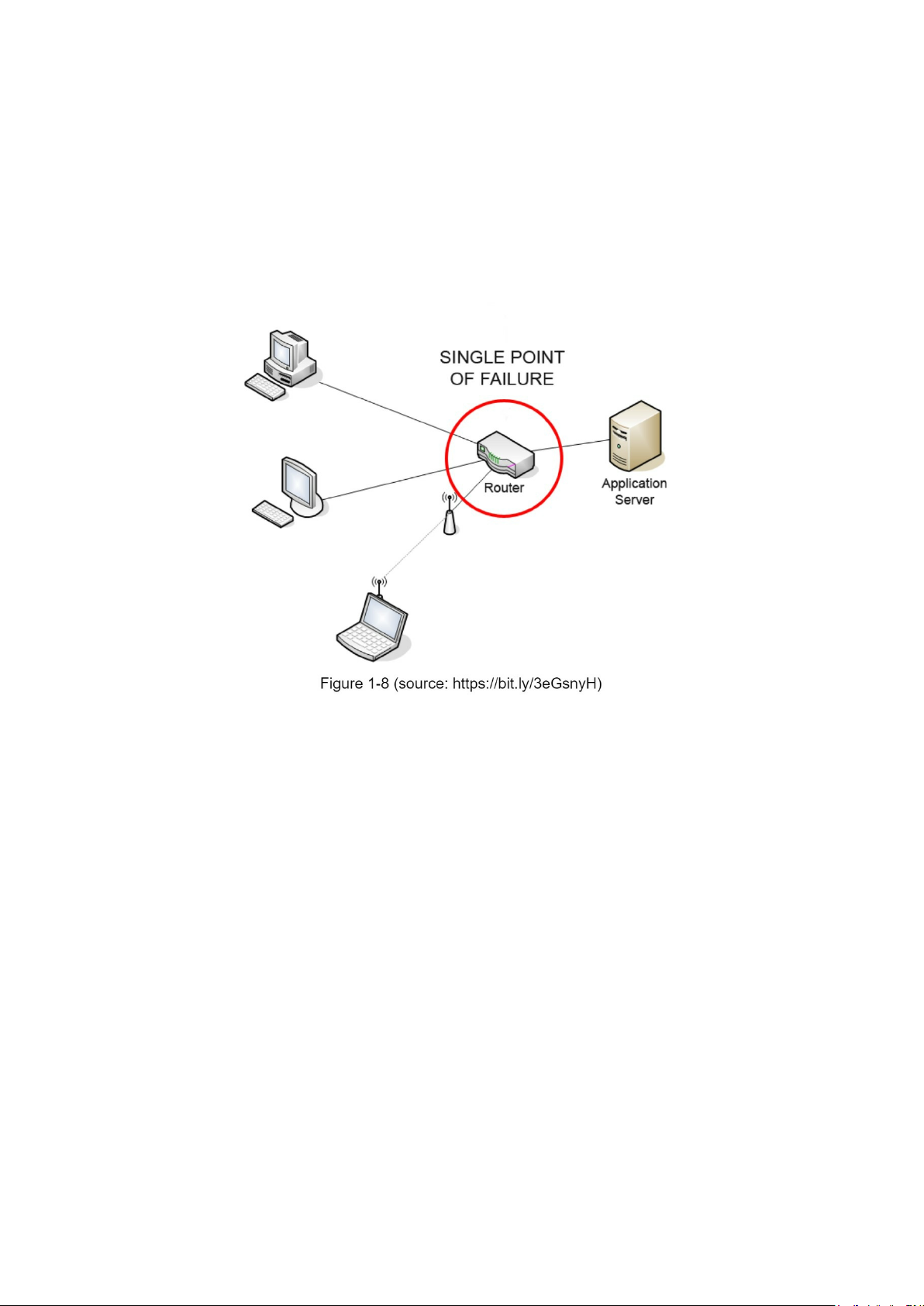
• Mitigating failures: A single cache server represents a potential single point of failure
(SPOF), defined in Wikipedia as follows: “A single point of failure (SPOF) is a part of a
system that, if it fails, will stop the entire system from working” [8]. As a result, multiple
cache servers across different data centers are recommended to avoid SPOF. Another
recommended approach is to overprovision the required memory by certain percentages.
This provides a buffer as the memory usage increases.
• Eviction Policy: Once the cache is full, any requests to add items to the cache might
cause existing items to be removed. This is called cache eviction. Least-recently-used
(LRU) is the most popular cache eviction policy. Other eviction policies, such as the Least
Frequently Used (LFU) or First in First Out (FIFO), can be adopted to satisfy different use cases.
Content delivery network (CDN)
A CDN is a network of geographically dispersed servers used to deliver static content. CDN
servers cache static content like images, videos, CSS, JavaScript files, etc.
Dynamic content caching is a relatively new concept and beyond the scope of this book. It
enables the caching of HTML pages that are based on request path, query strings, cookies,
and request headers. Refer to the article mentioned in reference material [9] for more about
this. This book focuses on how to use CDN to cache static content.
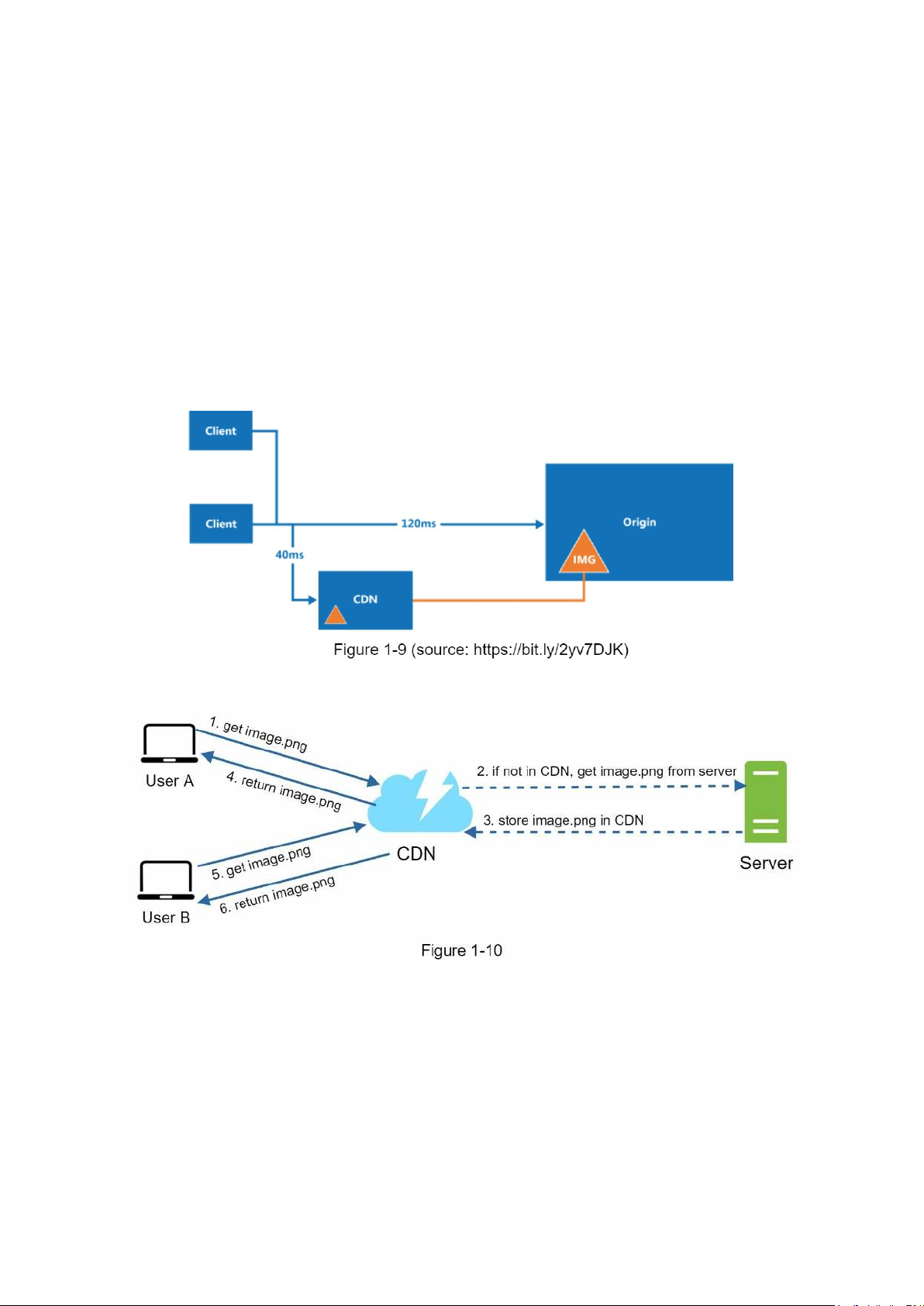
Here is how CDN works at the high-level: when a user visits a website, a CDN server closest
to the user will deliver static content. Intuitively, the further users are from CDN servers, the
slower the website loads. For example, if CDN servers are in San Francisco, users in Los
Angeles will get content faster than users in Europe. Figure 1-9 is a great example that shows how CDN improves load time.
Figure 1-10 demonstrates the CDN workflow.
1. User A tries to get image.png by using an image URL. The URL’s domain is provided
by the CDN provider. The following two image URLs are samples used to demonstrate
what image URLs look like on Amazon and Akamai CDNs:
• https://mysite.cloudfront.net/logo.jpg
• https://mysite.akamai.com/image-manager/img/logo.jpg
2. If the CDN server does not have image.png in the cache, the CDN server requests the
file from the origin, which can be a web server or online storage like Amazon S3.
3. The origin returns image.png to the CDN server, which includes optional HTTP header
Time-to-Live (TTL) which describes how long the image is cached.
4. The CDN caches the image and returns it to User A. The image remains cached in the CDN until the TTL expires.
5. User B sends a request to get the same image.
6. The image is returned from the cache as long as the TTL has not expired.
Considerations of using a CDN
• Cost: CDNs are run by third-party providers, and you are charged for data transfers in
and out of the CDN. Caching infrequently used assets provides no significant benefits so
you should consider moving them out of the CDN.
• Setting an appropriate cache expiry: For time-sensitive content, setting a cache expiry
time is important. The cache expiry time should neither be too long nor too short. If it is
too long, the content might no longer be fresh. If it is too short, it can cause repeat
reloading of content from origin servers to the CDN.
• CDN fallback: You should consider how your website/application copes with CDN
failure. If there is a temporary CDN outage, clients should be able to detect the problem
and request resources from the origin.
• Invalidating files: You can remove a file from the CDN before it expires by performing
one of the following operations:
• Invalidate the CDN object using APIs provided by CDN vendors.
• Use object versioning to serve a different version of the object. To version an object,
you can add a parameter to the URL, such as a version number. For example, version
number 2 is added to the query string: image.png?v=2.
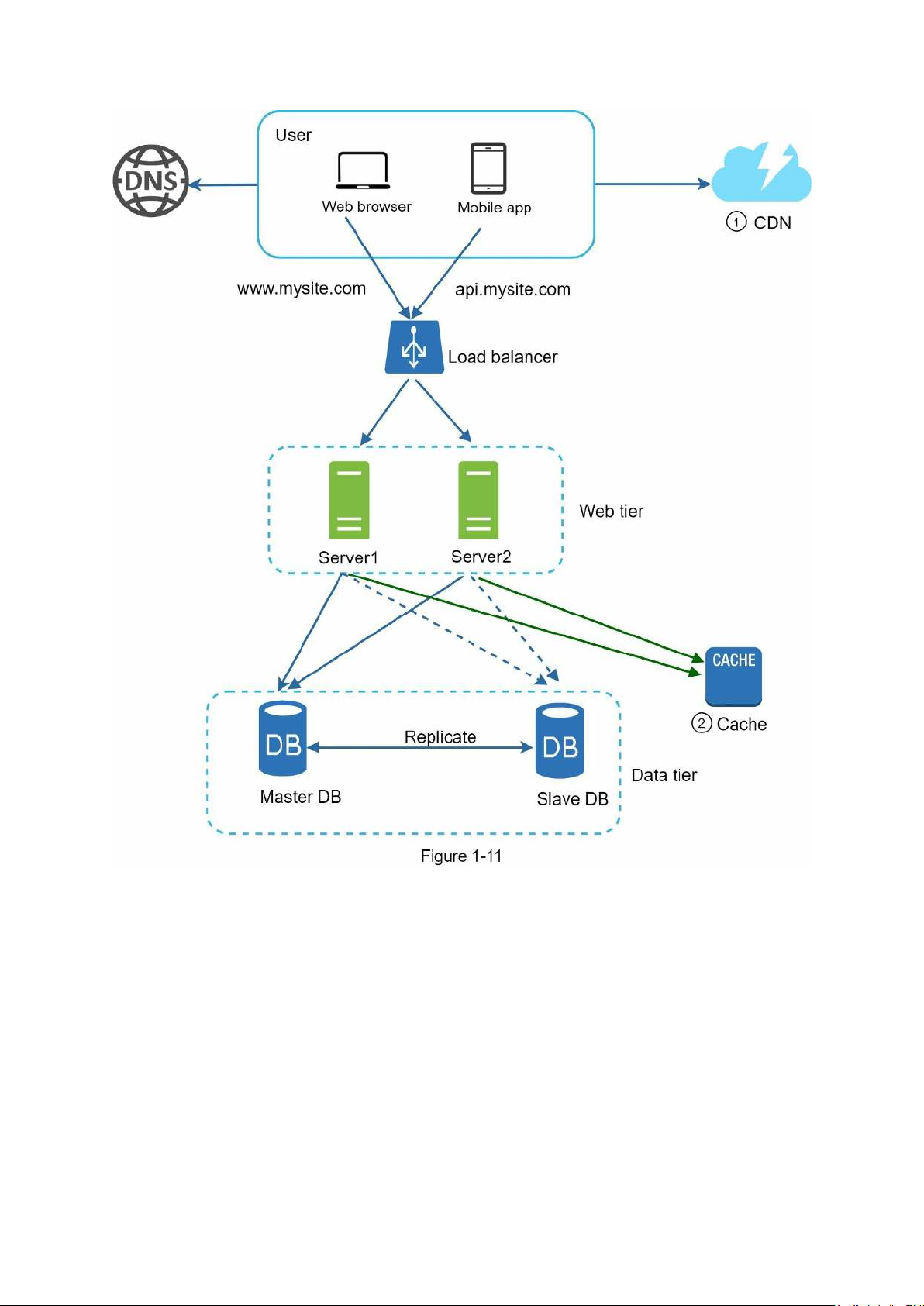
Figure 1-11 shows the design after the CDN and cache are added.
1. Static assets (JS, CSS, images, etc.,) are no longer served by web servers. They are
fetched from the CDN for better performance.
2. The database load is lightened by caching data. Stateless web tier
Now it is time to consider scaling the web tier horizontally. For this, we need to move state
(for instance user session data) out of the web tier. A good practice is to store session data in
the persistent storage such as relational database or NoSQL. Each web server in the cluster
can access state data from databases. This is called stateless web tier. Stateful architecture
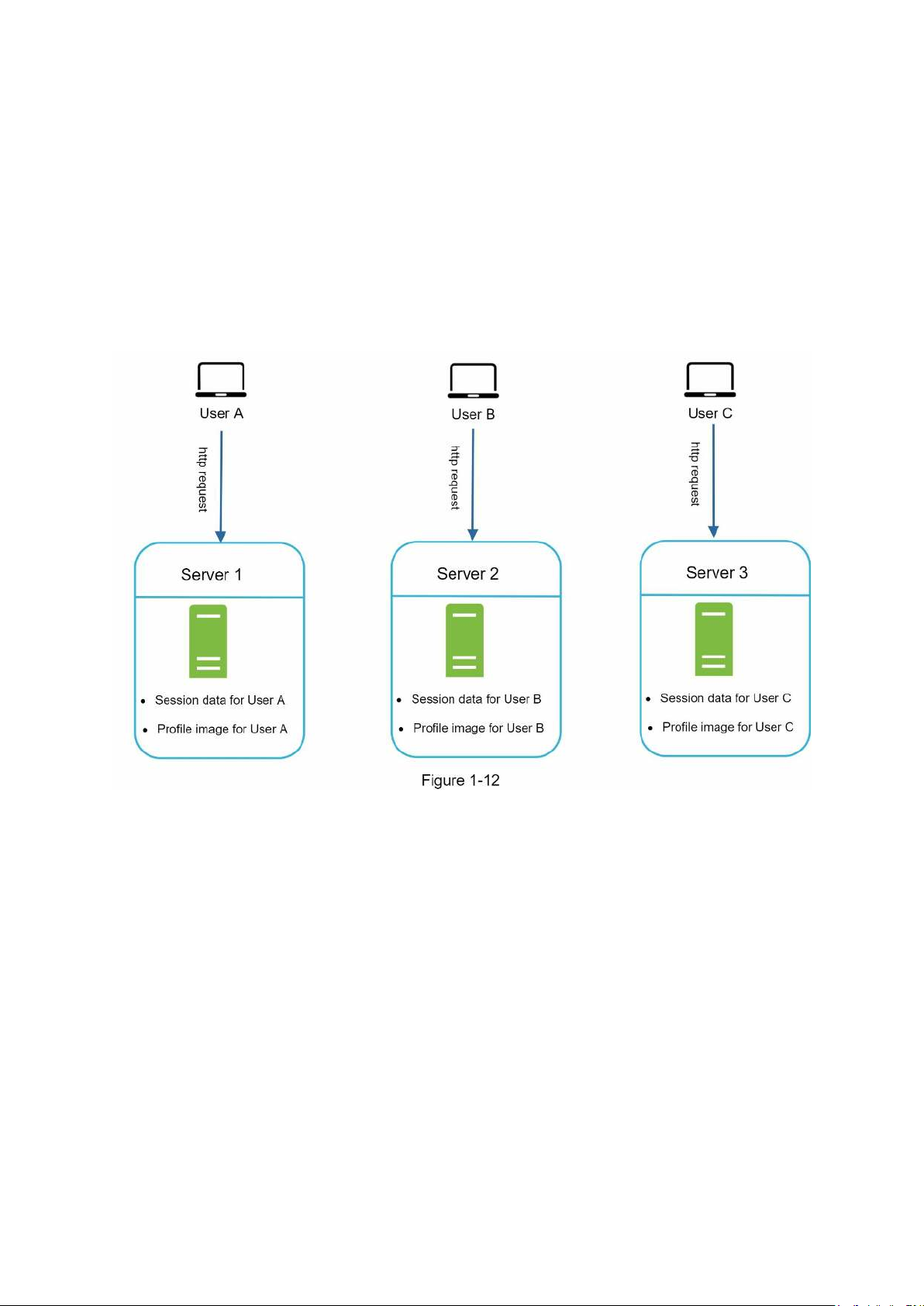
A stateful server and stateless server has some key differences. A stateful server remembers
client data (state) from one request to the next. A stateless server keeps no state information.
Figure 1-12 shows an example of a stateful architecture.
In Figure 1-12, user A’s session data and profile image are stored in Server 1. To authenticate
User A, HTTP requests must be routed to Server 1. If a request is sent to other servers like
Server 2, authentication would fail because Server 2 does not contain User A’s session data.
Similarly, all HTTP requests from User B must be routed to Server 2; all requests from User C must be sent to Server 3.
The issue is that every request from the same client must be routed to the same server. This
can be done with sticky sessions in most load balancers [10]; however, this adds the
overhead. Adding or removing servers is much more difficult with this approach. It is also
challenging to handle server failures. Stateless architecture
Figure 1-13 shows the stateless architecture.
Tài liệu liên quan:
-

Thực hành phần mềm misasme.net2020 môn Hệ thống Thông tin trong Kế toán| Học viện Công Nghệ Bưu Chính Viễn Thông
5 3 -

Thông tin hỗ trợ: trung tâm tư vấn và hỗ trợ khách hàng môn Hệ thống Thông tin trong Kế toán| Học viện Công Nghệ Bưu Chính Viễn Thông
5 3 -

Thủ tục kiểm tra Kiểm soát bán hàng- giao hàng môn Hệ thống Thông tin trong Kế toán| Học viện Công Nghệ Bưu Chính Viễn Thông
4 2 -

Chương 1 tổng quan về hệ thống thông tin kế toán môn Hệ thống Thông tin trong Kế toán| Học viện Công Nghệ Bưu Chính Viễn Thông
6 3